
What if every public-sector video helped people understand a service, make a decision or take a clear next step? For Malaysian public-sector teams, a video communication strategy for public sector organisations should start with that public need, not with the camera. Complex policies and services ca...

What if every public-sector video helped people understand a service, make a decision or take a clear next step? For Malaysian public-sector teams, a video communication strategy for public sector organisations should start with that public need, not with the camera. Complex policies and services can be difficult to explain, and rushed communication can put accuracy and trust at risk.
You already know video can make information easier to absorb. The challenge is making each production purposeful, accessible and aligned with organisational goals. This guide shows how to prioritise topics, choose a suitable format, build an accurate review process and evaluate whether people understood the message or knew what to do next. The goal isn’t simply to publish more video. It’s to make each video serve a public need.
• Use public information needs and organisational objectives to decide which topics deserve video.
• Build a video communication strategy for public sector teams around clear messages, verified facts and accessible communication.
• Match each objective to a suitable format and channel, then choose a signal that shows whether the audience understood or acted.
• Give subject experts, communication leads and approvers clear roles at each stage, from briefing to public feedback.
• Keep the audience need and intended outcome in view as a brief becomes an explainer, training video, documentary or other production.
Important services, policies and changes can be difficult to explain through text alone. A long notice may contain every detail yet leave residents unsure which steps apply to them. Video can show a process, clarify what has changed and make an update easier to follow. But a film is useful only when it answers a real audience need.
A public-sector video communication strategy is the planned use of video to meet public information and engagement needs, with each production tied to a defined audience, objective and measure of value. That’s what separates strategy from an isolated production. A video may be well made, but without a clear purpose it can add to the content stream without helping people understand or act.
Frame the need in the audience’s terms: What are people trying to understand? What information is missing? What should they be able to do after watching? For example, if a service process has several stages, the need might be to understand the correct sequence and required documents. If an update affects access to a public facility, the need might be to know what has changed and where to find current information.
This public-first principle connects with the public-service mission associated with Public broadcasting: communication is meant to serve audiences, not simply promote an institution. For public-sector video, that means being useful, clear and accountable to the people who need the information.
Choose a format for the communication task, not because it is fashionable. An explainer can clarify how a service works or break a complex policy concept into understandable steps. A short update can share timely, consistent information about a development, while a documentary can offer context through lived experience, outcomes or institutional history. Each format has a distinct role; none is automatically right for every message.
Give every planned video one primary objective. Identify the intended audience and the change sought in understanding or action. For instance, “Help first-time applicants understand how to begin” is more useful than “raise awareness.” It points to a specific audience and outcome, which can guide both the script and later evaluation.
Then separate public value from internal activity. Views, publishing frequency and production volume can describe distribution, but they don’t prove that people understood the message. Consider whether the audience can identify the next step, explain a key change or find the relevant service information. These signals make the strategy more accountable and help teams decide what to improve, update or produce next. Ask: if the video disappeared, what public need would go unmet?
Trust isn’t created by polished visuals alone. People need information they can follow, facts they can rely on and communication that treats them honestly. A confident voiceover cannot compensate for unclear claims, missing context or a mismatch between what a video says and what an organisation publishes elsewhere. Accuracy, clarity and consistency must shape the work from the script onwards.
For a video communication strategy for public sector teams, transparency means being precise about both the message and its limits. Use plain language, verify facts with subject experts and make uncertainty visible. If details are still developing, say so rather than filling the gap with reassuring but unsupported statements. Explain what’s known, what remains unclear and where the audience can find the next update.
Accessible video makes public information easier for more people to understand, follow and use. Treat accessibility as a planning choice, not a last-minute edit. Build in time to review captions, on-screen text, audio and pacing before publication.
Make the source and status of important information clear. Use a spokesperson who can explain the subject accurately, and provide context for their role. If members of the public appear, represent their views fairly; don’t imply that participation equals endorsement. Keep dates, instructions and service details consistent between the video, its captions, accompanying text and the relevant public information page.
For changing situations, set a clear expectation rather than making a vague promise. State when another update is expected, if that timing is known. If it isn’t, explain how updates will be shared. This makes uncertainty easier to understand and reduces the risk of an older video circulating as though it contains current instructions.
Plan for people watching in different settings and with different communication needs. Captions help audiences follow without sound; a transcript offers another way to read the information and search for a detail. Keep graphics legible on mobile screens, leave enough time to absorb each point and make speech clear over music or background noise.
Choose language and formats to suit the audience and purpose. For audiences who use different languages, consider whether translated captions, a separate version or another format will make the information clearer. Explain specialist terms in everyday language, and avoid relying on colour, fast cuts or visual cues alone to carry essential meaning.
identify essential facts and terms that need plain-language explanations.
check captions against the spoken content, and test graphics for readability.
compare the video’s instructions with accompanying public information.
These checks make accessibility and accuracy part of the production process, rather than optional polish. When a complex public message needs a clear narrative and careful execution, strategic video production can carry the audience need through from script to screen.
One message can take several forms, but the right choice depends on what the audience needs to do with it. A process that needs visual sequencing calls for a different treatment from a personal account or a time-sensitive announcement. Choose a video format based on the audience task it must support. Then select a channel that makes the video easy for that audience to find and use.
In a video communication strategy for public sector teams, distribution and impact are separate questions. Channel analytics can show whether a video reached people or prompted clicks. They can’t, by themselves, show that viewers understood the information or used it successfully. Plan for both kinds of evidence.
Use an explainer to show steps, relationships or concepts that become clearer when people can see them. Interviews and documentaries provide perspective and context through people’s experiences or outcomes. A live update suits timely information when the message is ready, the spokesperson is prepared and the team can respond appropriately. Event coverage can record key discussions or proceedings for audiences who couldn’t attend.
| Communication objective | Suitable format | Possible channel | Evaluation signal |
|---|---|---|---|
| Show how a service process works | Explainer | Relevant service page | Fewer repeat questions about the steps |
| Add context to a policy or programme | Interview | Organisation website or social channel | Audience feedback on key points understood |
| Document experience or outcomes | Documentary | Programme page or screening event | Relevant questions or engagement after viewing |
| Share a ready, time-sensitive update | Live update | Official livestream channel | Questions answered and update-page visits |
| Extend access to an event’s key content | Event coverage | Event page or official channel | Replay use and follow-up engagement |
Choose evaluation signals before production, so the team knows what success means beyond publication. Completion rates can indicate whether viewers stayed with the video; engagement and click-throughs can show whether they interacted or moved to a related resource. Repeat questions may reveal that a key instruction still needs clarification. No single signal tells the whole story.
Pair platform analytics with audience feedback, such as comments, short comprehension questions or queries received by the relevant service team. Where available, review service-related evidence too, such as whether people reach the correct information or complete the intended next step. Interpret results in context: a useful video for a specific audience may have modest reach but still answer an important need.
Views measure exposure, not comprehension. Use them to understand distribution, then look for evidence that the information made sense and helped people act. That distinction keeps format, channel and measurement connected to the video’s public purpose.
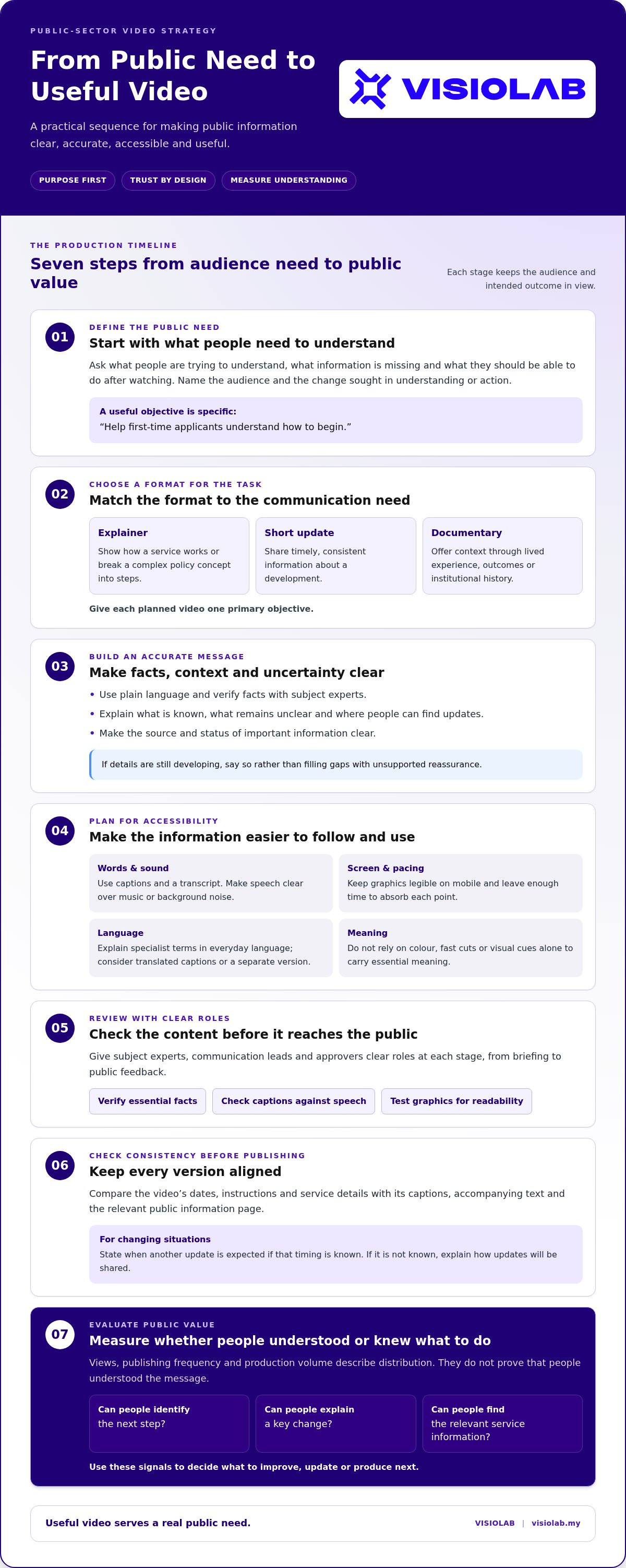
A clear workflow helps public-sector teams move with purpose without skipping the checks that protect accuracy and trust. In a video communication strategy for public sector organisations, governance isn’t a barrier to speed. It makes responsibilities visible, so the right people can make decisions at the right stages.
Use this sequence as a practical backbone. Adapt the review points to the subject, urgency and risk of each communication:
Identify the audience, information gap and intended outcome.
Set the core message, format, channel, next step and evaluation signal.
Check claims, instructions, dates and sources with the relevant subject experts.
Develop the script and visuals around the agreed message and accessibility needs.
Gather factual, communication and accessibility feedback in planned review rounds.
Confirm the final version, accompanying information, channel and publishing owner.
Review audience questions and available performance evidence, then record improvements for future work.
Assign ownership before production begins. Subject experts confirm technical meaning; the communication lead protects audience clarity and message consistency; a factual reviewer checks details against source material; an authorised approver makes the release decision; and the publishing owner handles the final upload and accompanying information. One person may hold more than one role, but accountability for each task should be explicit.
Build review time into the schedule rather than relying on informal sign-off at the end. For fast-moving information, agree in advance who can verify changes, approve the final wording and update the published version. That preparation supports timely communication while keeping accuracy, accessibility and consistency in view.
A useful brief records the intended audience, communication objective, core message and action viewers should take. Include factual sources, sensitive points, required approvals and accessibility needs, along with planned channels and any derivative formats. Name the signal the team will use to assess results. These details give reviewers a shared reference and help prevent late changes from pulling the video away from its purpose.
After publishing, review audience questions and feedback alongside available platform analytics. Look for patterns: are people missing an instruction, finding the update too late or asking for a format that better suits their needs? Compare those signals with the video’s intended outcome, then capture the lesson in the next brief. Learning turns each release into a stronger starting point, not a template repeated without reflection.
VISIOLAB’s strategic video production combines clear messaging with a disciplined production workflow, helping keep the communication purpose in view from brief to final video.
A strong plan earns its value in execution. Keep the audience need, core message and intended measure visible as the brief moves into scripting, filming, editing and publication. Each creative decision should help people understand the information or take the next step. If a visual adds atmosphere but obscures an instruction, it isn’t serving the brief.
Format follows function. An explainer can use animation, demonstrations or clear visual sequences to make a process easier to follow. A training video can model a task or reinforce consistent practice. A corporate film can introduce an organisation’s role and priorities, while a documentary can give lived experience or outcomes room for context. Event coverage can capture discussions and make selected content available to people who weren’t present. These formats serve different needs, not a hierarchy of impact.
For broader production context, explore strategic corporate video production. The same discipline applies to a video communication strategy for public sector organisations: align the narrative, production choices and final deliverables with what the audience needs from the communication.
A strategy-led partner first works to understand the subject, audience and communication objective. From there, complex organisational information can be shaped into a clear message and audience-centred narrative. Creative choices, such as animation, interviews, demonstrations or documentary footage, should make the message easier to grasp rather than distract from it.
Production planning then carries that intent into the details: script development, filming approach, review points, accessibility requirements and versions for intended channels. VISIOLAB combines strategic messaging with production discipline, helping keep the communication purpose in view from early concept through final delivery. This connection matters: a compelling story must also be accurate, usable and suited to the brief.
Bring three essentials into the initial conversation: the priority audience, the communication challenge and the outcome you want to support. For example, a team explaining a multi-stage process might explore an animated explainer, while a programme seeking to share participant perspectives may benefit from documentary storytelling. Training content or event coverage can suit other needs. Let the brief guide the format rather than trying to use every option.
If the challenge reaches beyond a single production, a wider visual communication strategy can connect video with the organisation’s broader communication approach. Explore how VISIOLAB can shape a video strategy around your public communication goals.
The next step doesn’t need to be a large-scale campaign. Choose one communication challenge that matters to the public, then define what people should understand or be able to do. That gives your team a focused starting point, a practical way to assess the outcome and a clearer basis for deciding what to create next.
A video communication strategy for public sector organisations grows stronger through purposeful action and learning. Treat each production as an opportunity to make the next public interaction clearer, more accessible and more useful. Progress comes from keeping the audience at the centre, not from publishing for its own sake.
Bring your priority audience and communication goal into the next brief. Contact VISIOLAB to shape a video strategy around your public communication goals.
It’s a coordinated plan for using video to meet public information or engagement needs. A strong video communication strategy for public sector teams connects an audience’s needs with the message, format, channel, approvals and evaluation. For example, a video explaining how to access a service should be planned around the questions people have at each stage and where they’ll go for more detail.
Video can combine spoken explanation with visual examples, making it useful when people need to see how something works. A service team might show the sequence of an application, while a training video can demonstrate a procedure that’s difficult to describe in a notice. Video isn’t always the best choice, though. If an audience needs to scan detailed instructions or check a specific fact, a written page may work better alongside it.
Build trust by making the video’s purpose and information easy to assess. Identify the organisation or speaker, provide enough context for viewers to understand their role, and avoid editing statements in a way that changes their meaning. For a programme update, distinguish completed actions from planned ones. Review the final video against its accompanying public information so viewers don’t encounter conflicting instructions in different places.
The best format is the one that helps the audience use the information. Animation can make an abstract process visible; an interview can give a specialist or participant room to explain a perspective; and training footage can show a task in sequence. Event coverage can preserve key discussions for later viewing. Before selecting a format, consider whether the message needs demonstration, explanation, human context or timely delivery.
Measure the response that fits the video’s purpose. If viewers should visit a service page, review click-throughs and whether the page helps them find the relevant information. If the video explains a new process, check whether common enquiries show that a particular step remains confusing. Completion and engagement data can add context, but compare them with audience feedback and service evidence before drawing conclusions about impact.
Prepare a lightweight update process before a time-sensitive issue arises. Keep an agreed source for current facts, name who can verify changes and establish who approves the message for release. Use a dated script or version record so the team can identify which details changed. If facts are still developing, say what’s confirmed and point viewers to the official place where revised information will appear.
Captions and transcripts can give viewers another way to access and revisit spoken information. Check that captions match the final audio, appear at the right time and accurately render names, places and specialist terms. A transcript should reflect meaningful spoken content, not rely on an automatic draft without review. Also test the video on a small screen and listen for dialogue that becomes difficult to hear beneath music or background sound.
Let’s create and collaborate
We’re versatile multitaskers, and we thrive on a lot of projects. You've seen a few of our works that we are most proud of, and your project could be next in line.

Empowering brands with captivating visual stories, creating strong connections and growth.
