
A machine can be understood before it ever runs. 3D animation for industrial process visualization turns machinery, internal components and process sequences into clear moving views. It can show how equipment operates, how materials flow through a system, and how each action connects to the wider wo...
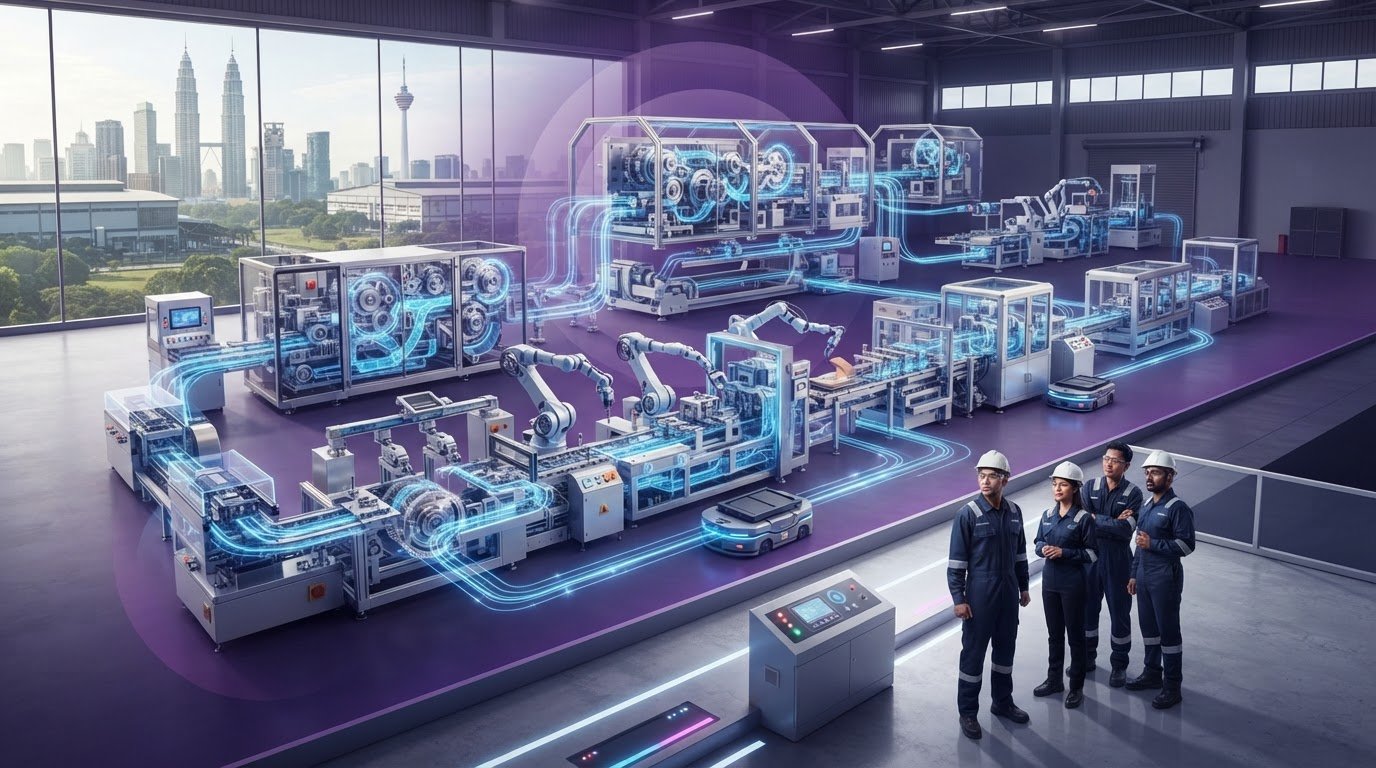
A machine can be understood before it ever runs. 3D animation for industrial process visualization turns machinery, internal components and process sequences into clear moving views. It can show how equipment operates, how materials flow through a system, and how each action connects to the wider workflow.
Complex processes are hard to explain when the important details are hidden inside equipment or spread across different stages of production. A well-planned animation brings those details into view, helping teams and stakeholders build a shared understanding. In this article, you’ll learn what industrial 3D animation involves, how it can visualize machinery and workflows, and where it can support training, safety and communication across operations. You’ll also see how its role extends beyond explanation: from illustrating a design to helping people understand a process before they encounter it on the work floor.
• See how 3D animation can turn complex machinery and process flows into clear visual explanations.
• Learn how cutaways, exploded views and motion sequences reveal details that ordinary footage can’t show.
• Understand how visual training materials can explain procedures while keeping learners away from hazardous scenes.
• Explore how industrial animation can support design discussions, safety communication and operational understanding.
• Discover how rendering and post-production shape the final animation for its intended audience and use.
An industrial 3D animation is a computer-generated view of machinery, products or technical processes in motion. It can reveal internal parts and production stages that a camera cannot easily capture. For a manufacturing team, this creates a visual way to explain how equipment works and how each stage connects.
Manufacturing workflow visualization maps production steps as connected movements, from incoming materials to finished goods. An animation can trace an item through each station, showing where a machine acts and what happens next. This helps viewers grasp handoffs, timing and process dependencies without having to visit every station. For example, a sequence can follow a component from a conveyor into an enclosed machine, then onward to packing.
This view can clarify a proposed process before teams present it to operators or decision-makers. It can also highlight transitions that need discussion, such as a transfer between machines. The animation is useful only if it depicts the real sequence accurately; extra visual detail should not distract from the process.
Engineering animation demonstrates a product’s design, movement or internal operation. During product development, a rotating view or cutaway can show how components fit together and move. In manufacturing sales, the same sequence can explain a product to customers who cannot inspect a working unit. For instance, a pump animation can show fluid entering, passing through internal parts and leaving the assembly.
For an accurate sequence, gather relevant CAD files, assembly information, dimensions and technical product data. Native CAD assemblies can contain millions of polygons, so they may require decimation, retopology and surface rebuilding after translation. When selecting a Malaysian studio for an industrial project, assess its ability to interpret technical data, explain the mechanism clearly and tailor the animation to its audience.
Production turns technical information into a planned visual sequence, then builds, animates and refines each scene. The work can move from reviewing CAD files and defining the workflow to preparing geometry, animating mechanisms, rendering frames and completing post-production with edits, labels or narration. These steps help keep the final explanation aligned with the process being shown.
A typical industrial animation takes 6 to 10 weeks to produce, depending on CAD data complexity and the number of mechanism steps. Rendering itself can take hours or days, depending on scene complexity and desired resolution. The overall schedule therefore reflects both the technical preparation and the final image workload.
Post-production guides how viewers interpret the rendered sequence. Editing can draw attention to a key movement, while labels identify parts or stages. In a manufacturing demonstration, a close-up followed by a wider production-line view can connect one component’s operation to the overall workflow. The format and level of detail should match the animation’s purpose, whether explaining a process or presenting a product.
Animation depicts a designed mechanism; live-action records real equipment; simulation models behaviour; and interactive visualization lets viewers control what they explore. Teams can adapt the format for employee training, safety explanations, sales demonstrations, trade shows or investor presentations, depending on the audience and message.
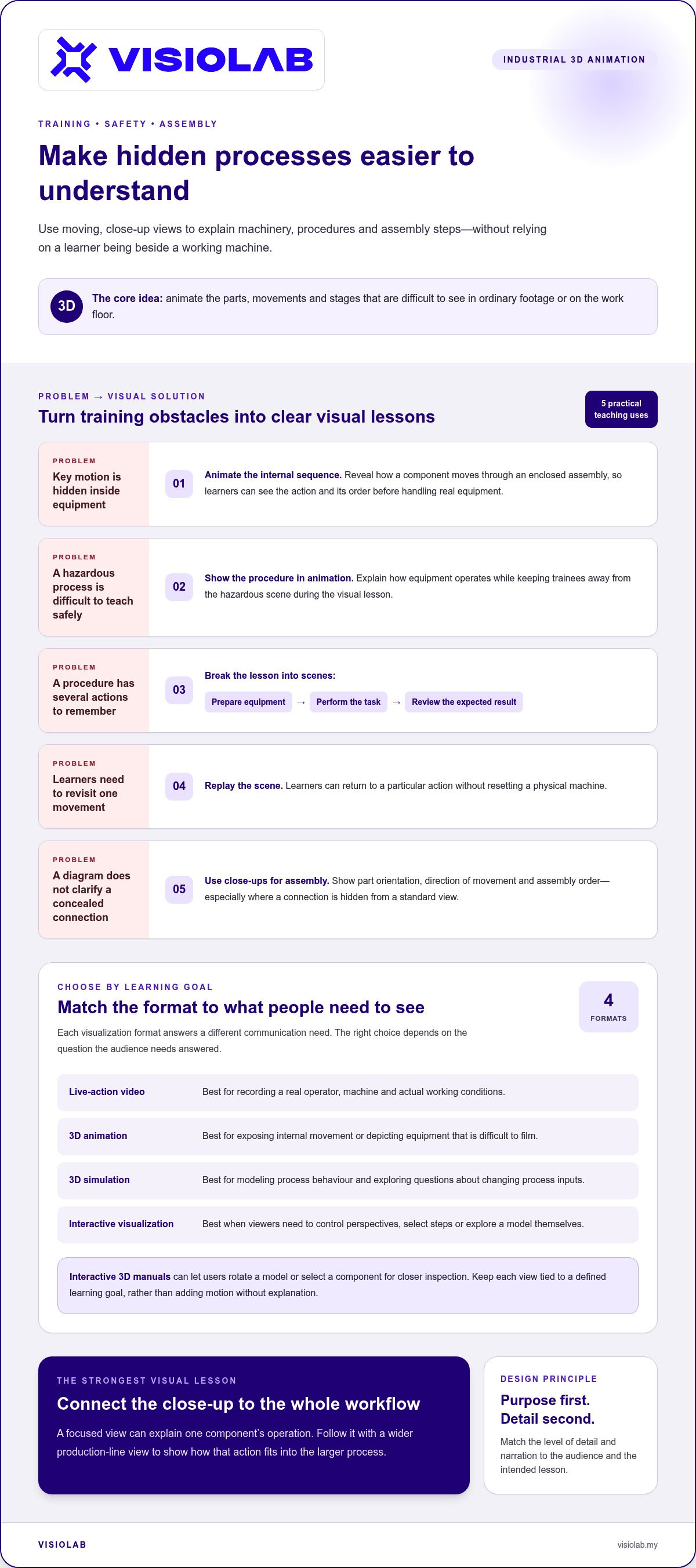
Industrial animation supports employee training by showing processes in motion, including steps hidden inside machinery. For example, a sequence can reveal how a component moves through an enclosed assembly before an operator handles the real equipment. This gives learners a visual reference for understanding the actions and their order.
Training teams can break a procedure into clear scenes: prepare the equipment, perform the task, then review the expected result. Replaying a scene lets learners revisit a particular movement without resetting a physical machine. A visual lesson can also explain hazardous processes without placing trainees in a hazardous situation.
Assembly instructions benefit from close-up views that isolate parts and show how they fit together. An animation can show a component’s orientation, direction of movement and assembly order. This visual sequence can complement written instructions, especially when manual diagrams do not clearly show a concealed connection.
Interactive 3D manuals extend this approach by letting users rotate a model or select a component for closer inspection. A maintenance learner, for instance, could explore an internal assembly before following a task sequence. These tools work best when each view supports a defined learning goal, rather than offering motion without explanation.
Each format answers a different communication need. Live-action video records a real operator and machine, while animation can expose internal movement or depict equipment that’s difficult to film. A 3D simulation models process behaviour; interactive visualization gives viewers control over perspectives or selected steps.
Choose a format based on what the audience needs to understand. A recorded demonstration shows actual working conditions; an animated cutaway clarifies hidden mechanics. A simulation suits questions about changing process inputs, while an interactive model supports self-guided exploration. Combining formats can connect a real setting with a clearer technical explanation.
The same animated sequence can support training, marketing, safety communication and investor presentations when its detail and narration suit the audience. At a trade show, a concise product demonstration can explain operation without requiring access to a working machine. For investors, a process view can make a proposed facility or workflow easier to understand.
For safety education, motion can illustrate a procedure and show how equipment operates, while keeping the explanation focused on the intended lesson. Training materials should distinguish each action clearly, especially when the procedure involves internal parts or a sequence of connected tasks. A focused industrial safety training video can help turn that sequence into a visual learning resource.
Industrial 3D visualization turns machinery, mechanisms and process movements into views people can inspect. A pump, conveyor or six-axis robot can be shown from angles that explain its operation.
Mechanism animation shows how equipment moves and its parts work together, helping buyers understand technical features. For example, a six-axis robot can be animated through its range of motion to show how the arm reaches a work area. The sequence explains the product’s function without relying on specialist terminology alone.
For a sales presentation, a 360-degree rotation can establish the machine’s overall form before focusing on a key mechanism. Slow-motion movement can clarify a cycle that happens too quickly to follow in real time. Buyers gain a clearer view of how machinery fits their process, while the animation keeps attention on relevant components.
Cutaways and internal camera views reveal components that exterior footage cannot show. An animation of a sealed pump can expose its internal parts and trace liquid through the equipment. This makes concealed processes visible without dismantling the actual machine.
Exploded-part views can separate an assembly visually, then show how its components align and connect. Labels identify parts, while graphical measurements can communicate interior diameter, height or length. These views help explain design details to buyers, maintenance learners and other audiences who need more than an exterior product shot.
Different views answer different questions. A rotating model communicates shape; a cutaway explains internal operation; a slowed mechanism breakdown clarifies sequence. For a conveyor system, a wide view can show materials travelling between stations, while a close-up focuses on a transfer point. Each shot should answer a specific question about the equipment.
Industrial visualization commonly uses CAD data alongside 3D modelling, animation and rendering software. CAD assemblies supply the source geometry; animation tools create movement and camera views; rendering software produces the final images. The workflow depends on the model’s condition and the visual detail needed, rather than one universal software package.
Accuracy is essential. If a model omits a component or depicts a mechanism incorrectly, the animation can mislead viewers. A rendered sequence illustrates intended movement; it does not automatically prove that equipment will perform under operating conditions. Technical review of the model and each key movement helps keep the explanation aligned with the real machinery.
For example, an animation of a six-axis robot should make the intended joint movement clear, while a pump cutaway should show the relevant flow path. Camera position, labels and motion all affect whether viewers can follow these details. A focused view can explain a complex mechanism; too much detail can distract from the process.
Industrial 3D animation makes technical ideas visible, helping teams explain functionality, processes and product value. For example, an animated production cell can show how a component moves between machines, while a product sequence can demonstrate its operation. Viewers see the connection between individual actions and the finished outcome.
One advantage is control over what the audience sees. A camera can move through a virtual machine, pause at a component or reveal an internal process. Lighting can distinguish moving parts from the surrounding structure, while labels identify key elements. In a product demonstration, these choices direct attention to features that would be difficult to capture clearly in physical footage.
Animation can also explain a problem and a proposed solution to people with limited industry knowledge. A sequence can show a blockage forming inside a pipe, then demonstrate how a redesigned process changes the flow. This gives engineers, managers and prospective customers a shared visual reference for discussing the issue and response.
One animation can serve different communication needs. A product page can use a mechanism demonstration; a sales deck can focus on customer benefits; technical training can highlight operating steps. The same visual can also support investor presentations, distributor training and after-sales documentation, with narration and labels adapted for each audience.
For instructions that depend on movement, animation can condense complex material into a concise visual explanation. It works well for a clear, specific sequence, such as showing how an assembly fits together, but should not replace every detail in a technical manual.
Product videos can also help audiences learn about equipment. An animation can pair a concise explanation with a cutaway or process view, helping viewers understand what a product does before they review its detailed specifications.
Return on investment depends on how well the animation serves its purpose and how widely teams use it. Reusing a well-planned sequence across product pages, sales presentations and training materials can extend its value beyond a single presentation.
To make the benefits practical, define the audience, the question they need answered and the scene that will answer it. A production manager may need to understand a process handoff; a buyer may need to see how a product works. Clear priorities keep the animation focused, technically useful and suited to its intended use.
By partnering with VISIOLAB, companies can leverage 3D illustrations and animations to show potential clients how a product or service works and help them envision its benefits for their facility or industry.
Industrial animation is most useful when a process is difficult to see, explain or review in person. Manufacturers in Malaysia can apply it to design discussions, safety communication and operational training, using each visual to clarify a particular decision or task.
Which industrial processes benefit most? Animation is especially useful for processes involving concealed machinery, linked production stages or hazardous scenes. Oil and gas, aviation, automotive, construction and mining are examples where visual sequences can explain equipment, assembly, production or site activity.
During design and product development, a proposed facility or machine can be visualised before it is built or operated. Engineers can present its layout, dimensions and process flow in one coherent view. For example, an animation of a planned production area can trace how materials move between workstations, helping project teams discuss the intended sequence before they encounter it on site.
Construction teams can use 3D visuals to communicate how a proposed structure or facility fits its setting. A rendered building view can combine the structure with animated process details, such as equipment movement or a sequence of installation work. This gives an investor or project stakeholder a clearer picture of the proposal than isolated technical drawings may provide.
Safety communication benefits from visuals that show a procedure without staging a hazardous event. An animation can depict a machine’s operating sequence, identify the area of focus and clarify the order of actions. For example, a safety video can illustrate a process around enclosed equipment while keeping attention on the relevant movement and work area.
Mining offers another application. A representational mechanical model can help illustrate reserves or support an investigation, while process animation can show how equipment relates to the wider operation. In oil and gas, a visual can clarify how a process moves through connected equipment. In both cases, viewers can see relationships that are difficult to convey in a single still image.
Operational communication improves when teams share a visual reference. A production manager might use an animation to explain a process handoff, while engineering staff focus on equipment behaviour. The same sequence can orient new employees or support discussion of a proposed change. Clear labels and a deliberate camera path help each audience follow the operation.
Rendering choices shape how viewers read a scene. Lighting can separate moving equipment from its surroundings, while camera framing directs attention to a process step. A polished image should improve clarity, not obscure technical details. For an investor presentation, show how the project operates; for a safety lesson, keep the procedure central.
To develop an animation, start by defining the decision or task it must explain, then identify the process, audience and views needed. Develop an industrial animation around that purpose, whether the priority is design communication, safety education or operational understanding.
VISIOLAB helps Malaysian organisations turn complex industrial messages into clear visual stories through Corporate Video, Explainer and Training Video, and Safety Video. When a process is difficult to film or explain, animation can make machinery, workflows and safety procedures easier for employees, customers and stakeholders to understand.
Turn to VISIOLAB when your team needs to explain a process, prepare visual training materials or communicate an operational message to different audiences. Start with the purpose: a safety lesson needs a different focus from a product or corporate presentation. VISIOLAB can shape the content around that message, using clear storytelling to connect technical detail with practical understanding.
To discuss an industrial video project, contact VISIOLAB or visit visiolab.my.
The strongest next move is to choose one operational question your audience needs answered. That focus gives your 3D animation for industrial process visualization a clear purpose, from aligning teams around a proposed change to helping stakeholders understand a technical decision. It also gives the visual story a useful direction beyond the screen: what should viewers understand, and what should they be ready to do next?
VISIOLAB can shape that message through Corporate Video, Explainer and Training Video, or ESG Video, depending on what your organisation needs to communicate. A focused brief connects the technical subject with the people who need to act on it, keeping the message clear and relevant.
Discuss your project with VISIOLAB and take the next step toward making your industrial story easier to understand. Clear communication can move complex work forward.
3D visualization is a digital representation of an object, space or system shown with depth and perspective. It may be a still image, a moving sequence or a model viewers can explore. For example, a plant layout visualization can help a project team examine equipment placement from different viewpoints before discussing the design. The format makes spatial relationships easier to communicate than a flat written description alone.
It is a moving digital depiction of industrial equipment or a process, created to show how actions and components relate over time. Unlike a static render, animation makes sequence and cause and effect visible. For example, a production overview can show how one stage leads into the next, with labels identifying the transition. This gives technical and non-technical viewers a shared reference for discussing the process.
Useful inputs include CAD files or technical drawings, key dimensions, equipment references and a clear description of the process sequence. Notes on what starts, stops or changes during operation help define the animated action. A marked-up drawing can identify important viewpoints, while a glossary can clarify internal part names. Together, these materials help align the visual sequence with the intended process and audience.
Let’s create and collaborate
We’re versatile multitaskers, and we thrive on a lot of projects. You've seen a few of our works that we are most proud of, and your project could be next in line.

Empowering brands with captivating visual stories, creating strong connections and growth.
