
The best training format isn’t always the most realistic one. The benefits of 2D animation for corporate training include turning complex ideas into clear visuals, using characters to make scenarios relatable, and updating content without reshooting footage. For many business topics, it can offer a...

The best training format isn’t always the most realistic one. The benefits of 2D animation for corporate training include turning complex ideas into clear visuals, using characters to make scenarios relatable, and updating content without reshooting footage. For many business topics, it can offer a practical balance of engagement and production flexibility.
Text and static slides can struggle to hold attention; live action can require actors and filming spaces; 3D can add detail that a straightforward training message may not need. This article compares those formats and explains when 2D animation can help employees follow processes, understand business ideas, and learn through concise storytelling. You’ll also see where character-led animation fits, what it can’t replace, and why the right choice depends on the subject, audience, and learning goal.
• Match the format to the learning goal: use animation to make processes visible, live action to show real environments, and text for quick reference.
• Use short, character-led scenarios to make training feel more relatable and keep the central message clear.
• Choose a visual style that fits the subject, from simple motion graphics for workflows to more detailed animation for specialised topics.
• Compare 2D and 3D by the level of visual detail the lesson needs, not by complexity alone.
• Build reusable training content around consistent messages, with updates focused on the sections that change.
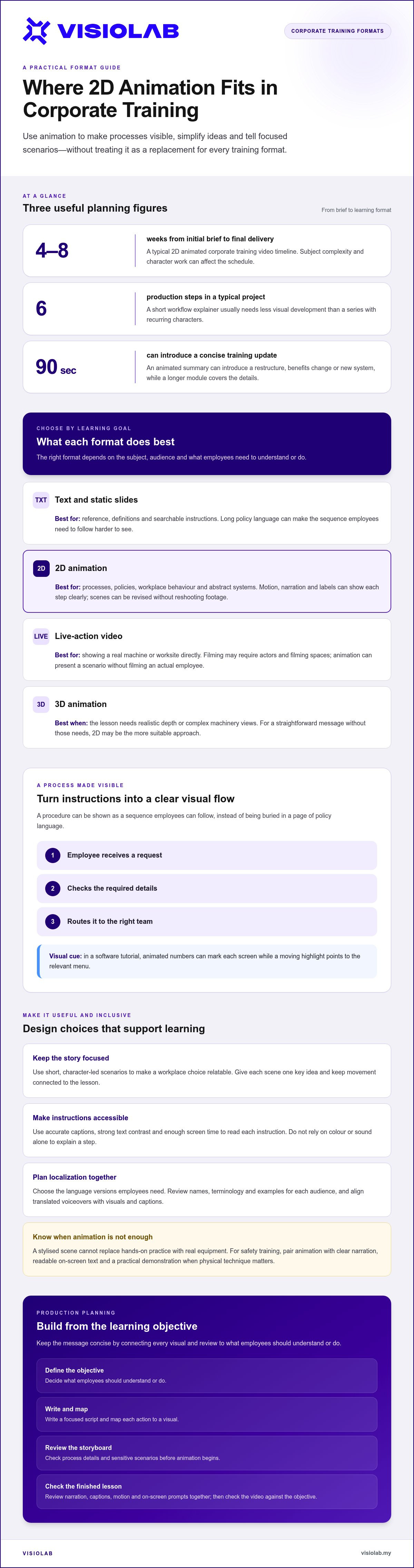
Text works well as a reference, but a page of policy language can hide the sequence employees need to follow. A 2D explainer can turn that same procedure into a visible flow: an employee receives a request, checks the required details, then routes it to the right team. Motion, narration and labels give each step a clear place, while text remains useful for definitions or searchable instructions.
Motion graphics make letters, numbers and calls to action part of the lesson, not mere decoration. In a software tutorial, animated numbers can mark each screen while a moving highlight draws attention to the right menu. A closing prompt such as “Submit the form” can appear beside the final action. This visual hierarchy helps employees distinguish instructions from supporting detail.
Compared with live-action video, 2D animation can show abstract systems, internal workflows or a sensitive workplace scenario without filming an actual employee. Live action can demonstrate a real machine or worksite more directly; animation can simplify the same subject and revise a visual without reshooting a scene. Against e-learning text and slides, animation adds movement and storytelling. Compared with 3D, 2D is often the more suitable approach when realistic depth and complex machinery views aren’t needed.
A typical 2D animated corporate training video takes four to eight weeks from initial brief to final delivery. A typical project runs across six production steps, with the subject’s complexity and character work affecting the schedule. A short workflow explainer usually needs less visual development than a series featuring recurring characters.
Animation also has limits. A stylised scene cannot replace hands-on practice when employees need to operate real equipment, and a fast-moving sequence may obscure a critical instruction. For a safety lesson, pair animation with clear narration, readable on-screen text and a practical demonstration when physical technique matters. Shape each scene around the task, not motion for its own sake.
For Malaysian teams, plan accessibility and localization together. Add accurate captions, strong text contrast and enough screen time for viewers to read each instruction. Do not rely on colour or sound alone to explain a step. Choose the language versions employees need, then review names, terminology and examples for each audience. Keep translated voiceovers aligned with the visuals and captions.
Plan production around the learning objective: define what employees should understand or do, then write a focused script and map each action to a visual. Review the storyboard before animation begins, especially for process details and sensitive scenarios. During production, check narration, captions, motion and calls to action together. A final review against the objective keeps the video concise and useful.
Engagement comes from giving each idea a clear visual role, not simply adding motion. For example, an announcement about a new system can follow an employee through the change and show what happens next.
Audience engagement is the attention and participation a training format earns through its story, visuals and sound. A character facing a familiar workplace choice gives employees a clear point of entry, while purposeful movement keeps each scene connected to the message. Animation can appeal across age groups, allowing teams to use a shared visual language for onboarding, safety or internal updates.
Specific choices can make training more engaging. A light moment may ease tension in a communication lesson, while a pause before a decision gives viewers time to consider the right response. For workplace harassment training, a fictional character can present a scenario without making a real employee its subject. The scene should still treat the issue seriously and clearly show the expected action.
Keep interaction tied to learning. In an LMS, a short animated scenario can end with a question or survey, helping learners apply the message and showing which points need clarification. For distributed Malaysian teams, captions and language versions can help employees follow the same scenario. The appeal comes from relevance, not visual activity for its own sake.
Concise communication means reducing a lesson to its essential message and presenting it in an order viewers can follow. Animation can pair narration with a visual cue, such as a moving process map that reveals one decision at a time. This is useful when employees need to remember a sequence rather than absorb a long explanation in one sitting.
A short format can also support microlearning. For example, a 90-second animated summary can introduce a restructure, benefits change or new system, while a longer module explores the details. Use one scene for each key idea, then reinforce the takeaway with a repeated phrase or visual symbol. That gives viewers a clear thread without crowding the screen with competing labels.
When appropriate to the subject, humour can make a lesson more enjoyable and help learners retain key information. In a customer-service module, a brief character interaction could contrast a rushed response with a clearer one. Keep the message accurate and the joke relevant: it should strengthen the learning, not distract from the action employees need to take.
After viewing, a brief LMS assessment or survey can reveal whether employees understood the central point. Use responses to identify a confusing scene, then clarify its narration or visual cue. For teams shaping a concise training message, animated training video production can turn the learning objective into a focused visual story.
2D animation suits training that explains processes, policies, workplace behaviour or new initiatives. For example, a visual sequence can show how a compliance request moves from employee submission to manager approval, making each decision easier to follow.
Choose the style according to what employees need to understand or do. A workflow with clear stages may work best as motion graphics; a policy scenario may need characters; and a data-heavy explanation may benefit from simple charts. The visual approach should make the learning objective easier to grasp, not compete with it.
Whiteboard animation can break a complex system into parts. For example, an onboarding video might show how a request moves between human resources, payroll and a manager. Motion graphics can then highlight the handoff or show where a digital form enters the process. Each visual gives one part of the explanation a clear place.
Character animation is useful when a lesson depends on decisions and consequences. A fictional team member can demonstrate how to respond to a customer complaint, report a safety concern or handle a workplace conversation. The character provides a consistent viewpoint, while the script keeps attention on the action and its outcome.
Abstract visuals are another way to explain ideas that are hard to film. A changing network of shapes can represent information flow, while arrows and labels can show how a new platform connects teams. Colour, symbols and movement can distinguish stages, but keep each visual consistent so employees can interpret it easily.
Artistic flexibility lets 2D animation reshape objects and characters to suit a lesson. A diagram can expand to reveal hidden steps, or a character can move through a process that would be difficult to stage in a real office. This makes animation useful for explaining technical data, internal systems and new initiatives without requiring realistic imagery.
The format should fit the task. Training on advanced machinery may need detailed views of real components, while a simple animated overview can explain why a process exists. If employees must perform a physical action, pair the visual explanation with practical instruction. Animation clarifies the concept; it does not replace direct practice.
Consider where employees will watch the lesson. A concise digital module for an LMS needs legible labels on smaller screens, while a town-hall presentation can use larger diagrams and broader visual storytelling. Matching the style to the viewing platform helps keep key instructions visible, whether employees learn individually or together.
Businesses can use 2D animation in training materials to explain products or services, illustrate processes and showcase data. A simple approach works when advanced visual effects are not needed.
For a training video built around a workflow or policy, 2D can be a more affordable alternative to 3D. It usually needs less production time when realistic depth and detailed objects aren’t essential. A studio can focus effort on the script, key visuals and movement employees need to understand.
3D has a different role. Training on advanced machinery may require views of parts, angles or operations that flat diagrams can’t show as clearly. For a process involving approvals, customer communication or safety decisions, 2D graphics may communicate the essential steps without building detailed models. The subject’s visual demands should guide the format.
Budget depends on the work involved, not just the label “2D” or “3D.” Character design, scene count, voiceover, revisions and technical detail all shape production effort. A short explainer video with simple icons has different needs from a story with recurring characters and several locations. Define the learning objective before adding visual complexity.
Existing 2D animated videos can often be edited without recreating the whole piece. If a software menu changes, for example, the relevant screen and narration can be revised while unaffected scenes remain in place. That can make updates more practical than arranging another live shoot. A focused change also helps preserve a consistent visual style across training materials.
Storytelling keeps animated videos connected to a real workplace need. Start with a character facing a specific challenge, such as following a new approval process. Show the decision, its consequence and the correct action. This gives employees a reason to follow each scene while keeping the lesson focused on what they need to do.
Keep training goals separate from marketing goals. A marketing animation may introduce a product or build interest; an internal explainer should clarify a task or decision. For example, a platform tutorial can show an employee navigating a software process, while a promotional story highlights customer benefits. Clear goals prevent decorative scenes from taking time away from instruction.
Measure learning, not just the animation’s visual polish. In an LMS, pair a video with an assessment or survey about its key points. For a safety module, ask learners to select the right response to a workplace scenario. Review incorrect answers and comments to identify scenes that need clearer wording or visuals.
Track completion alongside learner responses, then compare feedback with the intended action. If employees finish a module but misunderstand a process step, revise that scene instead of rebuilding every animated asset. This makes evaluation part of production: the objective shapes the story, and learner evidence guides the next edit.
A recurring animated character can turn a policy into a workplace story employees can follow. Instead of listing rules, show a new team member facing a decision, choosing an action and seeing its effect. This gives abstract guidance a human perspective without depicting a real employee or workplace incident.
Character-led training works particularly well when a lesson involves behaviour, judgement or communication. For example, a supervisor character can demonstrate how to respond to a harassment concern, while a colleague explains the appropriate reporting route. A scenario can present a sensitive topic consistently, provided the script stays respectful and focuses on practical actions.
Consistency matters across teams and locations. The same character can guide onboarding, workplace safety and software training in a familiar visual style. Employees receive the same core message, even when managers deliver training in different settings. A character can also model a step-by-step task, such as entering information into a platform, without relying on a live demonstration that may vary between sessions.
Design the character around the audience and learning objective. A frontline employee may need to recognise a safety risk, while a manager may need to practise giving feedback. Roles, dialogue and decisions should reflect those different responsibilities. Avoid stereotypes in appearance, accent or behaviour; use a balanced cast and scenarios that do not suggest one background represents an entire workforce.
For Malaysian teams, visual storytelling can support communication across languages and cultures, but careful localization is still essential. Review names, workplace examples, captions and voiceovers for each language version. Keep key actions visible on screen so the lesson remains understandable when audio is muted or terminology is unfamiliar. If a translation changes the message, revise both the dialogue and related visuals.
Plan character production with reuse in mind. Establish the character’s appearance, voice and role before creating multiple scenes, then keep those details consistent throughout the project. Reusable assets can support new training modules, while focused edits can update a changed process without rebuilding every scene. A character introduced in onboarding can return later in a software tutorial or safety refresher.
Measure whether the character’s story supports learning, rather than judging success by animation alone. Pair a scenario with an LMS question about the character’s decision, then review where learners choose an incorrect response. If a scene causes confusion, adjust its action, narration or visual cues. To shape a character-led training concept into a finished video, start planning your animated training video.
VISIOLAB helps Malaysian organisations turn complex training messages into clear visual stories. Its Explainer and Training Video work can suit onboarding, software guidance or process training, while Safety Video content can support workplace instruction. For broader organisational communication, Corporate Video can present a company’s purpose, people or initiatives in a structured narrative.
Bring a defined learning objective, the intended audience and the key actions employees need to understand. These details help shape the script, visual style and format around the training need, whether the subject calls for character-led storytelling or a direct explanation. Visit visiolab.my to discuss your training video project.
The strongest training video starts with a decision: what should employees understand or do differently after watching? Define that outcome first, then let it guide the story, visual style and level of detail. This keeps production aligned with the workplace need instead of adding animation simply because it looks engaging.
The benefits of 2D animation for corporate training are most valuable when visual storytelling makes the next action clearer. Choose a character-led scenario for a human decision, or a focused explainer for a process employees need to follow. The right format should serve the lesson and the people learning it.
VISIOLAB creates Corporate Video, Explainer and Training Video, and ESG Video content to help organisations shape complex messages into purposeful visual communication. If you’re ready to develop a training concept around a clear employee outcome, contact VISIOLAB about your training video. Give your next learning message a story employees can understand and use.
2D animation is a strong choice when training needs clear visuals without realistic depth. It can turn a policy, workflow or abstract concept into a sequence employees can follow, while keeping characters and graphics consistent with the organisation’s visual identity. It isn’t automatically best for every lesson: a task requiring close inspection of real equipment may need a different format. Choose based on the action learners must understand.
2D animation creates the impression of movement through a sequence of images arranged in a two-dimensional space. A character might move across a screen, or shapes might change to illustrate how information flows between departments. Digital production tools let animators adjust drawings, text and movement over time. For a workplace tutorial, this could mean showing an employee’s journey through a software interface using a simplified screen design.
The main benefits are visual clarity, consistent delivery and adaptable storytelling. An organisation can use one animated explanation to introduce a shared process, then tailor supporting materials for different roles. For example, a procurement overview could show the central approval path, while separate modules explain the tasks employees and managers handle. This keeps core instructions aligned without requiring every learner to go through identical role-specific detail.
Animation can make an instruction easier to follow by connecting a visual cue with a spoken or written explanation. To support recall, add a brief pause before a key decision and ask learners to choose the next action. Later, revisit the same idea through a short scenario or refresher prompt. These choices encourage active recall rather than relying only on employees watching passively.
Set a learning objective, then compare relevant measures before and after training. For a software lesson, assess whether employees can complete the target task; for a policy module, review scenario responses or recurring support questions. To estimate ROI, compare production and distribution effort with changes in repeat training, trainer time or avoidable process errors. Track the same measures over time and distinguish training effects from other workplace changes.
Let’s create and collaborate
We’re versatile multitaskers, and we thrive on a lot of projects. You've seen a few of our works that we are most proud of, and your project could be next in line.

Empowering brands with captivating visual stories, creating strong connections and growth.
