
The platform with the most features isn’t always the right place for your corporate video. A public-facing brand story, an internal training film and a stakeholder documentary serve different audiences, so each needs an appropriate route to access, measurement and distribution. That’s why effective...

The platform with the most features isn’t always the right place for your corporate video. A public-facing brand story, an internal training film and a stakeholder documentary serve different audiences, so each needs an appropriate route to access, measurement and distribution. That’s why effective corporate documentary video production starts with the audience journey, not a platform shortlist.
Choosing can feel complicated: public reach may come at the expense of privacy, while internal access can limit discovery. You also need to know whether a platform supports the analytics, accessibility and governance your team needs. This 2026 guide compares leading hosting options, including YouTube, Vimeo, Wistia, Vidyard, Kaltura, Brightcove and SproutVideo, by their strengths and likely use cases. Use the practical framework to match a platform to your audience, access needs, measurement goals and distribution workflow, whether you’re sharing a public corporate film or content for a defined group.
• Choose a hosting platform around the audience journey and communication goal, not a long feature list.
• Compare access, analytics, accessibility, governance and workflow needs before narrowing your options.
• Match platform categories to public communication, internal learning, stakeholder updates or enterprise-wide video needs.
• Build a publishing workflow that includes captions, transcripts, descriptive titles, clear calls to action and post-publication review.
• Connect corporate documentary video production to a deliberate distribution plan so the message, film and delivery work together.
A corporate film is one part of a wider communication journey. Production shapes the message, distribution puts it in front of its intended viewers, and review helps the team assess what happens next. A corporate video hosting platform stores, manages and distributes video. It can support that journey, but it isn’t the production process, a social media channel or the organisation’s broader video strategy.
Hosting and distribution often work together, but they aren’t the same. A team might store a master video on a hosting service, then share it through an internal portal, embed it on a public website or publish a social edit. The wider strategy connects those choices to the message, audience and desired response. In corporate documentary video production, the film’s purpose should shape how it reaches viewers, rather than leaving distribution decisions until after the edit is complete.
At a basic level, a platform makes video available for playback and gives an organisation a way to publish, share and manage content. Beyond that, requirements depend on the video. A public brand film may prioritise a straightforward viewing experience and broad reach. A staff training video may need controlled access, while a communications team may need viewing data to assess engagement.
Start by identifying the content’s audience and sensitivity, then define how it will be distributed. A video intended for employees may need a different access path from a documentary shared with stakeholders or the public. The Online Video Platform overview explains common platform models and features, but your requirements should come from your organisation’s use case.
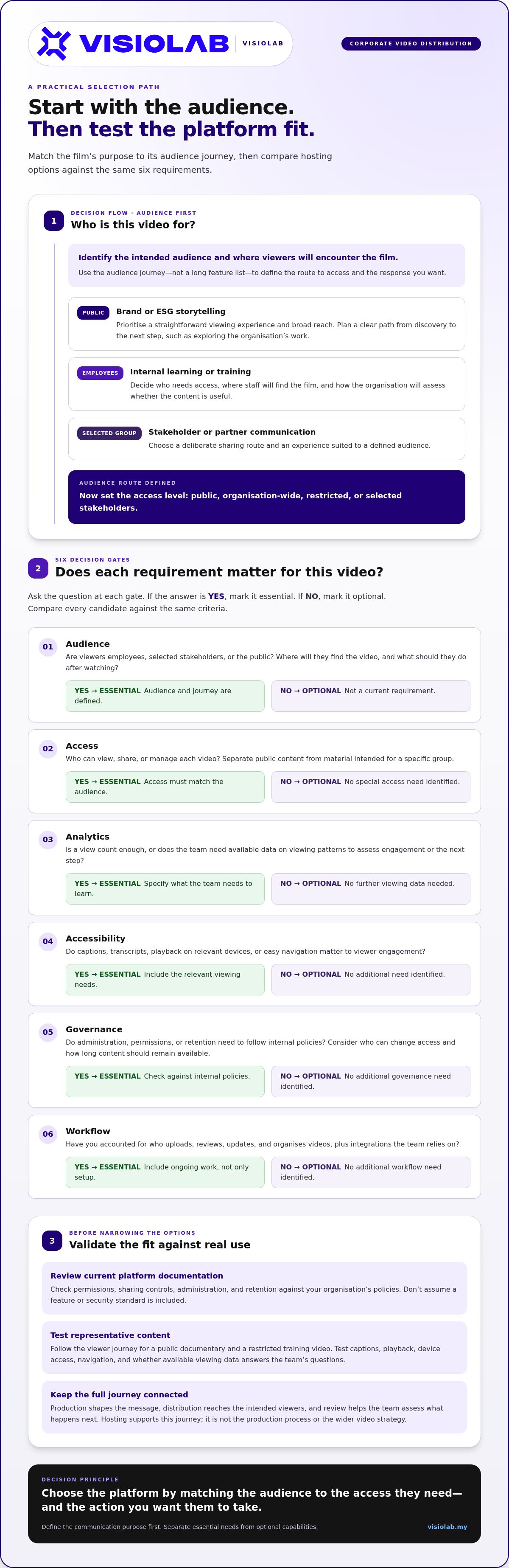
Map the journey in order: where will viewers encounter the video, how will they access it, and what should they do afterwards? Answering these questions first helps reveal practical requirements before you compare platform features.
Viewers may find a training film through an internal learning channel. Decide who needs access and how the organisation will assess whether the content is useful.
A documentary for partners or stakeholders may need a deliberate sharing route and an experience suited to a defined audience.
A brand or ESG film intended for public viewing needs a clear path from discovery to the next step, such as exploring the organisation’s work.
Include this journey in the production brief. It can shape the story, length, versions and closing message, as well as the distribution plan. A film created for broad public storytelling may need a different edit from one designed to support a focused internal learning objective.
Choose the platform by matching the audience to the access they need and the action you want them to take. First define the communication purpose, then assess which hosting approach can support it.
A useful comparison starts with your organisation’s requirements, not the longest feature list. Write down what the video must do, who needs to view it and how the team will manage it after publishing. Then assess each candidate against the same criteria. This keeps essential needs visible and separates them from optional capabilities.
Identify whether viewers are employees, selected stakeholders or the public. Note where they’ll find the video and what they should do after watching.
Define who can view, share or manage each video. Separate public content from material intended for a specific group.
Decide what the team needs to learn. Is it enough to know that a video was viewed, or does the team need available data on viewing patterns?
Consider captions, transcripts, playback on relevant devices and ease of navigation. These details affect whether viewers can engage with the content.
Map administration, permissions and retention needs to your internal policies. Review each platform’s current documentation rather than assuming a feature or security standard is included.
Account for who uploads, reviews, updates and organises videos, plus any integrations the team relies on. Include ongoing work, not only the initial setup.
Mark each item as essential or optional. Controlled access might be essential for a restricted stakeholder film, while a particular integration may be optional if the team can publish without it. Connecting these requirements to the brief early keeps the film’s intended audience and eventual delivery in view during corporate documentary video production.
Classify content as public, organisation-wide, restricted or intended for selected stakeholders. Then compare the platform’s permissions, sharing controls and administration options with your internal policies. Consider who can change access and how long content should remain available. These requirements depend on your organisation, so review current platform documentation before deciding whether an option meets them.
Start with the questions the communications team wants answered, such as whether viewers reached the intended content or took the next step. Assess whether the available viewing data can answer them. Also test captions, playback, device access and viewer navigation. Record setup effort, content-management responsibilities and relevant integrations. Ease of use for viewers matters as much as convenience for administrators.
Before committing to a workflow, test representative content, such as a public documentary and a restricted training video. Follow each viewer journey from opening the link through playback to the intended next action. Note friction, access issues and the information available to the team. A practical trial can reveal gaps that a feature checklist alone won’t show.
VISIOLAB’s corporate video production brings message and audience planning into the production process, helping teams shape the film alongside its delivery plan.
No single platform suits every corporate video. A public brand documentary, a campaign film and internal learning content have different audiences and delivery needs. Use the comparison below to shortlist options by likely use case, then review current platform documentation. Features, access controls, analytics and plan limits can change, so treat these as evaluation directions, not guarantees or a ranking.
| Platform or category | Use case | Audience | Access needs | Analytics | Verification notes |
|---|---|---|---|---|---|
| YouTube | Public-facing storytelling and discovery | General public, prospective customers or broad stakeholder groups | Assess whether public availability suits the content and sharing plan | Check whether available viewing data answers campaign questions | Compare current privacy, branding and analytics options with your requirements |
| Vimeo | Branded viewing or sharing a campaign film | Public audiences, clients or selected viewers | Confirm the access and sharing controls available for your intended audience | Review current measurement tools and plan limitations | Test the viewing experience and any access settings before publishing |
| Wistia | Marketing-led video and campaign measurement | Prospects, customers or campaign audiences | Match access settings to whether the video is public or audience-specific | Assess its marketing analytics against the questions your team needs answered | Verify current analytics, integrations and plan limits in vendor documentation |
| Microsoft Stream or another enterprise system | Internal communications and employee learning | Employees and defined organisational groups | Assess access in the context of organisational accounts and policies | Determine whether available data supports learning or communications review | Check the organisation’s environment, configuration and subscription details |
Start with the job the platform must do. YouTube can be considered for public discovery, Vimeo for a branded viewing experience, and Wistia when marketing measurement is central. These are starting points, not promises about current capabilities. For each option, compare access controls and analytics with your requirements, then test the viewer journey on the intended channel.
For employee learning or internal communications, assess Microsoft Stream and other enterprise tools within the organisation’s existing environment. An existing subscription doesn’t necessarily mean a particular feature is available or configured for your use. Review current documentation and test the workflow with the relevant audience, permissions and content-management responsibilities in mind.
For corporate documentary video production, begin the comparison with the film’s distribution purpose. A documentary for public brand storytelling may need a different route from a training film shared internally. Shortlist platforms against those distinct journeys, then verify the details that matter and test the viewer experience before making a choice part of the publishing workflow.
A reliable publishing workflow connects the creative brief to the viewer’s experience and the team’s learning after release. Define responsibilities before a video goes live: platform administrators manage settings and access, content owners approve the correct version and keep information current, and campaign or communications leads define measures and review results. One person may hold several roles, but the responsibilities should stay clear.
Use this sequence to move from planning to review:
Specify who should watch, where they’ll find the video and what they should understand or do afterwards.
Select the publishing channel and decide who needs permission to view, share or manage the content.
Confirm the final video, supporting text, captions and transcript, then assign a content owner.
Preview the published experience using the intended access route and check that the next step is clear.
Share the video through the planned channel, with context that helps viewers understand why it matters.
Check relevant platform data against the objective, gather stakeholder feedback and record improvements for future releases.
Give every asset a descriptive title, a concise description, a named audience and a clear next action. Prepare captions and a transcript so viewers can follow the content in different viewing situations, including when sound is unavailable. Use approved versions and consistent file names, such as a topic, audience and version label, to help teams distinguish a final film from drafts or alternate edits.
Before publishing, check that the title matches the content, captions align with the spoken words and the transcript is easy to find. Confirm that the call to action fits the video’s purpose. In corporate documentary video production, these details carry the story beyond the screen and connect viewing to a deliberate communication outcome.
Choose measures that reflect the objective. Reach can indicate whether the intended audience encountered a public film; completion may help a team review engagement with a training asset; a subsequent action can show whether viewers followed the next step. Treat platform-reported engagement as one signal, not automatic proof of organisational impact. Review results with communications stakeholders, add relevant context and apply the findings to future content.
A strong workflow begins before filming: audience, message, format and distribution should support one another. VISIOLAB’s strategic corporate video production connects those planning choices to clear visual communication. Planning the brief alongside delivery goals helps teams give the finished film a clear purpose.
A hosting platform is a destination, not the whole journey. Strong distribution connects five decisions: the message, the film, the audience, the route to viewers and the learning gathered after release. Planning these pieces together helps the documentary reach its intended viewers in a context suited to its purpose. Treating them separately can weaken the connection between the edit and the viewing experience.
That connection starts before filming. A documentary about an organisation’s sustainability work, for example, might be designed for public brand storytelling, while a film explaining an operational change may be intended for employees or selected stakeholders. Each needs a suitable viewing context. The message may be consistent, but the audience, access route and next action can differ.
For a public-facing film, the title, introduction and surrounding page should quickly show viewers why the story matters. Captions should carry the message when viewers watch without sound, and the call to action should make the next step clear. For employee or stakeholder communication, explain why the film is being shared and provide a viewing route aligned with the organisation’s access policies.
Before choosing a destination, define the intended audience and how they’ll encounter the film. Then make sure the documentary’s central message carries through its title, opening, captions and viewing context. This alignment helps avoid a mismatch, such as sending a restricted stakeholder story through a channel designed for broad public discovery. Platform selection should meet audience expectations while fitting organisational governance.
Documentary storytelling also depends on what the film is meant to preserve and communicate. VISIOLAB’s approach to corporate documentary storytelling focuses on shaping a story around a clear organisational purpose.
Message development and audience definition influence a film’s structure, tone and final use. A brand legacy documentary may need a different introduction and distribution route from an employee-focused film explaining a change. Discussing these choices during production planning gives the team a clearer basis for deciding where the finished video belongs and what viewers should take from it.
VISIOLAB brings strategic messaging into corporate film and documentary production, translating complex organisational messages into clear visual content. Set a deliberate communication objective, then plan the full lifecycle: clarify the message, shape the film, identify its viewers, select a suitable distribution route and review what the team learns.
VISIOLAB’s corporate video production links story development with distribution planning, so the finished film has a clear role in your communications.
Your next corporate video can be more than a moment of publication. Treat it as a communication asset with a clear role: build understanding, bring people closer to your organisation’s purpose or help viewers take a considered next step. The hosting decision should serve that role, while a thoughtful review after release can guide future content.
For corporate documentary video production, carry one clear intention from the first creative decision through to the final viewing experience. Keep the story grounded in what matters to its audience, and give it a distribution path that supports its purpose. This creates a stronger foundation for the conversations your organisation wants to start.
Ready to shape the story and its delivery together? Discuss your corporate video project with VISIOLAB.
The best platform is the one that fits the video’s audience, purpose and access requirements. A public-facing brand film may need broad discoverability, while internal onboarding content may belong in an employee learning environment. Start with a real video and map how viewers should find and use it. Then compare current access settings, analytics and administration options against that journey instead of choosing by popularity alone.
Yes, YouTube can host corporate videos intended for public viewing, such as a company introduction or campaign film. It can also support public discovery, but some organisations may need more branding control, privacy options or business-focused analytics. Treat less-public sharing settings carefully because a link can be passed on. For sensitive material, assess whether the access model fits your organisation’s expectations before uploading.
Vimeo may suit some internal video uses, depending on the access controls, account setup and plan available to the organisation. For example, a team might consider it for a presentation shared with a defined group, then test the viewing experience using a representative account. Review current documentation for restrictions and administration details. Don’t assume a branded player or share link alone meets internal governance needs.
Companies typically use an organisation-managed platform or a hosting service configured for a defined audience. First classify the video, decide who should view it, and identify who will manage permissions and remove access when it’s no longer needed. Then test the viewer route, including what happens when someone forwards a link or signs in with a different account. Keep sensitive content within a workflow that aligns with internal policies.
Look for a fit with the content’s audience and purpose, then assess access management, playback, captions, analytics, administration and ongoing content ownership. Consider the less visible work too: who updates titles, replaces outdated versions and handles access requests? A platform that seems simple at launch may create extra work if responsibilities aren’t clear. Test representative content and review current platform documentation before making it part of a routine workflow.
No, not every corporate video needs a separate specialist hosting service. A public film might be published through an existing website or social channel if the viewing experience and measurement needs are modest. A growing library, restricted audience or need for more deliberate content management may make a dedicated platform worth assessing. For corporate documentary video production, choose the simplest route that supports the film’s purpose without creating unnecessary administration.
Set a measure that reflects the video’s intended job. A public awareness film might be reviewed for reach and viewing patterns; a training video may be assessed alongside learner feedback or a related knowledge check. Platform analytics show activity, not necessarily organisational impact. Pair available viewing data with a relevant next-step measure, such as enquiries or course completion, and review the evidence with the team responsible for the communication objective.
Let’s create and collaborate
We’re versatile multitaskers, and we thrive on a lot of projects. You've seen a few of our works that we are most proud of, and your project could be next in line.

Empowering brands with captivating visual stories, creating strong connections and growth.
