
What if the most energetic track is wrong for your product launch? Choosing background music for corporate videos means matching the sound to the video’s purpose, brand and audience while keeping dialogue clear. An upbeat track can build momentum in a promotion; subtle instrumental music can help ke...

What if the most energetic track is wrong for your product launch? Choosing background music for corporate videos means matching the sound to the video’s purpose, brand and audience while keeping dialogue clear. An upbeat track can build momentum in a promotion; subtle instrumental music can help keep attention on the content in a training video.
It’s easy to focus on how a track sounds and overlook what it signals. The right choice supports the message and shapes the viewing experience, while music that clashes with the brand or competes with speech can pull focus away. This guide explains how to assess mood, pacing, audience and narration, including what to consider for launch and promotional videos. It also covers what to check in free tracks for training and promotions, and why usage rights matter even when a track costs nothing. The aim is a soundtrack that feels intentional, suits the story and lets the message land.
• Start with the video’s purpose and brand character, then choose music that reinforces both.
• For free tracks, focus on usage rights as well as mood so the music can be used appropriately in your video.
• Keep training and instruction videos focused with subtle music that supports, rather than competes with, narration.
• Shape promotional music around the audience and desired energy, while giving dialogue room to land.
• VISIOLAB’s Corporate Video and Explainer and Training Video services can bring the soundtrack and story together in a professionally produced video.
Professionals begin with the communication objective, not a favourite track. They identify whether the video must explain, reassure, celebrate, recruit or inspire, then shortlist music that supports that outcome. For example, a safety video needs a focused, measured tone, while a launch film can build anticipation with brighter energy. For teams choosing background music for corporate videos, this first step keeps the soundtrack aligned with the message.
Industry context can shape musical style, but it shouldn’t dictate a cliché. A technology company may suit a clean, contemporary instrumental, while an ESG story may call for reflective music that gradually feels hopeful. Ask whether the sound reflects the organization’s culture and values. A serious topic needs restraint; a celebratory milestone can carry a more upbeat track. Choose music that supports the subject, not a stereotype about its industry.
Next, match the music’s mood and energy to the visuals. A steady rhythm can enhance a sequence of people working, while a gradual build can give a reveal or transformation more emotional weight. The University of Hull recruitment video uses a strong beat that gradually accelerates to emphasize the building process of education. It demonstrates how pacing can echo what viewers see rather than simply sit in the background.
Audience matters as much as brand. A video for staff may need neutral, uplifting music that feels professional yet approachable. A customer-facing explainer may benefit from a lighter tone that makes complex information easier to follow. For interviews and testimonials, softer, sparse music leaves room for the speaker. Consider whether lyrics could compete with the message or make the tone feel less credible.
Review the storyboard and script during pre-production to keep the soundtrack coherent. Note scene changes, key statements and emotional shifts, then choose music that carries a consistent mood across those moments. A subtle change can signal a new scene; a sudden shift in style may distract. Early stakeholder input helps clarify what the brand wants viewers to remember from the finished video.
The final choice should serve the messaging objective from opening frame to closing moment. For motivation, an uplifting track with a steady rhythm can support forward movement. For sensitive presentations, serious, reflective music can preserve the subject’s weight. Choosing background music for corporate videos also means comparing shortlisted tracks with the actual visuals and dialogue, then refining the selection until it feels tailored to the story, not simply added afterward.
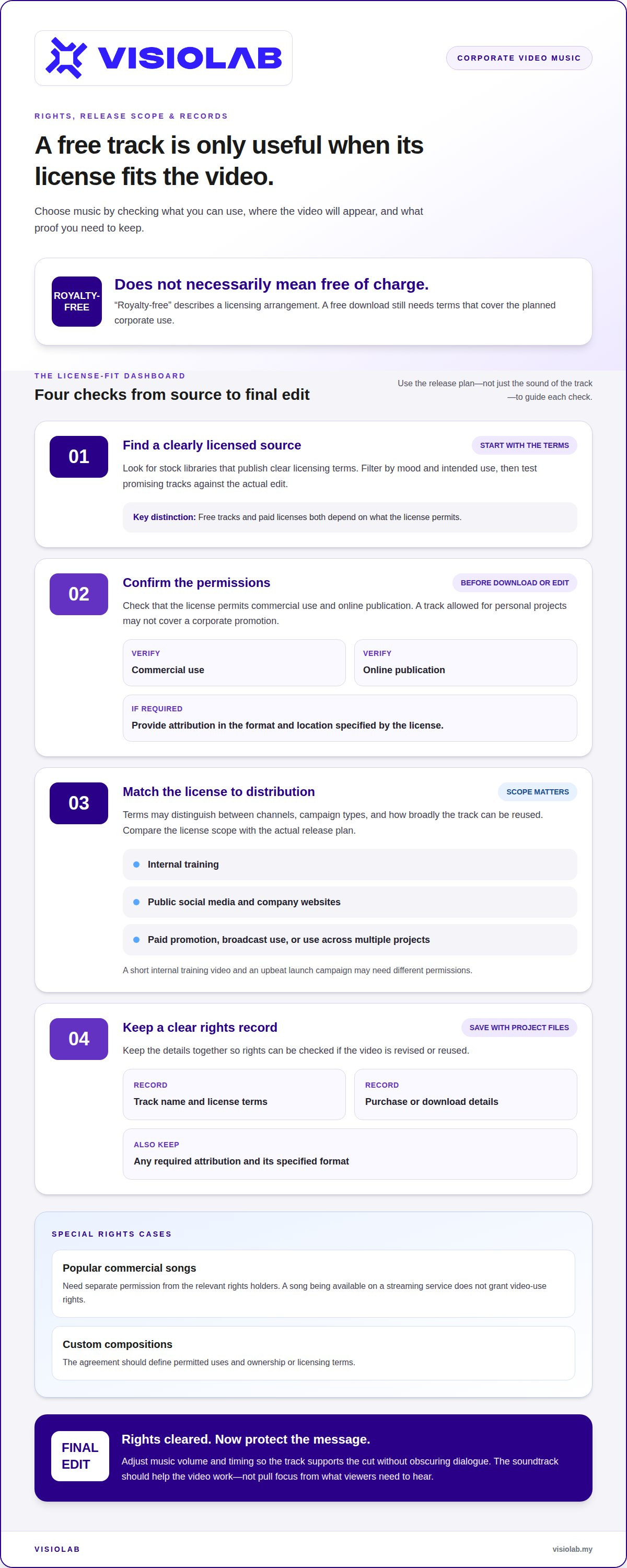
Start with stock libraries that publish clear licensing terms. Filter tracks by mood and intended use, then test promising options against the edit. A free download is useful only if its license covers the planned corporate use. “Royalty-free” describes a licensing arrangement, not necessarily a track that costs nothing.
Music copyright and licensing are separate from the creative choice. A track may sound right but still lack permission for a company’s video, channels or campaign. Using copyrighted music without the proper license can lead to legal complications. Match the license to the actual release plan, whether that means internal training, public social media, a company website or paid promotion.
How much do royalty-free music licenses for corporate videos cost? Some tracks are available at no charge, while paid licenses vary by track and permitted use. The music choice, distribution channels, campaign scope and license terms all influence the cost.
For a free track, read the license before downloading or editing. Check that it permits commercial use and online publication, and note any credit requirements. A track permitted for personal projects may not cover a corporate promotion. If attribution is required, provide it in the format and location specified by the license.
For paid stock music, compare the license scope with the video’s distribution plan. Terms may distinguish between social posts, websites, broadcast use, paid advertisements or use across multiple projects. A short internal training video and an upbeat launch campaign may need different permissions. The chosen license should also account for the final client and intended audience.
Keep license records after selecting the music. Save the track name, license terms, purchase or download record, and any required attribution with the project files. These details make it easier to identify the rights attached to an edit if the video is revised or reused. Then adjust music volume and timing so the track supports the cut without obscuring dialogue.
Popular commercial songs need separate permission from the relevant rights holders; a track’s presence on a streaming service doesn’t grant video-use rights. For a custom composition, the agreement should define the permitted uses and ownership or licensing terms. This gives the production a clear rights trail from selection to release. For a coordinated soundtrack and edit, explore professional video production.
For staff training, the soundtrack should support attention rather than compete with new information. Subtle, ambient music with a restrained rhythm often suits procedures, onboarding and safety demonstrations. A strong beat can make routine footage feel energetic, but it may distract viewers from spoken instructions or visual details. The music should create continuity without becoming the focus of the lesson.
Voice-over affects the music choice. Instrumental tracks are often a strong starting point because lyrics add another stream of language. If a narrator explains how to complete a task, words in the soundtrack can compete with that explanation. A light piano phrase or soft electronic texture may suit a calm walkthrough, while a fuller arrangement can obscure important wording. Keep the narration clear.
Vocals can still work when speech isn’t central. For example, an opening montage about company culture might use a vocal track before the presenter begins. Professionals can then reduce or remove the music beneath dialogue, restoring it between speaking sections. Group vocals, whistling and poppy piano melodies can also draw attention away from a speaker, so editors assess each passage against the actual voice-over.
Instrument choice affects whether a training film feels current and credible. Digital versions of acoustic instruments can sound artificial or dated, especially alongside polished workplace footage. Listen for a natural timbre and restrained arrangement instead of relying on a “corporate piano” label. A simple piano motif may feel composed and calm, but repetitive high notes could compete with technical instructions or on-screen text.
Editors shape volume around the most important information. During a demonstration, a tool sound or spoken warning may need the viewer’s full attention, so the score can dip or fade out. There’s no single volume formula for every voice and recording. Professionals balance music against the specific narration, then review transitions to ensure the soundtrack doesn’t suddenly draw focus between steps.
Customer instruction videos need the same clarity, with tone adjusted for the task. A software tutorial may suit a clean, steady instrumental bed; a product setup guide may work better with sparse music and clear pauses. For marketing content, a brighter or more energetic track can signal a different purpose, but it shouldn’t blur the distinction between promotion and instruction. Professionals help you pick a sound that supports the viewer’s task while reflecting the brand’s identity.
Choose a track by connecting the video’s message, its intended audience and the response it should encourage. A staff update may need calm, approachable music, while a customer launch film may call for a more engaging sound. The score should communicate the right feeling without distracting from what viewers need to understand.
Audience context changes how the same music can feel. A recruitment film aimed at prospective graduates might use a contemporary, forward-moving rhythm; a presentation for senior decision-makers may suit a restrained instrumental arrangement. These are creative choices, not fixed rules. Professionals consider the audience’s expectations, familiarity with the subject and likely viewing context before narrowing the style.
Genre also sets expectations. A documentary-style ESG film may use organic textures to support real interviews and observational footage. An explainer with animated graphics can take a cleaner, more rhythmic direction. In each case, align the musical character with the format, then check that it supports the subject rather than making the video feel like a different genre.
Mood and energy guide attention through the edit. An uplifting track can give a story of progress a sense of possibility, while a steady pulse can carry viewers through a sequence of workplace scenes. For a sensitive message, restrained music can preserve space for reflection. Professionals shape these choices around the footage’s emotional arc, so the sound moves forward with the story instead of forcing a mood onto it.
Compare candidate tracks against the same sequence to assess their effect. A bright, upbeat option may make a product reveal feel celebratory; a softer track may make it feel considered and premium. Listen for moments when music draws attention away from a key statement, facial expression or visual detail. Comparing these effects helps identify the track that best supports the intended message.
Refine the arrangement around the audience’s journey. Music can establish the tone in the opening, maintain continuity across related scenes and shift gently before a key message. A sharp change may signal a transition, but it can also interrupt the viewing experience. The final sound should convey the intended emotion, keep attention on the story and feel credible to the people watching.
A launch soundtrack has a specific job: convey why the product matters and make its arrival feel significant. Start with the campaign’s central promise, then choose music that supports the reveal. A new technology product might benefit from crisp, modern percussion, while a premium service could suit a more restrained score. Build excitement without making the product feel unlike the brand.
They also map the track to the promotional edit. A gradual build can lead into a product reveal; a strong musical accent can underline a key visual or message. If the edit moves from a problem to a solution, the score can shift with that change. Selecting music around actual scene transitions gives the sequence momentum, rather than laying an upbeat track over every shot.
Vocals depend on how the video communicates. A track with lyrics can add personality to a montage without narration, but it may distract from a voice-over or on-camera presenter. The G1 Series 2020 event announcement used a vocal track by D Fine Me without voice-over or pieces to camera. That example shows how vocals can carry promotional energy when spoken content isn’t competing for attention.
Not every promotion needs high-energy music. An ambient score can suit a product demonstration where viewers need to notice materials, features or careful craftsmanship. A serious announcement may call for measured music, even if the campaign aims to build interest. Choose a mood that follows the product and message. Excitement comes from alignment, not volume alone.
Professionals review the track alongside the final sequence, not just a brief or storyboard. They listen for whether the opening establishes the right tone, the middle sustains interest and the close leaves room for a call to action. If a slogan lands over a musical peak, the score may need a pause or softer passage. That timing helps the message register clearly.
For campaigns released in different formats, the soundtrack must also work with each edit. A longer launch film may have space for a gradual build, while a shorter cut needs its musical idea sooner. Professionals adapt the arrangement and transitions to the available footage, keeping the same campaign identity without forcing every version into an identical rhythm. Plan a launch soundtrack and edit with professional launch video production.
VISIOLAB creates Corporate Video content that brings an organization’s message, visuals and soundtrack together in a coherent story. Choose this service when a launch, company update or brand film needs clear creative direction from concept through production.
For staff learning and customer instruction, Explainer and Training Video can make complex information easier to follow. ESG Video and Safety Video support stories where clarity and tone matter as much as visual impact. Shape music around the audience, purpose and spoken content, so the soundtrack reinforces the message without competing with it.
Share your video’s purpose, audience and key message with VISIOLAB to discuss your project.
Before production moves forward, decide what you want the soundtrack to contribute beyond a single edit. It can help establish a recognizable audio identity across future campaigns, or give one important message its own distinct emotional character. That choice shapes how music fits the brief, the visuals and the way people experience your organization.
Choosing background music for corporate videos becomes more purposeful when it is considered alongside story, audience and delivery. VISIOLAB offers Corporate Video, Explainer and Training Video, and ESG Video services for organizations shaping company stories, learning content or sustainability messages. A focused conversation about the video’s purpose can turn an initial direction into a coherent production plan.
Contact VISIOLAB to discuss your video and take the next step toward a soundtrack that feels considered, distinctive and true to your message. Your story deserves a sound that moves it forward.
A custom composition can be shaped around a particular product, scene or brand sound. Define the desired feeling, pacing, instrumentation and moments when the music should change, then share those details with the composer. A launch film, for example, might need a restrained opening and a more expansive reveal. Agree on permitted uses before production so the finished track fits both the edit and its release plan.
A production team can search reputable stock libraries that clearly label tracks available at no charge. Read the individual license rather than relying on a “free” label alone. A track allowed in an internal training video, for example, may have different terms for a public advertisement. Save the license and attribution details with the project files so they’re easy to retrieve if the video is updated.
No single genre suits every corporate video. A restrained electronic score might complement a technology explainer, while organic textures could fit a documentary-style company story. A product montage may call for energetic pop, and a reflective ESG film may suit understated ambient music. Assess each track against the footage, brand character and intended response rather than treating a genre label as a formula.
Consider the edit’s pace alongside the story’s emotional direction. A steady rhythm can support a sequence showing a process, while a gradual build can lead into a reveal. Reflective footage may need quieter, slower-feeling music; celebratory scenes can carry more energy. The track should move with the visuals, not force every corporate video into the same mood.
They make the spoken message the priority, then place music around it. During a detailed explanation or important interview, the score can be reduced, simplified or faded out. Music can return between spoken passages to carry transitions. Professionals assess the actual recording, since a quiet speaker, overlapping voices or important sound effects can change how much space the soundtrack needs.
There’s no exact volume formula for every voice track and edit. Adjust the music by listening for clear speech and a soundtrack that supports the scene without drawing focus. Avoid making the score so quiet that it becomes oddly noticeable. Reviewing the mix on a laptop, smartphone and tablet can reveal differences in clarity and balance across devices.
Use music with permission that covers the video’s intended use and distribution. For a Malaysian corporate video, the production team should establish whether the license covers the planned channels, such as internal training, public social media or paid promotion. A free download alone doesn’t establish those permissions. Keep the license terms and any required credit with the project record, and avoid using commercial songs without appropriate authorization.
Royalty-free music is licensed under terms that generally avoid repeated payments for each use, but restrictions may still apply. Rights-managed music is licensed for defined uses under the conditions of an agreement. Public-domain status means a work can be used without copyright restrictions on that work, but a particular recording may have separate rights. Confirm which specific track and recording the permission covers.
Let’s create and collaborate
We’re versatile multitaskers, and we thrive on a lot of projects. You've seen a few of our works that we are most proud of, and your project could be next in line.

Empowering brands with captivating visual stories, creating strong connections and growth.
