
A strong corporate video script doesn’t try to say everything. It gives the audience one clear reason to keep watching. The most useful corporate video script writing tips start with the people you need to reach, then connect your objective, message and visuals in a focused story. A practical exampl...

A strong corporate video script doesn’t try to say everything. It gives the audience one clear reason to keep watching. The most useful corporate video script writing tips start with the people you need to reach, then connect your objective, message and visuals in a focused story. A practical example shows how those choices work together.
Scriptwriting can feel challenging: a video needs to sound natural, convey the right information and give every shot a purpose. This guide explains how to shape a script around your audience, define a clear objective and call to action, pair words with visuals, and keep the message concise. Examples for corporate, training and explainer videos show how a focused idea moves from the page to the screen.
• Start with the audience’s needs and the video’s purpose so the story feels relevant from the first scene.
• Shape the script around one objective, then make the call to action a natural next step.
• Pair narration with specific visual direction so each shot supports the message instead of repeating it.
• Use concise language and practical examples to make complex corporate topics easier to follow.
• Explore how professional video production can turn a focused script into a cohesive corporate, training, ESG, or safety video.
Before drafting dialogue, identify the video’s purpose and intended viewers. You may want to educate, inform or promote a product or service, and each goal calls for different storytelling choices. An educational script might explain a process, while a promotional story could show how an offering addresses a customer’s problem. Defining the goal first keeps the audience, message and format aligned.
Define your target audience in practical terms: their role, existing knowledge, main concerns and desired next step. A video for new employees, for example, needs different context from one for senior decision-makers. Consider what each group already understands and what they need to know. That distinction shapes the opening, terminology, examples and amount of explanation.
Specific audience details guide language, tone, and settings. For a target audience mainly made up of 20-30-year-old businesspeople, a modern tone, contemporary settings, and direct language may feel more relevant. The script shouldn’t assume that every viewer in this age range shares the same interests. Instead, the writer connects the style to the audience’s work, challenges, and expectations, using familiar situations rather than stereotypes.
To understand your audience, identify the problem viewers want solved. You can map the story around a relatable character, an understandable conflict and a resolution that positions the brand as part of the solution. For example, show a team struggling with a complicated process, pinpoint where confusion arises, then demonstrate a clearer approach. This gives viewers a reason to care before you present the information.
Choose a format that suits how your audience will watch. A social media information video may pair voice-over with captions so viewers can follow along with or without sound. A staff learning video may need more explanation and clear visual steps. Viewing context affects pacing, word choice and which details belong in the script, rather than leaving every point to narration.
The best corporate video script writing tips start with audience decisions, not polished lines. Review the brief, distinguish viewers from decision-makers, and connect their needs to the video’s purpose. Then build the script around relevant examples, accessible language and a suitable format. When viewers recognise their own challenge right away, the story has a clear path from attention to understanding.
Build a clear connection between the audience’s challenges and the solutions they seek. Plan the script around its target audience and purpose, whether that is to educate, inform or promote a product or service. This keeps each choice focused on what viewers need and why the video is being made.
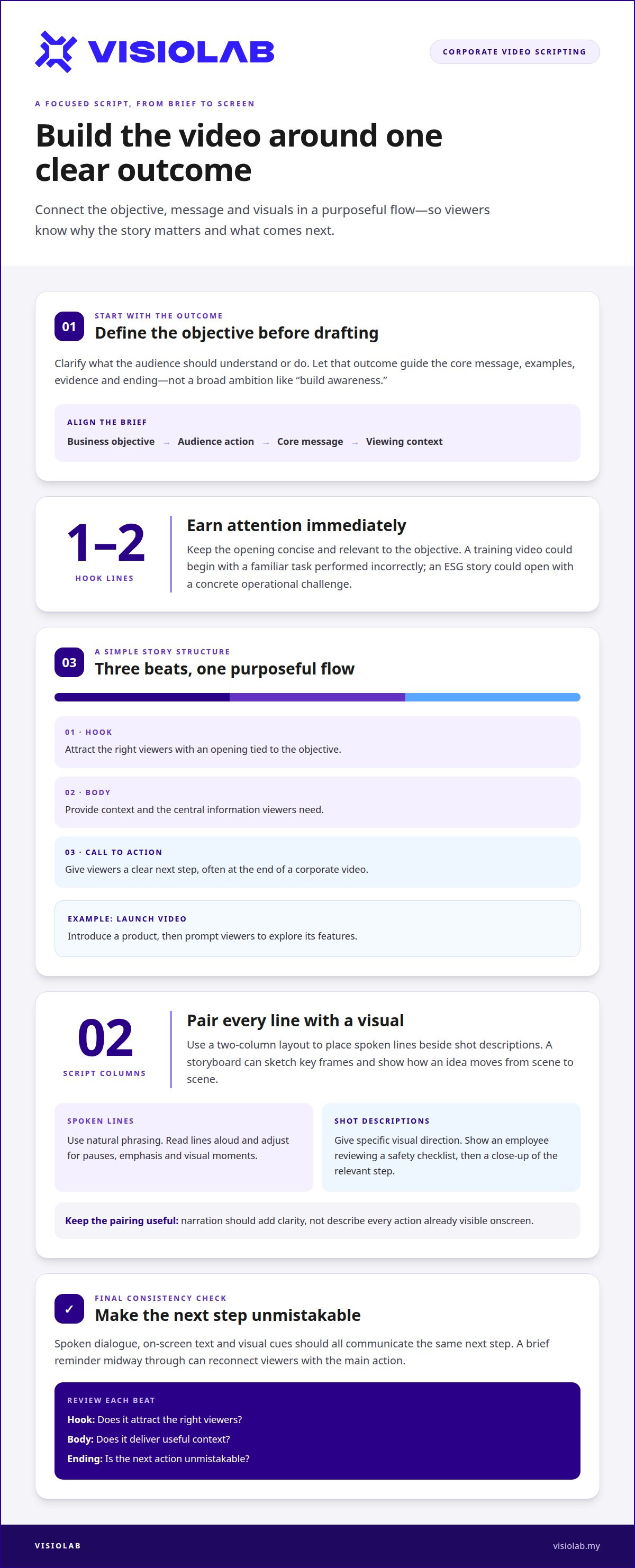
Start by clarifying the business objective, audience action, core message and viewing context. Then shape a hook, body and call to action around that outcome. For example, a launch video might introduce a product and prompt viewers to explore its features.
Let the objective guide the script instead of leaving it as a broad ambition in the brief. “Build awareness” gives little direction about what viewers should understand or do. A more focused aim might be to help prospective customers recognise a problem and consider a particular solution. For organisations aligning video with broader revenue initiatives, strategic agencies like Stratagon emphasise designing customer-centric campaigns where each touchpoint drives a clear commercial objective. Use that aim to select the evidence, examples and ending.
Next comes the structure. A hook is often one or two lines, designed to earn attention immediately. Keep it relevant to the objective: a training video could open with a familiar task performed incorrectly, while an ESG story might begin with a concrete operational challenge. The body then supplies context and the central information. The call to action often comes at the end of a corporate video, giving viewers a clear next step.
A clear call to action tells viewers what to do and why it matters. “Learn more” can feel vague without a destination or benefit. A stronger line might invite viewers to explore a new service after showing how it addresses a specific need. Match the action to the objective. If you want to encourage enquiries, asking viewers to download a general guide leads to a different outcome.
Professionals also decide whether a memorable tagline can reinforce the action. A tagline should express the video’s central promise in language viewers can recall. It can work as a closing line, but shouldn’t compete with the call to action. For example, a safety video may end with a concise reminder about following the demonstrated process, followed by a direct instruction to review the relevant procedure.
A brief reminder midway through the video can reconnect viewers with the main action. An animation might show how a process works, then prompt viewers to see the full explanation. Spoken dialogue, on-screen text and visual cues should all communicate the same next step. Check that the action remains clear even if viewers miss a line of narration.
During review, professionals test each beat against the objective: does the hook attract the right viewers, does the body deliver useful context, and does the ending make the next action unmistakable? A focused professional video script connects those choices into one purposeful flow.
Treat the script as a production blueprint, not dialogue alone. Connect what viewers hear with what they see in every scene. For example, narration about a delivery process might pair with footage of a team preparing an order. This link ensures that each visual conveys information instead of simply filling screen time.
To format and storyboard a corporate video script, professionals arrange each beat so narration, dialogue, visuals, and sound cues align. A two-column layout can place spoken lines beside shot descriptions, while a storyboard sketches the important frames. The production team can then see how an idea moves from one scene to the next.
For dialogue and voice-over, scriptwriters use natural phrasing and read lines aloud to catch awkward wording. Read the lines aloud and adjust the timing for pauses, emphasis, and visual moments. A voice-over explaining a process should add clarity, not describe every action already visible onscreen.
Give the team specific visual directions for planning each shot. A script might show an employee reviewing a safety checklist, then call for a close-up of the relevant step. Character actions, shot sizes, camera angles and movement give the production team a shared picture. These details also reveal when an idea needs a visual solution.
Lists and instructions often work better as visual aids than as dense dialogue. A training video, for example, can show each process step as an on-screen label while the narrator explains its purpose. An animation can simplify a technical concept, such as how information moves between departments. Choose visuals that make ideas easier to understand and remember.
Make audio and visuals support each other. A sound effect can mark a transition, while music can shift gently as a scene moves from a challenge to its resolution. For social media information videos, voice-over and captions can share the same key point, helping viewers follow along with or without sound.
Use transitions to clarify changes in time, place or idea. A cut from a busy worksite to a labelled animation, for instance, can move from a real-world problem to its explanation. Note the shift and the intended sound or graphic cue in the script. These corporate video script writing tips help keep the finished video engaging without overloading each moment.
Keep dialogue simple, especially when presenting lists or steps. Visual aids can communicate that material without crowding spoken lines. Plan shots to work with the audio, not compete with it, and make character actions, camera angles, movements and shot sizes clear to the people shaping the video.
Before writing a scene, consider the intended visuals and style. Choose details that can be shown purposefully, rather than mentioning elements that have no clear visual counterpart. If a line introduces a process step, let the visuals carry the list or sequence while the audio stays straightforward. This keeps picture and sound working together and gives the production team a clear basis for planning the scene.
A focused script makes one central idea easy to recognise and remember. The objective gives that idea direction; the message gives viewers something specific to understand. For example, a company introducing a new service could focus on how it solves one customer problem. Trying to explain every feature, the company’s history and its future plans would dilute the central point.
Define the objective in terms of what the audience should understand or do after watching. “Explain the new process” is clearer than “show what the company does.” Then choose supporting details that advance that outcome. A scene, fact or line that doesn’t strengthen the objective may distract from it, even if it sounds impressive on its own.
A three-minute corporate video should limit its core messages to 1-3. A single message often creates the clearest through-line: introduce it, support it, then reinforce it. If the video must address several points, the scriptwriter groups related details under a central idea. For example, speed, simplicity, and support can all reinforce the message that a service makes a process easier.
Clear language makes that message accessible. Scriptwriters replace jargon with words viewers already use, then explain any necessary technical term in context. Instead of “operational optimisation,” a line could say, “The new workflow helps teams complete requests more easily.” Short, punchy sentences keep one idea in focus. Business video script sentences should generally contain fewer than 20 words.
During editing, test each passage against the objective. Ask what viewers should take away from it. If a sentence introduces a separate benefit, decide whether it supports the main message or belongs elsewhere. For example, a safety video about reporting hazards shouldn’t suddenly shift into a broad company history.
Keep the message consistent across narration, on-screen text and the call to action. If the narration says a process is simple, the visuals shouldn’t show a confusing sequence without explanation. The ending should reinforce the same priority as the opening and body. This alignment helps preserve the script’s intended meaning in every scene.
Clear corporate video scripts don’t rely on repetition to make a point stick. They use purposeful language, relevant examples and a consistent message to guide viewers. In the final review, remove lines that introduce new topics, repeat information or obscure the main idea. The result communicates clearly from the opening statement to the final call to action.
Examples show how a broad concept can become a workable production plan. Each sample below connects an introduction, a specific message, visual direction and purposeful ending. The strongest format depends on the video’s purpose, audience and viewing context.
Corporate introduction: “Every project starts with a question: how can we make complex work clearer?” The visuals move from a team reviewing plans to a close-up of a finished process. A voice-over then explains the company’s role in plain language. The final line invites viewers to explore the organisation’s approach. This sequence earns attention with a human situation, then gives the audience a reason to continue.
Explainer video: “Submitting a request shouldn’t mean losing track of the next step.” An animation shows a request moving through a simple process, with each stage labelled on screen. The narrator explains what happens and why instead of reading every label aloud. The closing line directs viewers to learn how the process works. This example uses a familiar frustration to make technical information easier to follow.
Safety training: “Before entering the work area, stop and check your protective equipment.” The opening shows the correct preparation, followed by close-ups of each required action. On-screen prompts reinforce the narration, and the final scene shows the complete sequence. The ending can direct employees to follow the relevant workplace procedure. Unlike a launch video, this example prioritises clear instruction over promotion.
For Malaysian corporate scripts, align factual claims with applicable legal requirements and the organisation’s brand guidelines. Use approved names, messages and visual identity, and avoid claims the company can’t substantiate. For example, check that a product description in the voice-over matches the approved wording in company materials.
A corporate video commonly runs 2-3 minutes, but the subject and purpose affect its ideal length. A rough guide is about 75 words for 30 seconds, 150 words for one minute, and 300 words for two minutes. A training script may need more explanation than a short introduction, so professionals read it aloud and time the delivery.
These examples show how one clear purpose can shape the introduction, supporting points, visuals, and final action. During video production, a scriptwriter can refine those elements with the team, then adapt the format to the audience and channel. To develop a script around your organisation’s message, work with a professional video team.
VISIOLAB helps organisations turn complex messages into focused corporate videos through strategic scripting and visual storytelling. It’s a natural next step when your team knows its audience and objective but needs professional support to bring them together in a cohesive video.
For detailed explanations, VISIOLAB creates Explainer and Training Video content. ESG Video can communicate sustainability initiatives, while Safety Video can present important workplace guidance. The right format depends on what viewers need to understand and what the video must convey. A focused brief gives the production team a clear foundation for shaping the script, visuals and narration.
If you’re ready to develop a corporate video around your message, contact VISIOLAB.
A script can be more than a production document. It can express clearly how your organisation wants employees, customers and the wider community to understand it. Use these corporate video script writing tips to keep that intent visible as your ideas move from planning into production.
For your next step, consider which story best serves your communication need. A Corporate Video can introduce your organisation, Explainer and Training Video can clarify a process, and ESG Video can communicate your sustainability story. Each format gives your message a distinct purpose and audience.
Bring your objective, audience, and key information together, then shape them into a video plan with professional support. Contact VISIOLAB to plan your video and take the next step toward a focused, purposeful story.
Define the audience and the understanding or decision the video should support. Distinguish intended viewers from internal approvers, since their priorities may differ. For example, a video for prospective clients might clarify a service’s value, while an internal announcement could explain a change employees need to understand. This distinction helps keep the script relevant and useful.
Professionals choose a structure that fits the story and the information viewers need. A change-management video, for example, could move from the current situation to the change, then explain what employees should expect. A customer story might follow a challenge, the response, and the outcome. The script’s scene order should build understanding, while production notes make clear where dialogue, on-screen text, and footage belong.
Connect the opening and closing to the same viewer need. A hook might state a familiar challenge, such as “Your team needs the latest procedure, right when work begins.” The call to action can then point viewers to the relevant training material. Specific wording works better than a generic instruction because it clarifies the next step and gives the video a purposeful finish.
Review the organisation’s established voice and adapt its vocabulary for spoken communication. For companies that need to clarify their core narrative before scripting, working with a specialist agency like Branding TITANS™ can help establish the strong brand identity and mission statement needed to guide consistent messaging. A brand that uses direct, practical language in customer materials should sound similarly clear in narration, not suddenly formal or packed with jargon. Keep product names and terminology consistent across dialogue, captions and graphics. This creates a coherent experience while allowing the script to sound natural aloud.
A professional review can catch unsupported claims, conflicting edits and scenes that don’t fit the intended production. For instance, a draft may promise a product capability stakeholders haven’t approved, or request footage that cannot illustrate the spoken line. Reviewing the script can flag these issues before filming, clarify which feedback is essential and prevent revisions from introducing messages that distract from the video’s purpose.
Let’s create and collaborate
We’re versatile multitaskers, and we thrive on a lot of projects. You've seen a few of our works that we are most proud of, and your project could be next in line.

Empowering brands with captivating visual stories, creating strong connections and growth.
