
A highlight reel can look energetic and still leave viewers unsure what the event meant. Creating a highlight reel for a corporate event works best when it follows a clear story: establish the event’s purpose, bring its key messages to life, and close on a moment that feels earned. The strongest edi...
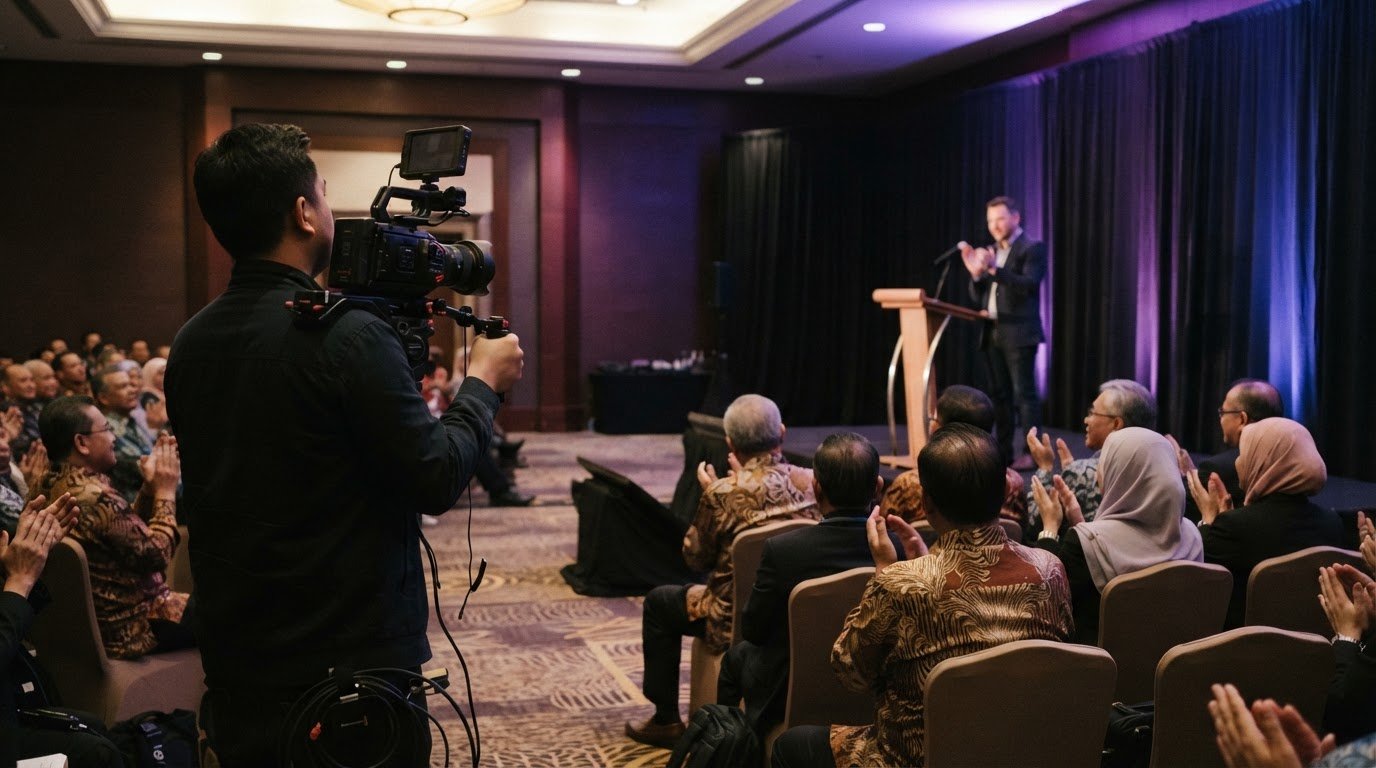
A highlight reel can look energetic and still leave viewers unsure what the event meant. Creating a highlight reel for a corporate event works best when it follows a clear story: establish the event’s purpose, bring its key messages to life, and close on a moment that feels earned. The strongest edit balances polished stage moments with candid reactions, meaningful interactions, and a pace that keeps the story moving.
It’s tempting to treat the reel as a montage of everything that happened. But footage becomes more memorable when each shot helps viewers understand the event’s message, atmosphere, or impact. A keynote, product demonstration, burst of applause, and conversation between attendees can each play a distinct role in the story.
This guide explains how to shape the narrative, plan the moments worth capturing, use attendee reactions with purpose, and edit for emotion and flow. You’ll also learn how to keep the core message clear, so the finished reel does more than recap the event: it gives people a reason to remember it.
• Choose the reel’s audience and purpose before filming so the event’s theme guides what gets captured.
• Shape the edit around emotional beats, using sound, music, and pacing to make each moment carry weight.
• Build a clear beginning, middle, and ending so the reel feels like a story, not just a sequence of clips.
• Use candid reactions and brief attendee interviews to bring the experience to life and show why it mattered.
• Bring key messages forward with carefully chosen footage and concise on-screen context that supports, rather than distracts from, the story.
Start by defining what the event should mean to its audience. A product launch might centre on innovation, while an annual staff gathering could celebrate shared achievements. That purpose shapes which moments to capture and the feel of the finished video. Before filming, align the shot plan with the event theme, key messages, speakers, and activities. A venue establishing shot can set the scene; a product demonstration can show the theme in action.
Build a short capture plan with the organiser before attendees arrive. Mark the keynote, panel discussion, networking period, and any live demonstrations as priority moments. Add visual details that locate the event, such as the stage branding, welcome signage, and guests entering the venue. These images help viewers understand where they are and why the gathering matters. During networking, capture natural exchanges and gestures without interrupting conversations or staging reactions.
For filming in Malaysia, arrange approval with the event organiser and venue, and ask about any site-specific permit process. Use an attendee notice to explain filming, and obtain written permission from people featured in interviews or prominent close-ups. Forms and processes depend on venue rules and how the footage will be used, so agree on them before filming begins.
Choose equipment to suit the venue and programme, rather than relying on a generic kit list. A camera with stabilising support can cover stage action, while a second angle captures audience reactions. Use a microphone connected to the sound desk for speeches, plus a separate recorder or wireless microphone for interviews. Bring suitable lighting for dim rooms, positioned so it doesn’t distract speakers or attendees.
For speeches, coordinate with the event’s audio operator and record a clean feed alongside room sound. Frame the speaker with enough space for titles or captions, then capture applause and audience attention as complementary footage. For networking, film wide scenes that establish activity, followed by closer interactions that show genuine engagement. At a demonstration, include the product, the presenter’s actions, and the audience response.
Emotion comes through in specific details: a speaker’s pause, attentive faces, laughter after a remark, or applause following an announcement. Capture each moment without making the camera an interruption. Keep movement steady, avoid blocking sightlines, and respect no-filming areas. These choices help the reel feel present rather than staged, while protecting the event’s atmosphere.
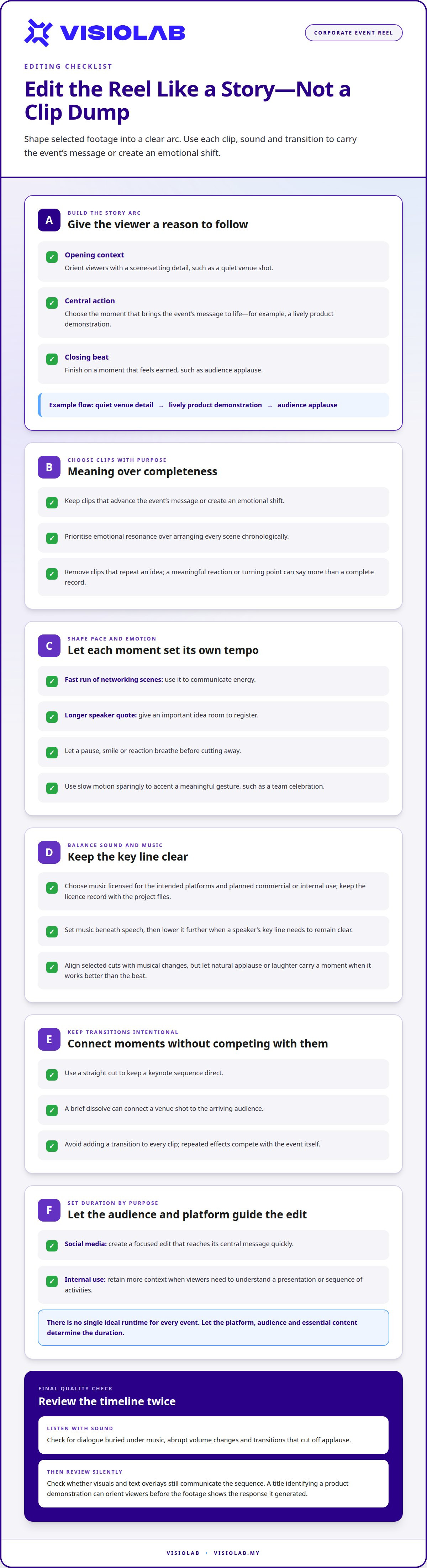
Start the edit by grouping footage into a clear sequence: opening context, central action, and a closing beat. Choose clips that advance the event’s message or create an emotional shift. For example, move from a quiet venue detail to a lively product demonstration, then finish on audience applause. This gives viewers a reason to follow each transition instead of watching unrelated shots.
Shape the pace around what each moment needs. A fast run of networking scenes can communicate energy, while a longer speaker quote gives an important idea room to register. Let a pause, smile, or reaction breathe before cutting away. Use slow motion sparingly to accent a meaningful gesture, such as a team celebration, rather than slowing every action and flattening the edit.
For a corporate reel in Malaysia, choose music licensed for the intended platforms and planned commercial or internal use. Keep the licence record with the project files, because a track available in an editing app may not be cleared for every publication. Set music beneath speech, then lower it further when a speaker’s key line needs to remain clear.
Match transitions to the footage. A straight cut keeps a keynote sequence direct; a brief dissolve can connect a venue shot to the arriving audience. Avoid adding a transition to every clip, since repeated effects compete with the event itself. Align selected cuts with musical changes, but let natural applause or laughter carry a moment when it works better than the beat.
There isn’t one ideal runtime for every event highlight. For social media, create a focused edit that reaches its central message quickly; for internal use, retain more context when viewers need to understand a presentation or sequence of activities. Let the platform, audience, and essential content determine the duration, then remove clips that repeat an idea.
Review the timeline once with sound and once without. The sound pass reveals dialogue buried under music, abrupt volume changes, or a transition that cuts off applause. The silent pass shows whether visuals and text overlays still communicate the sequence. For example, a title identifying a product demonstration can orient viewers before the footage shows the response it generated.
When a reel needs both polished momentum and a clear corporate message, structured event video production can connect footage, music, and transitions into one coherent viewing experience.
A strong highlight reel shapes selected footage into a narrative arc, using emotional beats and dynamic pacing to make separate moments feel like one cohesive story. Rather than arranging every scene chronologically, prioritise clips with emotional resonance. A carefully chosen reaction or turning point can give the sequence more meaning than a complete record of events.
Good footage still needs a logical sequence, with smooth movement between moments. Pair high-quality visuals with transitions and dynamic music to sustain an energetic pace, while keeping each choice in service of the event. Slow motion, time-lapse, and hyper-lapse can add visual dynamism when they suit the material, helping the reel feel engaging and memorable without distracting from its central story.
Plan the story before production by writing one sentence that states what viewers should understand. Then sketch a simple beginning, middle, and ending, assigning each part a purpose. For a product launch, the beginning can build anticipation, the middle can reveal the product and show it in use, and the ending can connect the launch to the company’s direction. This storyboard gives the footage a narrative rather than a chronological checklist.
Choose a theme that reflects the event’s central idea, not just its decoration. A leadership summit about collaboration might follow people moving from separate discussions toward shared decisions. A sustainability event might connect a speaker’s remarks with practical demonstrations and attendee participation. These through-lines explain why each scene belongs and give the editor a clear test: does the shot support the chosen idea, or merely show that it happened?
Cinematic storytelling comes from purposeful visual choices, not effects alone. Open with a detail that establishes the setting, such as a branded stage or a product displayed before its reveal. Move into wider views that show the room’s scale, then use closer images to reveal expression and action. A speech can introduce the challenge; a demonstration or audience response can show its relevance. Finish with an image that suggests what happens next.
Use speeches as narrative anchors. Select short excerpts that express distinct ideas, then place supporting footage over them to add context. A leader’s statement about innovation might sit alongside a product demonstration, while a team member’s comment could lead into a collaborative activity. Avoid stitching together quotes that change the original meaning. Each excerpt should be understandable and contribute to the same central message.
Turn the storyboard into a practical production guide with three columns: story beat, visual evidence, and sound or dialogue. Under “opening,” note the venue and event identity; under “main idea,” list a key speech or demonstration; under “outcome,” choose a reaction or closing image. Share this sequence with the filming team before the event. It keeps coverage purposeful while leaving room for an unplanned moment that strengthens the narrative.
An event highlight video can have a beginning that sets the scene, a middle that shows the main event, and an ending that provides closure. Traditional highlight reels often follow chronological order, while modern reels may combine footage with graphics, animations, and narrative voiceovers.
Event highlight videos can incorporate a client’s logos, colours, and graphics to reinforce brand identity. They can also feature sponsors through branded moments, booth interactions, product placement, or short sponsor quotes, such as capturing visitor engagement at an exhibition stand for The Camper Man.
Attendee reactions show how an event lands beyond the stage. A keynote may introduce an idea, but a thoughtful nod, shared laugh, or animated discussion can reveal how people engage with it. Shape the footage around that experience: show a presentation, then a listener’s response, followed by a conversation that carries the idea into networking.
Capture a range of moments rather than relying on repeated crowd shots. A wide view can establish the room’s energy; a medium shot can show a group collaborating; a close-up can catch a genuine reaction. At a product demonstration, pair the presenter’s actions with attendees leaning in, asking questions, or discussing what they have seen.
Networking scenes work best when they feel observed, not staged. Film people greeting colleagues, exchanging ideas, or joining a group conversation, then let each interaction unfold naturally. Avoid filming only the busiest area. A quieter exchange near a display or refreshment space may show a more personal side of the attendee experience and add contrast to the event’s pace.
Vox pops, or brief attendee interviews, can add a first-person perspective. Use open prompts such as, “What idea will you take away?” or “Which session stood out to you?” These questions invite specific answers instead of a simple yes or no. A clear response about a useful workshop gives viewers more context than a generic statement that the event was enjoyable.
Keep each interview focused on one thought. Give the attendee time to finish, then ask a follow-up if the answer needs context. For example, “What made that session useful?” can draw out a concrete detail. Short, distinct responses from a speaker, a first-time attendee, and an exhibitor can create a more varied picture than several similar sound bites.
In the edit, place each voice where it advances the story. An attendee’s comment about a practical insight can follow footage of the relevant session; a remark about meeting peers can sit over networking scenes. Keep the speaker’s meaning intact, and avoid cutting words together in a way that suggests a different opinion. Use brief identifying text only when it helps viewers understand the person’s perspective.
Social proof is strongest when reactions remain credible. A compelling highlight reel can include enthusiasm, concentration, curiosity, and reflection, rather than presenting every attendee as having the same experience. Choose footage that supports the event’s actual message. This balance makes the story feel human and gives prospective participants a clearer sense of what attending could involve.
A highlight video should leave viewers with a clear takeaway, not only excitement about the event. Choose the message first, then make every visual, speech excerpt, and attendee moment support it. For a conference focused on customer experience, the central idea might be how teams turn feedback into better service. A product demonstration, speaker quote, and audience response can each reinforce that point.
Before editing, identify the event’s intended audience and the action or idea they should remember. Separate essential messages from supporting details. If a launch introduces a new product, prioritise what it does, why it matters, and how people respond. Avoid giving equal time to every session. The strongest sequence gives the main idea room to register while still showing the event’s scale and atmosphere.
Use visual storytelling to make abstract messages tangible. Pair a statement about collaboration with footage of people working together, or place an ESG commitment beside a relevant project or activity. Add concise text overlays for names, locations, or key phrases when viewers need context. Keep the wording brief and readable, so it clarifies the image rather than competing with it.
Plan delivery alongside the edit. A high-quality master file can preserve the finished work, while platform-specific exports make it easier to share. Landscape framing suits a website, internal presentation, or event page; vertical-first edits work well for Instagram Reels, TikTok, YouTube Shorts, and paid social. Choose the resolution and file format to match the destination, source footage, and playback needs, then review the export on the intended screen.
Distribution should follow the audience. Share a social edit where prospective attendees, speakers, or sponsors can discover it; send a follow-up version to attendees by email; and feature the main film on the organisation’s events page. A shorter teaser can build awareness for a future conference, while a speaker-focused cut can carry a specific insight beyond the event. Keep titles and thumbnails aligned with the actual message, not just the most dramatic image.
Make the call to action fit the story. A closing line can invite viewers to explore the next event, learn about a featured initiative, or continue a post-event conversation. For example, an industry conference reel might prompt viewers to revisit its central theme through a related resource. Track views, shares, and viewer retention to understand which messages hold attention and guide future content strategies.
For a message-led event film that connects footage with corporate priorities, plan your corporate event video around the audience, core takeaway, and intended channels.
VISIOLAB can shape a corporate event highlight into a clear story, from planned coverage to a focused final edit. Its Corporate Video and Event Coverage services suit organisations that need more than a record of the day: they bring key messages, attendee moments, and brand identity together. For a launch, conference, or internal event, the intended audience and core takeaway can guide what the film captures and how it communicates.
When the event message needs further explanation, Explainer and Training Video or ESG Video can support related communication. The next step is to define the event’s purpose, priority moments, and where the finished video will be shared.
Contact VISIOLAB to discuss your corporate event video.
Decide how the finished film will keep working after its first release. Treat it as a starting point for ongoing communication: a carefully chosen moment could open a future-event teaser, while a strong speaker insight might support a later campaign. This gives the event’s central idea room to travel without asking one edit to serve every audience.
As you plan creating a highlight reel for a corporate event, choose the message you want people to carry forward, then consider where it belongs next. A clear creative brief can connect the event’s purpose with the organisation’s wider communication goals and help shape a film that feels relevant beyond the day itself.
VISIOLAB can help translate that direction into a considered video project. Start a conversation with VISIOLAB about the story you want your event to tell.
Give the moments a clear point of view, and let the story move forward.
A corporate event highlight reel is a short edited film that gives viewers a focused impression of an event, rather than a complete recording. Include details that help the intended audience understand its value: a defining announcement, a concise speaker insight, a recognisable brand element, and a moment showing how people responded. For an internal town hall, a team milestone followed by a leader’s next-step message can make the recap useful after the event.
Use music licensed for the intended platforms and planned commercial or internal use, and keep the licence record with the project files.
Let’s create and collaborate
We’re versatile multitaskers, and we thrive on a lot of projects. You've seen a few of our works that we are most proud of, and your project could be next in line.

Empowering brands with captivating visual stories, creating strong connections and growth.
