
A short video can still involve a complex production. The factors affecting video production costs go beyond the finished runtime: scope, locations, crew, production stages, equipment, and visual effects all influence the budget. The more the project needs to capture, create, or deliver, the more ti...

A short video can still involve a complex production. The factors affecting video production costs go beyond the finished runtime: scope, locations, crew, production stages, equipment, and visual effects all influence the budget. The more the project needs to capture, create, or deliver, the more time and resources it may require.
It’s natural to look for a simple price for corporate event video production, but one figure won’t fit every brief. A straightforward event capture has different requirements from a project involving multiple locations, custom graphics, or versions tailored to different audiences.
This guide explains how production decisions affect the budget. You’ll see how planning, filming, and post-production contribute, how equipment and location choices shape the work, and when animation or motion graphics can add complexity or provide another way to tell the story. The aim is to help you define what your video needs so its budget reflects the work required to make it effective.
• Match the event coverage plan to the story and deliverables; crew size, shoot duration, and editing needs all shape the workload.
• Account for location changes, access arrangements, and permissions early, as each can add coordination and production time.
• Plan across pre-production, filming, and post-production so the budget reflects the full process, not just the shoot.
• Choose camera, lighting, and specialist equipment for the scenes you need to capture; more gear can mean more setup and coordination.
• Use animation and motion graphics with purpose: their complexity affects post-production, while visual storytelling can help explain ideas that are difficult to film.
In Malaysia, crew size, experience, shoot duration, and post-production workload all shape a video budget. More crew members or longer editing and sound-design work increase labour needs, while rates reflect the expertise required for the project.
A corporate event video’s scope matters as much as its finished runtime. A short highlight edit and a detailed training video call for different production and editing effort, even if both have a clearly defined audience.
Crew and post-production expenses cover the work required to capture, shape, and finish footage. Filming is only one stage: editing, colour grading, sound design, graphics, and animation may all continue after the event.
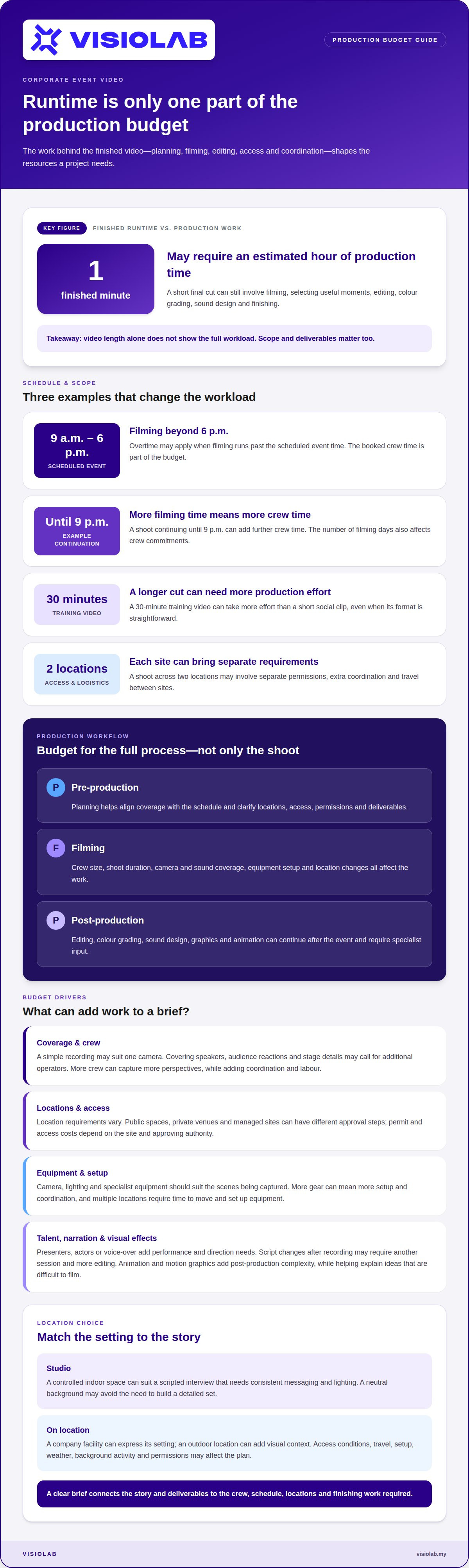
A camera operator might film a speaker, while sound technicians record clear dialogue and a producer coordinates the shoot. After filming, editors select useful moments, build a coherent message, balance the audio, and prepare the final cut. Each task takes time and specialist input. A one-minute finished video may require an estimated hour of production time, illustrating why runtime alone doesn’t show the full workload.
Experience influences how a producer or crew plans and carries out a shoot, while day rates reflect the time booked for filming. An experienced team may work efficiently, but its expertise and reliability are reflected in the rate.
Consider an event scheduled from 9 a.m. to 6 p.m. If filming runs past 6 p.m., overtime may apply; a shoot continuing until 9 p.m. can add further crew time. The number of filming days also matters: a one-day event and a multi-day programme require different crew commitments. A producer’s planning helps keep coverage aligned with the schedule, reducing avoidable delays without removing the need to budget for the crew’s time.
Video length affects how much footage needs review and editing, while crew size determines how many people support filming. A longer final video may need more coverage, and a large event may require cameras and sound to be handled simultaneously.
A 30-minute training video can take more production effort than a short social clip, despite its straightforward format. A short video can also be demanding if it needs multiple speakers, precise timing, or animation. For a live event, one camera may suit a simple recording; capturing speakers, audience reactions, and stage details may call for additional operators. More crew can cover more perspectives, but each person adds coordination and labor to the shoot.
Talent and voice-over fees cover performers or narrators who deliver the video’s message. They apply when a script calls for a presenter, actors, or narration rather than relying on event speakers alone.
Talent requirements depend on the role, preparation, and filming time. A presenter delivering a short introduction needs different direction from actors staging a scripted scene. Voice-over work also involves more than recording: the narration must fit the edit, tone, and intended audience. If the script changes after recording, revised lines may require another session and more editing. Planning the message before filming helps align performance, narration, and visuals, whether the final piece uses live footage or animation.
In Malaysia, location access, travel, equipment needs, and filming days all affect the budget. Each additional site can mean more coordination and setup. Permit fees aren’t standard across all shoots, so arrangements depend on the location and relevant approving authority.
Location permits and public-land fees are charges or permissions associated with filming at a particular site. Access arrangements can affect the schedule, crew movement, and overall production workload.
For an outdoor shoot, obtain written permission in advance and identify the permit process for the location. A public space, private venue, and managed site may each involve different approval steps. For instance, filming a corporate interview in a company office involves different access considerations from planning a scene in a public area. Identify the site, intended activity, and filming dates before scheduling the crew.
Permit and access costs depend on the location and its requirements. A shoot across two locations may involve separate permissions, additional coordination, and travel between sites. Account for these practical differences in the budget instead of treating access as one generic line item.
Studio filming uses a controlled indoor space, while on-location filming captures the setting itself. Each approach has different requirements for access, setup, travel, and production design.
A studio can suit a scripted interview that needs consistent messaging and lighting. Filming at a company facility may better express its vision, but the crew must work around the space and its access conditions. An outdoor location can add visual context, while weather, background activity, and permissions may affect the shoot plan.
Compare what each scene needs. If actors deliver a script against a neutral background, a controlled space may avoid the need to build a detailed set. If the story depends on a real workplace, bringing the crew there may be more effective. Multiple locations also require time to move and set up equipment, even when the finished video is brief.
Location and set design determine what appears on camera and what the crew needs to prepare. A complex setup can add construction, dressing, lighting, and coordination to the shoot.
A simple interview may need only a suitable background and a clear camera position. A staged corporate scene might need furniture, branded details, or a set that supports the script. Each design choice should serve the intended vision, rather than adding visual elements without a clear purpose.
For example, a two-scene video could use one adaptable room or two distinct locations. The second option may create stronger contrast, but it also adds transitions and location coordination. Keep the plan focused on the audience and message: choose settings that communicate the idea clearly, then account for the setup each scene requires.
For a location-led concept, plan a corporate shoot around your locations so access, travel, and visual direction work together.
A video budget should reflect the work needed to achieve its objective, from planning through delivery. For a marketing explainer, the script, filming, editing, and final versions all contribute to production costs.
Budget decisions connect a video’s objective with the planning, filming, and finishing work it requires. A clear brief helps focus resources on deliverables that serve the audience.
Start by defining the intended result: explain a process, introduce a service, or support staff training. A training video may need a structured script and clear demonstrations; a marketing message may need a concise story and versions for different channels. The objective determines what to capture or create and which final outputs will be useful. Without that direction, revisions can increase the cost without making the video more effective.
Planning maps the work and resources to the approved scope. It matters because decisions made before production can prevent avoidable changes during filming and editing.
Organise the brief around the message, locations, contributors, and final formats. For example, agreeing on interview questions before a corporate shoot helps keep filming focused. Set a review process and gather feedback in coordinated rounds instead of changing the script after filming. Keep essential creative elements, but remove scenes or outputs that don’t support the objective. This helps the production budget reflect purposeful work rather than repeated setups or revisions.
Footage reuse means planning a shoot to support more than one relevant edit. When planned carefully, it can reduce the need to capture similar material again.
A company introduction might include an interview, workplace scenes, and product details. With the intended marketing outputs in mind, an editor can shape suitable footage into a main video and shorter, channel-specific edits. Reuse works best when the footage supports each version’s message and audience, not when clips are included simply because they exist. List the deliverables in the original brief so framing, interviews, and shot selection support the planned edits.
Production quality reflects the craft and resources applied to planning, filming, and finishing. The approach should suit the message and viewing context.
A straightforward internal update may need only a presenter, clear sound, and clean editing. A brand film may call for detailed scripting, controlled lighting, colour work, and graphics. A more elaborate production can cost more, but complexity alone doesn’t make a video more effective. Match the creative treatment to the audience: prioritise the elements that clarify the message, then plan the rest of the work around them.
Video production costs depend on the project’s objectives, scope, production stages, and deliverables. A quote should reflect those specific requirements.
Allocate the budget across pre-production, production, and post-production based on the actual workload. A scripted explainer, for example, needs narrative planning, while an event recap may require more footage selection and editing. Considering all stages gives a clearer picture of the total production cost than focusing on filming alone.
Equipment choices depend on the scenes, visual style, and technical requirements of the finished video. A single-camera interview needs a different setup from a shoot involving aerial footage, 360-degree views, or complex lighting.
Equipment and technology requirements include the cameras, lenses, lighting, and specialist tools needed to capture the planned scenes. Each additional tool brings setup, operation, and coordination requirements.
For a straightforward interview, a camera, a suitable lens, and lighting shaped for the room may be enough. A construction overview, by contrast, might benefit from drone footage if the story needs an aerial perspective. Virtual reality or 360-degree cameras can also add technical demands because the production must plan how viewers experience the scene. The right equipment follows the intended result, not a checklist of premium gear.
Match each tool to a specific shot. If a scene works with a steady camera position, a gimbal may add little value. If the camera needs to move through a space, stabilisation can support that movement. Each choice affects preparation and filming, so a clear shot plan keeps equipment needs purposeful.
Technical setup means arranging and testing equipment before filming begins. Camera, lighting, and sound choices need to work together for each scene.
For a two-person interview, the crew may need to frame both speakers, balance light across their faces, and position microphones to capture clear dialogue. A product demonstration may instead need close camera framing and controlled lighting to reveal important details. These setups require different placement and testing, even in the same room.
Lighting complexity can also affect setup. A naturally bright office differs from a dim event hall, where the crew may need additional lights and more careful positioning. Planning around the scene can reduce repeated adjustments during filming and help maintain a consistent look across separate shots.
Production techniques describe how equipment is used to create the intended visual effect. They matter because a technique can require specialist tools, skilled operation, or extra preparation.
Aerial filming, moving camera shots, and 360-degree capture each call for a distinct approach. A drone may provide an overhead view, while a gimbal can help create smooth movement through a workplace. Those choices affect the shoot plan and the crew’s technical work. Special effects created during filming can also require extra lighting or controlled staging.
Consider an explainer that combines live footage with animation. The camera captures the presenter, while planned animated elements are designed to clarify the subject during editing. This approach can make complex ideas easier to follow, but it requires coordination between filming and visual design. Choose techniques that serve the audience and message, then match equipment to those needs.
Visual effects and motion graphics can explain ideas, build atmosphere, or show what a camera cannot capture. Their cost depends on visual complexity, level of detail, and the time required to create and revise each element.
Start with the communication task. A safety video might use simple arrows and labels to clarify a procedure, while a product explainer could need animated diagrams showing how components work together. Each graphic needs a visual style, design, and timing that fit the footage and message. A restrained treatment can keep attention on the speaker; a detailed animated sequence can become the main visual focus.
Motion graphics add movement to designed elements such as text, shapes, icons, or diagrams. The workload grows when animation involves many objects, detailed transitions, or precise timing with narration. For example, a static process diagram takes less animation work than a sequence that reveals each stage, changes views, and highlights moving parts. The main cost driver is the work required to design and animate the visual, not simply how long it appears on screen.
Three-dimensional animation can be useful when live-action filming is difficult. A factory process may involve restricted access, operational shutdowns, or repeated reshoots. In those conditions, a 3D sequence can depict equipment or workflows without filming each step in the real environment. Similarly, in property development, visualization studios like Realitech use 3D modeling and 360° virtual tours to showcase spaces before construction is even complete. It still requires specialist design and animation, so the practical comparison is the full production work each approach needs, not the camera shoot alone.
Visual effects range from small refinements to extensive computer-generated imagery. Adding a title over footage differs from creating a digital environment that must match camera movement, lighting, and perspective. The latter requires more technical work and careful integration with filmed scenes. Clear visual references and an agreed style help define what each shot requires before detailed production begins.
Review cycles matter, too. If the script or diagram changes after animation begins, designers may need to revise timing, movement, and related scenes. A practical approach is to settle the message and approve key visual frames before completing the animation. For an explainer about a complex process, this helps align graphics with narration and avoids detailed animation illustrating an outdated explanation.
Choose visual effects for a reason: clarify a process, show an unseen mechanism, or strengthen a key moment. Develop 2D or 3D motion graphics that make complex ideas easier to understand.
VISIOLAB helps organisations turn complex messages into clear video plans, linking creative goals to the production work required. It’s a natural next step when you’ve defined your audience and purpose but need to bring the scope, locations, filming approach, and post-production together in one coherent project.
For corporate communications, staff learning, sustainability stories, or workplace procedures, the right format depends on the message and how people will use the video. A Corporate Video, Explainer and Training Video, ESG Video, or Safety Video may each call for a different balance of live footage, graphics, and production stages. Clear objectives help focus the work and guide thoughtful budget decisions.
If you’re ready to discuss a video project, contact VISIOLAB.
Understanding the factors affecting video production costs helps you make purposeful decisions before creative work begins. The next step is to turn those decisions into a brief that connects your audience, message, and intended use. A clear direction gives every production choice a reason, from the visual approach to the final deliverables.
VISIOLAB works with organisations on Corporate Video, Explainer and Training Video, and ESG Video projects. Each addresses a different communication need, so the scope and creative approach should serve the purpose rather than add complexity for its own sake. Bring your objectives and initial ideas together, then shape them into a production plan for the story you need to tell.
Ready to define the direction for your next project? Start a conversation with VISIOLAB and take the next step with clarity.
Rates reflect the work, people, and resources needed to deliver the agreed video. A single-camera interview differs from a multi-scene production involving actors, specialist equipment, and custom graphics. Shoot days, script complexity, editing expectations, and intended distribution all shape the scope. For a useful estimate, define the deliverables and production requirements, not just the video’s running time.
VISIOLAB project budgets typically start between RM30,000 and RM60,000, with the project scope shaping the estimate. A corporate film with several locations and tailored graphics has different requirements from a focused training video. The estimate reflects the planned production stages, deliverables, and creative treatment. Describe the audience, purpose, locations, and desired outputs so the project can be scoped around what you need.
These requirements depend on the locations, travel plan, and operating conditions of the shoot. Travel between sites can add crew time and coordination; venue or project requirements may also call for specific insurance arrangements or compliance planning. For example, filming at a controlled industrial site may involve more coordination than recording an office interview. Include these needs in the production scope alongside filming and delivery.
These costs arise when a project needs original design, specialist animation, or permission to use particular creative assets. Music licensing can depend on where and how long the video will be used, while graphics vary according to their detail and movement. A simple title card, for instance, differs from an animated process diagram. Define the intended channels and visual requirements early so asset selection and design suit the video’s use.
Labor and post-production shares vary with the filming plan and the amount of finishing work. A commonly used planning benchmark allocates 50-60% to production and 20-25% to pre-production; post-production needs depend on editing, sound, colour work, and graphics. A multi-camera event edit, for instance, requires different review and assembly work from a single interview. Treat these percentages as planning guidance, not a fixed allocation for every project.
Write a concise brief covering the business objective, audience, core message, and intended use. Then identify key scenes, contributors, likely locations, and deliverables, such as a main video and shorter edits. Note whether the project needs scripting, animation, or voice-over. For example, an employee training brief should explain what viewers need to learn. A defined scope helps an estimate reflect the actual work rather than assumptions.
The main factors affecting video production costs are scope, crew time, location needs, equipment, and post-production complexity. The intended visual treatment matters too: filmed interviews, motion graphics, and 3D animation involve different kinds of work. A short video may still need substantial planning if it explains a technical process. Focus first on the communication goal, then select the production elements that help deliver it.
Costs depend on the project’s creative and planning requirements, including the amount of script development, research, and visual planning involved. A short message with an established outline differs from a detailed explainer that needs a structured narrative and storyboard. Stakeholders and review stages can also shape the workload. Include the intended audience, subject, and outputs in the brief so pre-production can be scoped to the project.
Let’s create and collaborate
We’re versatile multitaskers, and we thrive on a lot of projects. You've seen a few of our works that we are most proud of, and your project could be next in line.

Empowering brands with captivating visual stories, creating strong connections and growth.
