
A worker spots a hazard but hesitates: should they stop the task, report it or follow another step? If you’re asking how to create safety training video content that guides this kind of decision, start with the approved procedure, not a generic script. Identify the equipment in use, the hazards empl...
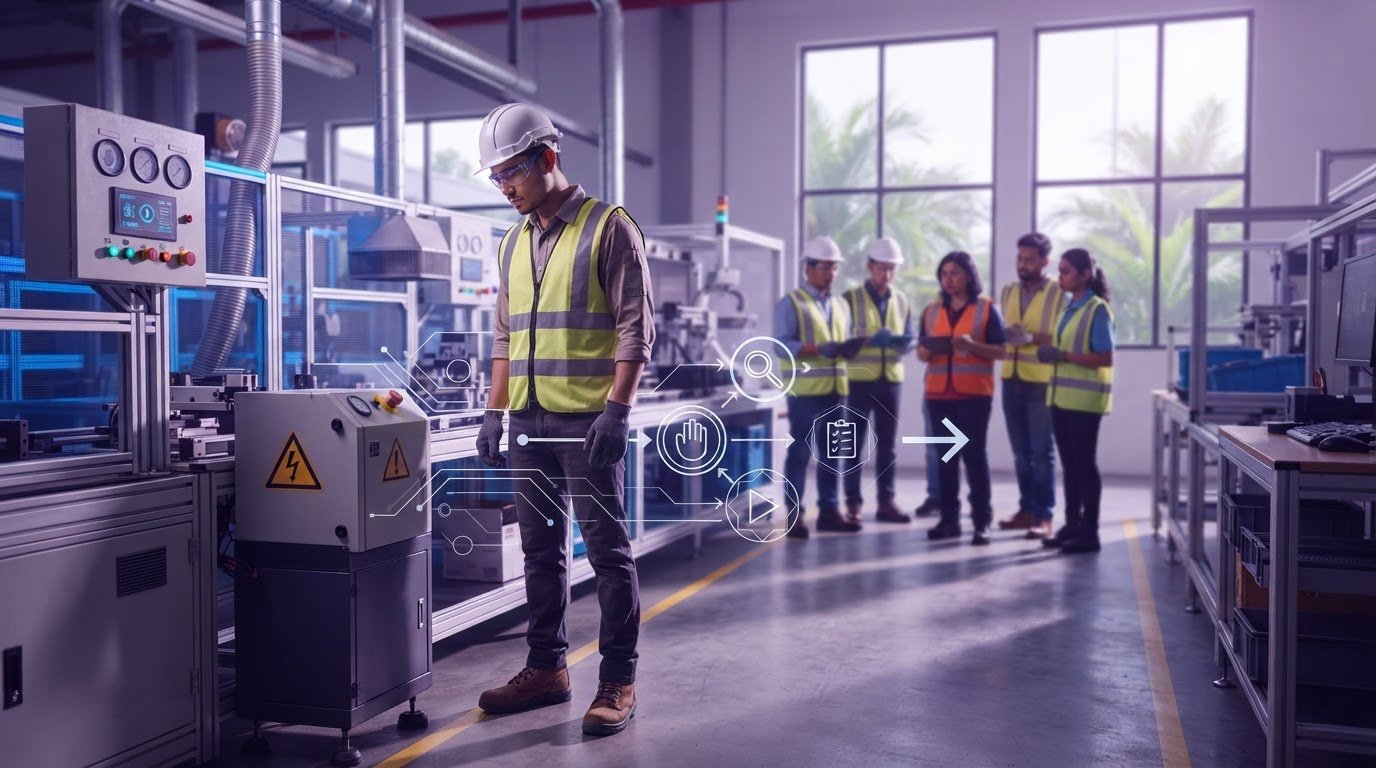
A worker spots a hazard but hesitates: should they stop the task, report it or follow another step? If you’re asking how to create safety training video content that guides this kind of decision, start with the approved procedure, not a generic script. Identify the equipment in use, the hazards employees need to recognise and the reporting steps they’re expected to follow.
Complex procedures can be difficult to explain consistently, especially when a video doesn’t reflect the workplace where employees need to apply them. A useful safety video makes accurate workplace decisions visible. Clear scenes and purposeful storytelling can turn instructions into practical guidance employees recognise on the job.
This article explains how to plan, script and produce a workplace-specific safety training video, review it for accuracy and assess whether it supports the right decisions. You’ll also see how motion graphics can clarify difficult-to-film scenarios and how a focused video can fit into wider training. The goal is to make the procedure clear, the risks visible and the next step easier to choose.
• To plan how to create safety training video content, start with an approved procedure, a defined audience and one learning objective.
• Choose the format for the task: live action can show real equipment and work areas, while animation can clarify complex or difficult-to-film steps.
• Review the script and storyboard for procedural accuracy before production is complete, not only when the finished video is ready.
• VISIOLAB’s typical full production timeline is 4-10 weeks, depending on complexity, with 5 rounds of review included.
• Plan how the video will fit into wider training and how you’ll assess whether employees understand the intended actions.
A procedure only helps protect people if they understand it before a hazard appears. Written instructions can be difficult to interpret under pressure, and a general presentation may not show what an employee should do at a particular workstation. The challenge isn’t simply to share information. It’s to make the right action visible, recognisable and easier to recall when it matters.
A safety training video is visual instruction built around a specific task, hazard or response. It can show what to notice, what action to take and when to report a concern. A safety training video turns an approved workplace procedure into observable decisions employees can recognise and apply on the job.
Engagement can help hold attention, but it isn’t the measure of effectiveness. Accuracy, clarity and workplace relevance matter more than dramatic visuals or a polished soundtrack. Each scene should match the approved procedure, use understandable language and make the intended response unmistakable. A video can support formal instruction, supervision and required training, but it shouldn’t be presented as a replacement for them.
Ground the content in the organisation’s current procedures and applicable Malaysian guidance. Identify who owns the procedure and involve relevant safety and operations reviewers before scripting. Their input helps align the message with both the documented instructions and the way work is carried out.
Give the video one focused learning objective: what should a viewer recognise, do or report after watching? For example, a video about a machine task could focus on identifying a specific hazard and following the approved response, rather than trying to cover every safety rule in the facility.
Keep the essential steps in the main story. Move background information, related policies and broader explanations into appropriate training materials. This focus helps viewers follow the sequence and gives reviewers a clear test: does every scene support the intended action?
Use familiar equipment, work areas, terminology and reporting steps where appropriate. A generic scene may show a hazard but leave employees unsure whether their own equipment, warning signs or reporting route follow the same process. Workplace detail can close that gap, provided every visual reflects the approved procedure rather than an assumption.
Before scripting, identify who owns the procedure and which safety or operations subject-matter reviewers need to validate it. Their input can resolve differences between written instructions and actual practice early. That’s central to how to create safety training video content employees can use: verify the decision first, then shape the story around it.
Strong visuals can’t fix an unverified instruction. Before choosing a format or writing dialogue, establish which procedure the video will teach, who owns it and who can approve its safety details. An approved workplace procedure should anchor every safety-video script, because storytelling can clarify an instruction but must never change its meaning.
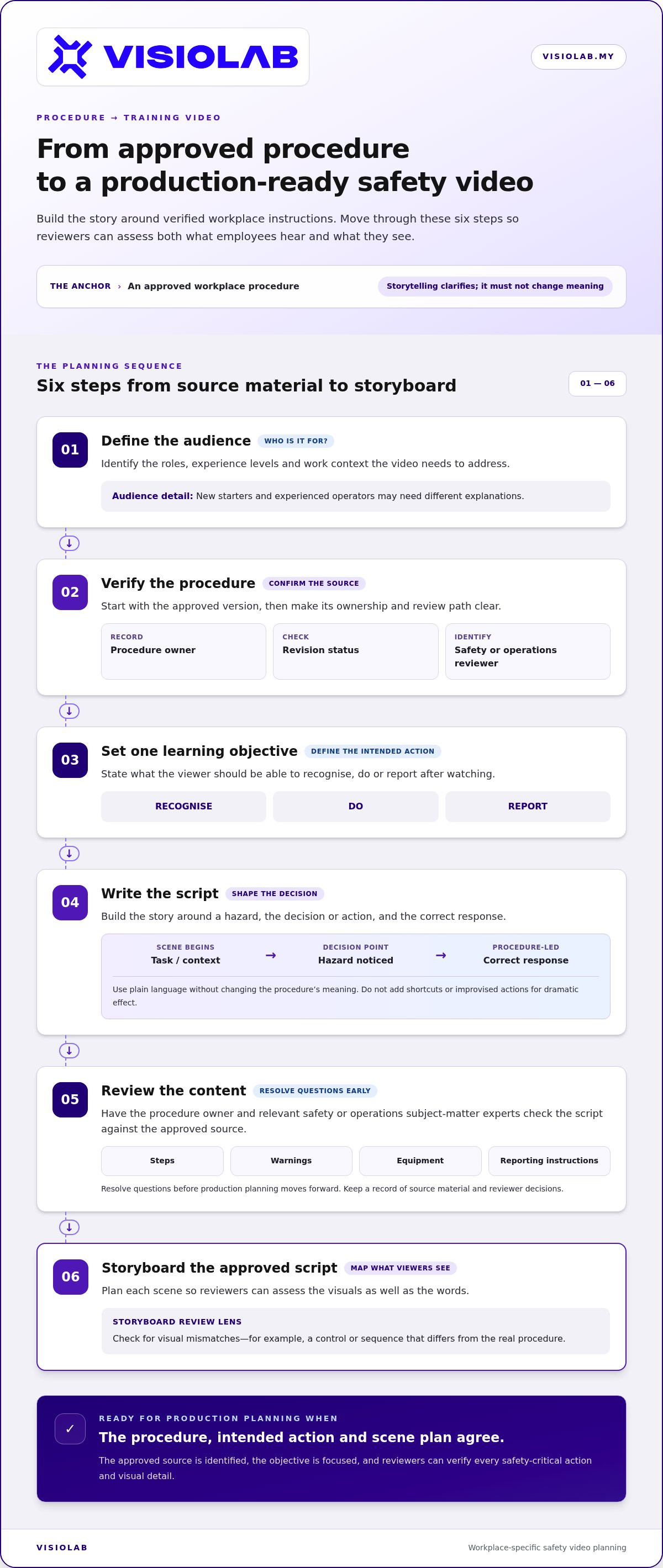
Use a clear sequence to move from source material to a plan that reviewers can assess:
Identify the roles, experience levels and work context the video is for. New starters and experienced operators may need different explanations.
Start with the approved version. Record its owner, revision status and relevant safety or operations reviewer.
State what the viewer should recognise, do or report after watching.
Build the story around a hazard, a decision or action, and the correct response.
Resolve questions about steps, warnings, equipment and reporting before production planning moves forward.
Map each scene so reviewers can assess what employees will see as well as what they will hear.
Translate technical wording into plain language while preserving its meaning. A scenario might show an employee preparing for a task, noticing a condition covered by the procedure, then following the stated response and reporting route. Don’t add a shortcut or improvised action for dramatic effect. Keep secondary topics in separate modules so the central objective stays clear.
Make the script production-ready by marking narration, on-screen text, demonstrations and safety-critical details. Note which equipment or warning must be shown clearly, and flag any wording that needs exact approval. For broader guidance on structuring clear communication, explore explainer video production in Malaysia.
Involve the procedure owner and relevant safety or operations subject-matter experts. Ask them to check each action, warning, equipment detail and reporting instruction against the approved source. A storyboard lets them catch visual mismatches early, such as a scene that appears to show a different control or sequence from the real procedure.
For Malaysian workplace content, base the review on the organisation’s approved procedures and applicable local guidance. Keep a record of the source material and reviewer decisions so the team can trace how each safety instruction was validated. If you’re shaping a complex procedure into a clear visual narrative, VISIOLAB’s video production approach can connect the approved content to script and storyboard decisions.
Choose the format to serve the learning objective, not the latest production trend. If employees need to recognise a specific control, tool or sequence, real workplace footage can make those details easier to identify. If the lesson involves an internal process, a hidden mechanism or a difficult-to-film hazard, animation can make the action visible in a controlled way. No format is right for every task; each must keep the approved procedure clear.
AI-generated visuals are another production approach, but they don’t verify the content they depict. A convincing scene can still show the wrong equipment, an unsafe action or a workplace that doesn’t match the intended context. Review every visual against the objective and approved procedure, whether it’s filmed, animated or generated. When deciding how to create safety training video content, ask: what must the learner see clearly to make the right decision?
| Format | Best-fit use | Review consideration |
|---|---|---|
| Live action | Real equipment, locations and visible task sequences | Check the setting, equipment and demonstration against current practice. |
| 2D or 3D animation | Sequences, systems or scenarios that are hard to film clearly | Confirm diagrams and movement represent the procedure accurately. |
| AI-generated visuals | Illustrative scenes where a generated approach suits the objective | Inspect details closely for inaccurate actions, equipment or context. |
Live action is useful when the appearance of approved equipment, work areas or controls matters to the lesson. Plan each demonstration so the safety-critical action is visible, not hidden by camera angles, fast cuts or unnecessary movement. Before filming, align the location and equipment with the current workplace procedure. A familiar setting can make a scene recognisable, but only if it shows the right practice.
Use 2D or 3D motion graphics to simplify a sequence, show how parts relate or represent a process that a camera can’t explain clearly. AI-generated scenes need the same accuracy review as other visuals: check equipment, actions and workplace details, and remove anything that could suggest the wrong response. A combined approach can pair a real demonstration with animation that clarifies what viewers can’t see directly.
Choose scenes by asking what learners need to notice, understand and do. That decision can also shape wider communication planning, from the story structure to the visual language. For a broader view of aligning video choices with organisational goals, explore strategic corporate video production in Malaysia.
A reliable production workflow gives each decision a place: content is shaped, checked, produced and assessed before the video becomes part of training. VISIOLAB’s full production process usually takes 4-10 weeks, depending on complexity. Set review points early so subject-matter reviewers have time to resolve accuracy questions before they lead to production changes.
Map the work from the first conversation through to workplace use:
Clarify the training need, audience and intended use.
Organise the approved information around the learning objective.
Shape the narration and action into a clear sequence.
Plan what each scene communicates before production begins.
Create the video, then gather feedback at planned checkpoints.
Place the approved video within the wider training programme and decide how learners will respond to it.
This sequence makes clear where decisions happen and who needs to contribute. VISIOLAB includes 5 rounds of review; additional reviews may incur minimal fees. Use each round purposefully: consolidate feedback and keep a clear record of approved changes.
Assign reviewers to check distinct aspects: procedural accuracy, visual clarity, language and audience fit. A safety reviewer can focus on the demonstrated action, while an operations reviewer checks that the setting and workflow make sense. At scripting, storyboarding, shooting and draft review, resolve safety-critical feedback before approval and distribution.
Separate essential corrections from preferences. If a warning, action or reporting detail is inaccurate or unclear, pause sign-off until it’s addressed. Keep approved versions identifiable so the training team can distinguish the current video from drafts and connect it to the procedure it supports.
Views show reach, not understanding. Add a short knowledge check that asks learners to choose or describe the correct response in a relevant scenario. Ask whether the instruction was clear, relevant to their work and useful for applying the procedure. If learners misinterpret a scene, review the content rather than simply repeating it.
Where suitable, compare training indicators over time, such as knowledge-check results, reported uncertainties or relevant workplace trends. Interpret these alongside other changes in training, procedures, supervision and work conditions. A video can contribute to a broader effort, but changes in incidents or compliance can’t be attributed to the video alone.
If you’re ready to turn a reviewed procedure into a structured production plan, develop a safety training video with VISIOLAB.
Your procedures, people and work environment should shape the video from the first conversation. VISIOLAB produces Safety Video and Explainer and Training Video content, translating complex instructions into visual stories employees can follow. With over 8 years of experience and 250 projects for 100 clients, the team brings strategy and production together to keep the message clear and the workplace details central.
That matters when you’re working out how to create safety training video content for a real task, not a generic scenario. The project begins with the learning need and audience, then develops the information into a script and storyboard for review. Production follows the approved direction, with structured review points to help stakeholders align on what the video shows and says.
Discovery establishes the audience, message and workplace context. Bring the procedure forward and describe where employees need to apply it. This gives the content strategy a practical foundation: what needs explaining, what should be shown and what the learner should understand after viewing.
Next, the strategy takes shape as a script and storyboard. The script organises the message; the storyboard shows how each scene will communicate it. Stakeholders can review the proposed approach before production begins, helping identify unclear steps or visual details early. Once the approach is approved, production moves through planned stages, with reviews supporting alignment from the initial concept to the video draft.
When a camera can’t clearly explain a sequence or process, 2D and 3D motion graphics can make the information easier to see. The visual approach serves the message, whether that means showing a real workplace task, simplifying a process with animation or combining both.
A few key materials can help keep the first discussion focused. Gather the current procedure, identify the intended audience and collect relevant approved training materials. Also identify the safety or operations stakeholders who can review the content. Their input helps the project team understand both the documented steps and the context employees need to recognise.
• The approved procedure and any relevant supporting materials
• The roles or teams the video is intended to reach
• The safety and operations stakeholders responsible for review
• The task, hazard or response the video should help explain
With these essentials ready, a discussion with VISIOLAB can start with the training objective rather than production guesswork. Contact hello@visiolab.my, call +603-8326 2164 or +6011-6644 3836, or discuss your safety training video with VISIOLAB.
You don’t need a complete production plan to begin. Start with one workplace decision employees need to make, then identify the procedure and audience that should shape the message. That gives your team a practical brief and creates a shared starting point for the people responsible for the content and the people creating the video.
Knowing how to create safety training video content means translating a real workplace need into instruction employees can recognise and use. Keep the objective specific, make accuracy part of the creative process and treat the finished video as one component of ongoing training. A focused conversation can clarify what to show, what to explain and how the video should support your wider learning approach.
VISIOLAB brings strategic thinking and video production together to shape workplace-specific safety communication. Discuss your safety training video with VISIOLAB and take the first step toward making the right action clearer for your team.
Every safer decision starts with a message people can understand. Make yours count.
To understand how to create safety training video content, begin by defining who will watch it and what decision they need to make. Use the current approved procedure, then involve the people responsible for its accuracy. Write a scenario that makes the correct response visible and choose visuals that suit the task. Before sharing the video, review it with relevant stakeholders and add a short question or scenario to check what learners understood.
Include the task or hazard, the action employees should take and any relevant warning or reporting step. For a spill response, for example, show what condition should prompt action and where the approved procedure directs employees to report it. Use plain language and visuals that match current workplace instructions. Keep the video focused on one lesson; material about separate tasks or policies belongs in other training resources.
AI can help generate or adapt video content, but it can’t validate a workplace procedure on its own. Have safety and operations reviewers check whether the equipment, actions and setting match the approved instructions. For a lesson about a specific control panel, real footage may show the correct details more clearly; animation may better explain an abstract sequence. Judge the approach by whether learners can understand the intended action.
Make the video only as long as it needs to teach its objective clearly. A brief response procedure may need less explanation than a task with several decision points, so there’s no single ideal duration for every audience. Remove background information that doesn’t help with the lesson. Then use a knowledge check or learner feedback to see whether the explanation is clear, rather than shortening the video simply to meet an arbitrary time limit.
Check understanding with a question or scenario that asks learners to choose the appropriate next action, then ask whether the instruction felt clear and relevant. Video views and completions indicate exposure, not learning. Where useful, compare training results or workplace indicators over time, while noting other factors such as supervision or procedure changes. Avoid crediting one video alone for changes in behaviour, incidents or compliance.
VISIOLAB’s full production process usually takes 4-10 weeks, depending on complexity. It includes discovery, content strategy, scripting, storyboarding, production and review, with stakeholder feedback shaping the work along the way. VISIOLAB has occasionally delivered projects in as little as 48 hours for urgent requests, but that is not a standard or guaranteed timeline. Share the objective and scope early to support realistic planning.
The procedure owner and relevant safety or operations subject-matter experts should approve the technical content. They can verify that instructions, equipment, warnings and response steps reflect the current workplace process. Other stakeholders can check whether the language and visuals suit the intended audience. Resolve safety-critical comments before final approval, and keep the approved version identifiable so teams can distinguish it from drafts.
Let’s create and collaborate
We’re versatile multitaskers, and we thrive on a lot of projects. You've seen a few of our works that we are most proud of, and your project could be next in line.

Empowering brands with captivating visual stories, creating strong connections and growth.
