
A business concept becomes easier to grasp when people can see how its parts connect. To understand how to explain complex business concepts with video, start with one audience need, then pair a clear story with visuals that make abstract ideas concrete. Finance explainers should focus on one topic...

A business concept becomes easier to grasp when people can see how its parts connect. To understand how to explain complex business concepts with video, start with one audience need, then pair a clear story with visuals that make abstract ideas concrete. Finance explainers should focus on one topic in 2-3 minutes.
Dense terminology, figures, and processes can make even a useful idea feel distant. The subject does not need to lose its depth; the explanation needs a clearer path.
This guide shows how storytelling, familiar analogies, and purposeful visuals can make complex business and financial information easier to follow and remember. You’ll also learn how to structure a presentation video around a product explanation or business pitch, and how to test whether someone outside your field understands the message.
From the first idea to the final frame, the aim is the same: preserve the essential detail, remove friction, and help viewers see why it matters.
• Build a relatable story around the audience’s priorities, then use familiar comparisons to make financial ideas easier to follow.
• Choose charts, diagrams and animation to show how information connects, rather than filling each frame with detail.
• Shape presentation videos around one clear purpose, whether you’re explaining a product or pitching a business idea.
• Use video to focus attention on essential financial concepts and reinforce them with clear narration and visual cues.
• Keep important nuance intact: organise the explanation into logical steps and test whether it makes sense to someone outside your industry.
Financial terms can feel abstract when viewers cannot connect them to everyday decisions. Start by identifying the audience and the choice the concept affects. For example, explain working capital through a small bakery: the business must pay for flour and wages before every customer has paid. This familiar image introduces the business term in context.
Build the explanation around a clear sequence: someone has a goal, encounters a constraint, and uses information to decide what to do next. A business owner might compare two ways to fund new equipment. Show the need, explain the trade-off, and end with the decision criteria. This keeps the concept tied to a real problem rather than a list of definitions.
Benefits are easier to grasp when viewers see them in a real situation. Instead of listing “faster approvals” and “clearer reporting,” follow a manager through a delayed approval, then show how a simpler workflow changes the next step. Keep the example focused, with each scene revealing a useful consequence. Viewers can relate the benefit to their own work without being asked to accept a string of claims.
Emotional engagement comes from making the stakes visible, not from adding dramatic music. A scenario about a team balancing cash flow, supplier commitments, and payroll can show why a forecast matters. Keep the financial details accurate, and let the people in the story give them meaning. This makes the explanation more engaging while preserving the logic viewers need to understand.
Choose the format that best reveals the idea. Animation can show an invisible process, such as data moving through a forecasting model. An interview can let a finance lead explain a decision in their own words. A narrative works when viewers need to follow events in sequence. For an unfamiliar technology, a virtual assistant can offer a relatable example of AI responding to a request.
Control the scope. A finance explainer should address one topic in 2-3 minutes, while a complete story can sometimes be told in 60 seconds. Use the shorter format for one clear point, such as why a forecast changes after new orders arrive. For a broader subject, divide the explanation into connected parts instead of cramming every detail into one video.
Frameworks can help calibrate the story to viewers’ knowledge. Wired’s 5 Levels Video Series moves through five levels: child, teen, college student, grad student, and expert. The Hero’s Journey offers a 12-step structure for science communication, but a business video needn’t use every step. To decide how to explain complex business concepts with video, choose only the structure that helps this audience follow the idea.
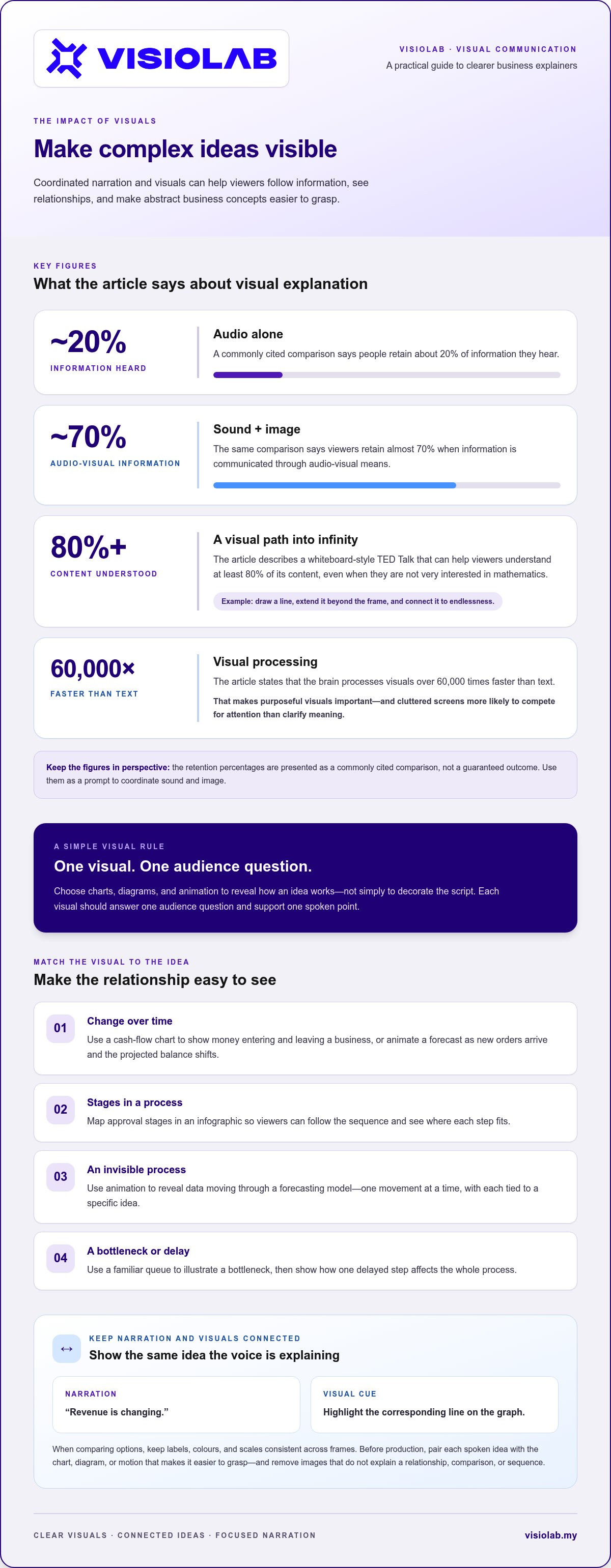
Choose visuals that reveal how the idea works, rather than simply decorate the script. A cash-flow chart can show money entering and leaving a business over time. An infographic can map approval stages, while animation can reveal an invisible process, such as data moving through a forecasting model. Each visual should answer one audience question and support one spoken point.
Pairing narration with relevant images gives viewers two ways to follow an explanation. One commonly cited comparison says people retain about 20% of information they hear, while viewers retain almost 70% communicated through audio-visual means. Treat those figures as a prompt to coordinate sound and image, not as a guaranteed result. If the voice explains a rising cost, let the chart show the same increase.
Make the connection explicit. As the narrator describes a change in revenue, highlight the corresponding line on the graph. When comparing options, keep labels, colours, and scales consistent across frames. A familiar object can also anchor an unfamiliar idea: use a queue to illustrate a bottleneck, then animate how one delayed step affects the whole process. Viewers can see the relationship as it unfolds.
Infinity offers a striking example of visual explanation. A whiteboard-style TED Talk about infinity can help viewers understand at least 80% of its content, even when they aren’t very interested in mathematics. A presenter can draw a line, extend it beyond the frame, and return to the idea of endlessness. Each mark gives the narration a visible reference point, helping abstract language feel more tangible.
Animation and motion graphics work especially well when a concept changes over time or contains steps viewers can’t observe directly. For example, animate a forecast as new orders arrive, then show how the projected balance shifts. Keep each movement tied to a specific idea. The brain processes visuals over 60,000 times faster than text, so cluttered screens compete for attention instead of clarifying meaning.
Before production, write a simple visual script: pair each spoken idea with the chart, diagram, or motion that makes it easier to grasp. Remove any image that doesn’t explain a relationship, comparison, or sequence. For a business topic that needs coordinated narration and graphics, an animated explainer video can bring the concept into focus.
A presentation video should help viewers understand one offer, decision, or opportunity. For a new service, show the problem it addresses, how it works, and what the audience should do next. For an investor pitch, connect the business model to its market need, delivery approach, and growth logic. A focused message is easier to share with the right audience.
Tutorial videos make a product’s workings visible. Demonstrate a user completing a real task, such as submitting an expense claim through a digital platform. Show each step on screen, explain the purpose of key features, and clarify where users commonly hesitate. Potential customers can see how the product fits their workflow, while existing customers can return to the guidance when questions arise.
Video can give a product explanation a stronger viewing appeal than text alone. Consumers are four times as likely to prefer watching a product video as reading about it. Shoppers who view a product video are 1.81 times more likely to purchase the item than shoppers who don’t. These figures describe reported preferences and likelihood, not a promise that video will produce a sale.
Build a business pitch around a clear progression. Introduce the audience’s challenge, show the proposed solution, then explain its value and the next step. A launch presentation, for example, can reveal a new service through a concise demonstration before outlining who it helps. For a more personal connection, a product review can feature an actual customer describing a specific experience. Customer voices can make testimonials feel more genuine.
How long should a business explainer video be? A finance explainer should address one topic in 2-3 minutes. For a product demonstration or pitch, let the number of steps and the audience’s viewing purpose shape the length; remove scenes that don’t advance the message.
What tools can you use to create business explainer videos? A camera or screen recorder can capture a demonstration, while a microphone, editing software, and animation tools support clear narration and visuals. Choose tools to suit the format: screen recording works well for a software tutorial, while motion graphics can clarify a service process.
Production quality depends on deliberate choices. Record narration in a quiet room, keep on-screen labels readable, and edit pauses that interrupt the explanation. Before sharing the draft, show it to someone unfamiliar with the industry. Ask them to explain the main point afterward. If they are confused by a feature or claim, revise that section.
How do you measure whether a business explainer video is effective? Match the measure to its goal: review completion and questions for training, or inquiries and product-page actions for a pitch. What common mistakes should you avoid? Do not crowd the script with jargon, feature lists, or claims without context. Eighty percent of consumers say a video showing how a product or service works is important, so make the demonstration clear and relevant.
A financial concept often combines definitions, relationships, and consequences. Video can place those elements in sequence, helping someone see how one decision leads to another. For example, explain diversification by showing an investment portfolio divided across different asset types. Narration can clarify the principle while the visual shows how the parts fit. People retain 95% of a message when watching a video, compared with reading text.
That figure is not a reason to turn every report into a video. It is a reason to choose video when movement, comparison, or demonstration can clarify the topic. A paragraph about compound interest may feel abstract; an animation can show a balance growing as interest is added over time. Keep the figures and assumptions visible so the story supports, rather than obscures, the financial logic.
Explainer videos encourage focus by requiring creators to identify the essential information. For a lesson on a company’s debt-to-equity ratio, define the terms, explain what the relationship indicates, and show how a change in debt affects the calculation. Save related topics for separate segments so viewers can follow one idea before moving to the next.
Stories give financial information a practical frame. Imagine someone choosing between paying down a loan and keeping funds available for an upcoming expense. A video can outline the decision, introduce the relevant factors, and distinguish general principles from personal circumstances. This helps viewers understand why the concept matters without presenting one choice as right for everyone.
Reinforce comprehension after the explanation. An interactive video can display a pop-up summary of key terms, then use a quiz to test understanding. After explaining a balance sheet, for instance, ask viewers to identify which items are assets or liabilities. Their responses show whether the message landed and which point needs a clearer explanation.
Use a simple review process before publishing. First, write the one learning outcome viewers should take away. Next, match each spoken point with a visual or example. Then, ask someone unfamiliar with the topic to explain the main message in their own words. If they confuse a definition with its implication, revise that section. This keeps the video concise, accurate, and useful for the audience.
A business concept rarely has just one moving part. A cash-flow forecast, for example, depends on timing, expected income, outgoing payments, and assumptions that may change. Compressing all of that into a short video can hide the conditions behind the result. Start by identifying the details viewers need to understand the decision, then separate them from supporting information.
Technical language creates another barrier. ETSI notes that explaining complex technical concepts in business terms risks oversimplifying them and losing important details. Consider a video about cybersecurity risk: replacing precise terms with a broad phrase like “online danger” may make the message easier to hear, but less useful for a business decision. Define essential terms plainly, then show how each affects the audience’s work.
A linear script can also suggest certainty that the subject does not support. The World Health Organization highlights how linear, static language can make complex problems seem simpler and misrepresent reality. For example, a video about supply-chain risk should not imply that one event always causes the same outcome. Show the relevant conditions and explain how different outcomes can arise.
Visual choices can distort meaning, too. A chart with a shortened axis may make a small change look dramatic, while a smooth animation can make an uncertain forecast seem inevitable. Check every graph, label, and transition against the underlying information. If a forecast depends on changing demand, show that assumption on screen instead of presenting one projected line as a guaranteed result.
Audience differences complicate the edit. A finance team may understand “working capital,” while a new employee may need to see how invoices, inventory, and payments connect. Choose one primary audience and test the script with someone outside the subject area. Ask them to explain the main point and identify any unclear step. Their response can reveal gaps subject experts overlook.
Clarity comes from careful selection, not from stripping away nuance. Keep the central message visible, define necessary terms, and distinguish established facts from assumptions. For a topic with several dependencies, use separate scenes to explain each relationship before showing how they interact. If your business message needs that kind of structure, shape it into a clear, engaging video.
VISIOLAB turns complex organisational messages into clear, purposeful video content. When a financial process, business strategy, or technical idea needs more than a list of talking points, a Corporate Video can give the message structure and context. For focused explanations, Explainer and Training Video content can guide viewers through key concepts and processes.
Choose the format to suit the audience and subject. An ESG Video can communicate an organisation’s environmental, social, and governance story, while a Safety Video can make workplace procedures easier to follow. Clear scripting, considered visuals, and a logical sequence help preserve essential details while making the message accessible.
If your organisation has a complex message that needs a clearer visual story, contact VISIOLAB to discuss your video project.
When deciding how to explain complex business concepts with video, start by defining what viewers should be able to do afterward. Choose one intended outcome: understand a financial choice, follow a process, or connect an organisational commitment to daily work. That purpose gives the creative brief a clear centre and helps every production decision serve the message.
Before developing a script, decide where the video will appear and what viewers need at that moment. A presentation for a leadership meeting may need a different emphasis from an employee learning resource. Set a simple review question, too: can someone explain the main idea in their own words after watching? This keeps revisions focused on understanding, not decoration.
VISIOLAB can shape your message through Corporate Video, Explainer and Training Video, or ESG Video, depending on the audience and communication goal. A focused project discussion can establish the direction for the script, visuals, and presentation while keeping the substance true to your organisation.
Discuss your video project with VISIOLAB and move your next business message toward a clearer, more useful form. Your next idea can make a stronger connection with its audience.
Images make relationships easier to understand by showing how parts connect. For example, a diagram of a procurement process can position the requester, approver, and finance team separately, then use arrows to show where responsibilities change hands. Add short labels for decisions or documents at each stage. This gives viewers a mental map for unfamiliar terms without relying on a long verbal description.
A complex concept combines ideas, conditions, or relationships that affect one another. A company’s profitability, for example, involves revenue, operating expenses, and the period being examined. Understanding one part alone may not explain the overall result. A concept is complex when viewers need to understand how its parts interact, which assumptions matter, and how a change in one area can affect another.
Set a clear scope, define essential terms, and retain the conditions that affect meaning. For a profitability comparison, specify whether the figures include operating costs and compare equivalent periods. Avoid replacing a precise term with a catchy phrase if it changes the concept. Then check the explanation against the original business information and ask a colleague to spot missing context.
The best format depends on what viewers need to see or hear. A presenter-led explanation can suit leadership messages; a screen recording can show software tasks; an interview can capture an expert’s perspective; and animation can illustrate an invisible system. A training video might, for example, combine a presenter with a recorded workflow. Choose the format based on audience familiarity, message sensitivity, and where people will watch.
Write the script in a clear sequence: open with the audience’s challenge, explain the key idea, show its practical relevance, then close with the next action. For a new internal reporting process, begin with the reporting problem, define the required information, and explain who uses the completed report. Add visual cues beside each spoken line so the script guides both narration and production.
Animation can make hidden stages visible, while graphics can organise data for comparison. For a customer onboarding process, animate each hand-off from initial registration to account activation, and label the responsible team at every stage. For a performance dashboard, use consistent colours for the same categories across screens. This helps viewers track changes and compare information without confusing one metric with another.
Let’s create and collaborate
We’re versatile multitaskers, and we thrive on a lot of projects. You've seen a few of our works that we are most proud of, and your project could be next in line.

Empowering brands with captivating visual stories, creating strong connections and growth.
