
A useful onboarding video library is a learning path, not a pile of recordings. To understand how to integrate video into employee onboarding, start with a reusable template for each module: define what a new employee should learn, explain one task or topic, and point to the relevant reference mater...

A useful onboarding video library is a learning path, not a pile of recordings. To understand how to integrate video into employee onboarding, start with a reusable template for each module: define what a new employee should learn, explain one task or topic, and point to the relevant reference material or support.
Videos can make role-specific guidance easier to follow and revisit, but they work best as part of a clear sequence, not as a replacement for every document or conversation. This guide explains how to integrate video into employee onboarding by organizing modules around new hires’ needs and pairing each video with practical reference materials. It also covers how to keep content focused and accessible with captions, transcripts, and language support, so employees can find the right explanation when they need it.
• Use a consistent template to connect each video to a role-specific learning goal and the company context new hires need.
• Arrange videos and reference materials in a clear learning path, while making individual explanations easy to revisit.
• Break complex subjects into short, focused modules so each video has one clear purpose.
• Plan captions, transcripts, and language support to make onboarding content easier for employees to access and use.
• Use video to reinforce consistent guidance, then assess learning through relevant task checks rather than completion alone.
A template turns onboarding videos into a consistent learning path rather than a set of disconnected recordings. Start with high-level company information: who the organisation serves, what its mission means, and which values guide everyday decisions. For example, a welcome module can show how a stated value shapes a customer interaction. This gives new employees context before role-specific instructions begin.
Company culture becomes clearer when employees see it in practice. An introduction might pair a leader’s explanation of the mission with examples from team projects, customer service, or safety routines. Tie each example to a value, such as collaboration or accountability. The goal is to show what that value looks like at work, not simply display it as a slogan.
Build two connected tracks: a company-wide sequence and role-specific modules. The shared track can cover the organisation’s purpose, teams, communication practices, and core expectations. A role track can then explain relevant workflows, tools, and responsibilities. For example, a new operations employee may need a process walkthrough, while a sales hire needs guidance on customer conversations.
A reusable template helps every video answer the same practical questions: who is it for, what should viewers understand, and what should they do next? Set a learning objective, identify the presenter or visual example, and link the explanation to a reference document. Keep each script focused on one topic instead of packing several policies into the same video.
Use company-provided images, approved logos, and audio assets to create a recognisable introduction. A team photograph can put real colleagues in view, while a logo can identify the organisation at the opening. Keep visuals relevant and use only assets cleared for internal training. These choices make the content feel connected to the workplace rather than like a generic presentation.
Which onboarding topics work best on video? Choose topics that benefit from seeing a person, process, or example, such as company culture, a day-in-the-life overview, role tasks, and security practices. Keep detailed policies and reference steps available in writing alongside the video.
Production costs depend on the scope, including scripting, filming, animation, and the number of modules; a price is given after a quote request. To add videos to an LMS or HR system, organize files by track, label each module clearly, and place its related documents beside it. Keep formal completion records in the system responsible for managing them.
To keep content accurate, assign an owner to each module and review it whenever a process, policy, or role changes. Date the source materials and update the video and linked documents together. A template makes revisions easier by keeping the learning goal, visuals, and next-step reference visible during each review.
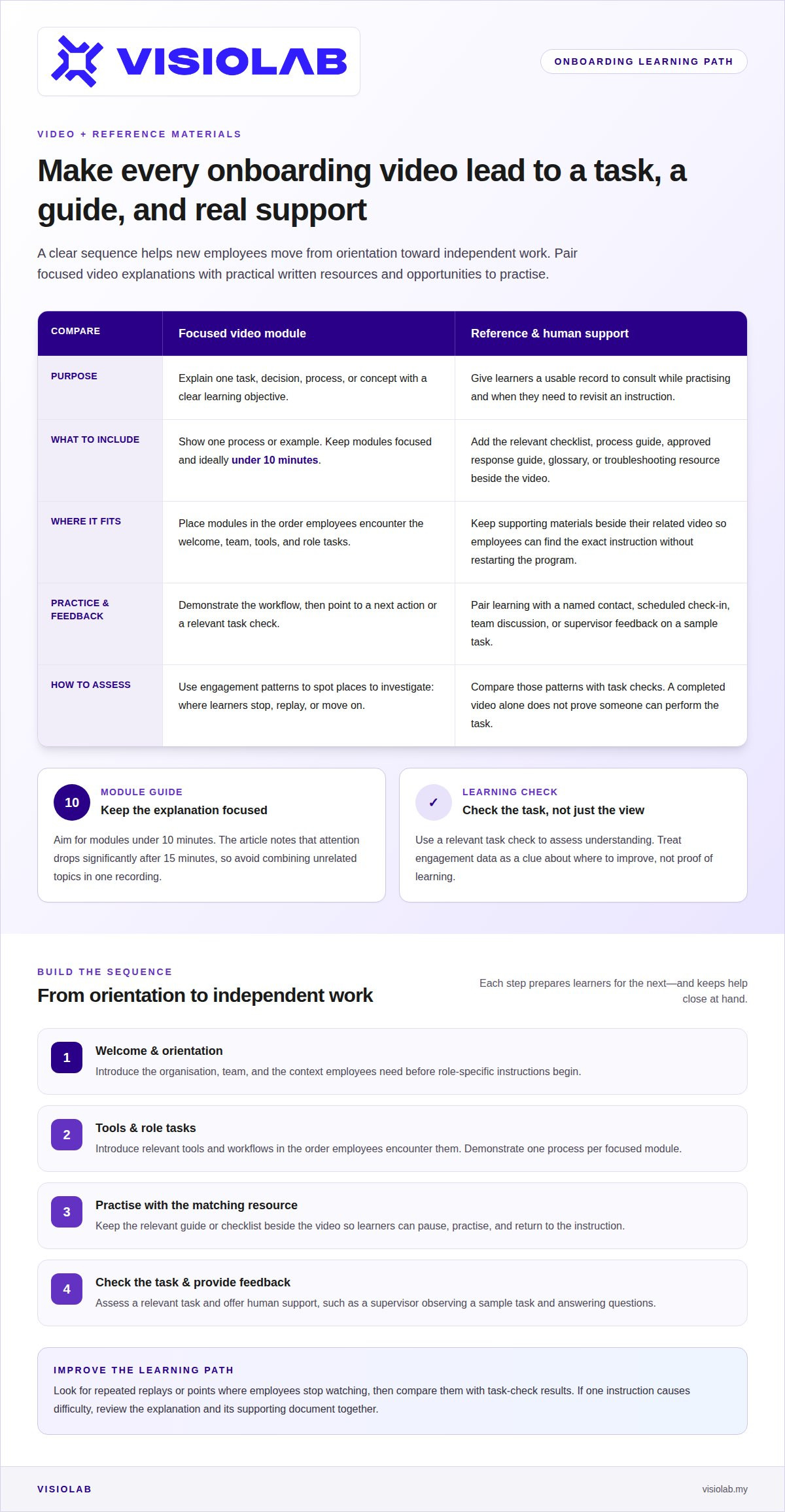
Sequence onboarding as a path from orientation to independent work. Begin with a welcome message, then introduce the team, tools, and role tasks in the order employees encounter them. For a customer support hire, that could mean explaining the service promise, demonstrating how to log a case, then linking the approved response guide. Each step prepares learners for the next.
Build progressive learning through focused modules under 10 minutes each. Start with a clear objective, show one process, and finish with a next action. A module on handling a customer request might demonstrate the workflow, then direct the learner to a written checklist. Keep the reference beside the video so employees can pause, practise, and return to the exact instruction.
A practical approach to integrating video into employee onboarding is to connect each recording to a task and its supporting resource. Identify the learning need, outline the key actions, record a focused explanation, then add a relevant task check. For example, label a safety walkthrough by topic and role, and place the matching procedure beside it.
Video can make a program engaging, but it cannot replace human support. A new employee may understand a recorded workflow and still need feedback on a real case. Pair each module with a named contact, scheduled check-in, or team discussion. After a software demonstration, for instance, a supervisor can observe the employee completing a sample task and answer questions.
Use engagement analytics to improve the learning path. Track where employees stop watching, replay a section, or move on, then compare those patterns with task checks. Repeated replays around one instruction may signal that the explanation or reference document needs revision. Engagement data shows where to investigate; video completion alone does not prove someone can perform the task.
Provide further learning resources where employees need them: a process guide beside a workflow video, a glossary beside unfamiliar terms, or a support channel beside a troubleshooting module. Keep approved explanations easy to find, and let employees revisit individual videos without restarting the program. A recording of a recurring live session can also extend access while giving employees a route to ask questions.
For teams deciding how to integrate video into employee onboarding, balance recorded instruction with practice, feedback, and written guidance. Relying too heavily on video can leave learners without personal feedback or a usable record. Assess understanding through a relevant task check, rather than treating a click as proof of learning. A focused explainer and training video can support this approach when its objective, resources, and next step are clear.
Short modules make a large onboarding process easier to navigate and maintain. Keep each video focused on one task, decision, or concept, ideally under 10 minutes. Attention drops significantly after 15 minutes, so avoid stretching one recording across unrelated topics. A module called “Submit an expense claim” should explain that process, not combine it with leave requests and team introductions.
Start by defining the outcome for each video. What should a new employee know or be able to do after watching? For a software walkthrough, the outcome might be locating a customer record and updating its status. Use that outcome to shape the script, demonstrations, and final reminder. If the subject involves several outcomes, split it into separate videos.
Choose a repeatable format so employees recognise the structure across modules. Open with the topic and its purpose, show the steps in sequence, then close with the next action or reference. For example, a safety module can introduce a procedure, demonstrate the practice, and point learners to its written checklist. Consistency helps employees focus on the explanation instead of figuring out each video’s layout.
Organize modules into clear categories that reflect the onboarding journey. A company-wide track might contain orientation and shared processes; a role-based track can hold team workflows and tool demonstrations. Use descriptive titles such as “Prepare a site handover” instead of labels like “Module 4.” Group related videos together, but keep each file useful on its own when employees need a quick refresher.
Complex subjects need smaller units, not faster narration. Break a multi-stage workflow into distinct videos, such as preparing, reviewing, and submitting a report. Each module should explain only the decisions and actions relevant to that stage. This also makes updates more precise: if the review step changes, revise that module rather than re-recording the entire workflow.
Use a script to control scope before recording. Remove background detail that belongs in a reference document, and keep only the context needed to understand the task. A useful script names the action, explains why it matters, and shows what successful completion looks like. Read it aloud during review; any section that shifts to another topic may need its own module.
Finally, test the format with a new employee or someone unfamiliar with the process. Ask them to find a specific module, follow its explanation, and locate its related resource. If the title, sequence, or instruction causes hesitation, revise it. Short videos work best when their organisation makes the next useful step obvious.
Accessible onboarding content gives employees more than one way to understand a message. A spoken explanation, readable transcript, and clear visual can reinforce the same knowledge. For example, a process video can show each screen action while narration explains why it matters. Employees can follow the demonstration, read the steps, or revisit both formats later.
Add captions to every video with spoken instruction. Auto-captions can provide a first draft, but a reviewer should correct names, technical terms, and timing. In a software walkthrough, an incorrect product label can change the meaning of an instruction. Check that captions stay synchronised and remain legible against changing backgrounds.
Provide a transcript beside the video rather than burying it in another folder. Include the speaker’s words and meaningful spoken cues, then organise the text under the same title as the video. A new employee looking for one instruction can scan the transcript instead of replaying the entire recording. This also makes the learning library easier to search.
Choose translations based on the languages employees need for training. Translate the narration, captions, on-screen text, and linked reference materials as one package. If a safety video uses a warning label, that label must match the translated explanation. A bilingual reviewer familiar with workplace vocabulary can help preserve meaning across versions.
Use audio description when visual information carries meaning that narration does not explain. For example, if a screen changes colour to signal an error, describe the change aloud and include it in the transcript. Make visual instructions understandable without relying on colour alone. Clear labels, readable text, and deliberate narration make content easier to follow.
For employee training videos in Malaysia, follow the organisation’s relevant privacy requirements and internal policies. Practical safeguards include avoiding unnecessary personal information, controlling access to recordings, and getting permission before identifiable employees appear. A sample onboarding video can demonstrate a process without displaying real customer records or confidential screens.
Onboarding video content can include transcripts, language translations, audio descriptions and auto-captioning to improve accessibility. These features can be included in onboarding video content as ways to improve accessibility. Transcripts, language translations, audio descriptions and auto-captioning are all options for making onboarding video content more accessible, and the content can include these features as part of its accessibility approach.
On-demand video also lets employees learn at their own pace. A new colleague can pause a software demonstration, try the action, and replay a step before continuing. This turns a one-time presentation into a reference employees can return to during real work. Pair the video with a written guide so they can choose the format that best supports the task.
Video can make processes more visible than a written description alone. A step-by-step screen recording shows where to click, while an animation can clarify a complex procedure or relationship. For example, a safety walkthrough can show how a sequence of actions fits together. Interactive questions can then prompt employees to apply the explanation rather than watch passively.
Recorded explanations can also leave more room for discussion in live sessions. If employees can view a recurring introduction beforehand, a team meeting can focus on questions, practice, and feedback. A supervisor can use the session to watch a new hire complete a task and correct misunderstandings. Clear instruction paired with human support makes learning more practical.
Measure whether video supports the onboarding goal, not just whether employees press play. Choose a relevant task check, such as completing a sample workflow, and review it alongside viewing patterns. If employees repeatedly stop at one explanation or make the same mistake afterwards, revise that segment or its supporting materials. Compare similar employee cohorts and account for workflow changes before interpreting differences.
Use video where consistency, demonstration, or replay adds value, and retain live guidance for questions and judgement. A recording cannot prove that someone can perform a task correctly, and completion data alone is not evidence of competence. When evaluating the onboarding program, look for a connection between accessible instruction, observed task performance, and employee feedback.
For onboarding content that needs a clear visual explanation, develop an explainer and training video around the task employees need to learn. The strongest result is not simply more video content. It is a useful learning resource that employees can find, understand, and apply.
Seventy-two percent of employees say video training improves onboarding, while step-by-step tutorial videos can help new hires learn specific tasks and workflows they need to perform.
VISIOLAB helps organisations turn complex information into clear, purposeful video for employee learning. When onboarding needs a consistent welcome, a visual explanation of a process, or training employees can revisit, a well-planned video can support the wider program without replacing reference materials or human guidance.
VISIOLAB’s Corporate Video, Explainer and Training Video, ESG Video, and Safety Video services can help communicate company context, role knowledge, and workplace practices. The right format depends on what employees need to understand and do, from seeing a process demonstrated to hearing a company’s story. A clear learning objective gives each module direction and makes it easier to pair with supporting documents.
If you’re shaping onboarding videos for your team, contact VISIOLAB to discuss your project.
The clearest way to decide how to integrate video into employee onboarding is to start with one moment that needs a better explanation. Look for a point where a new hire needs context, a visual demonstration, or a reliable way to revisit guidance. Then define what successful understanding looks like in practice. That gives each production decision a purpose and connects the learning experience to real work.
Treat the first release as a foundation, not a finished library. Gather feedback from new employees and the people supporting them. Use their questions and observed learning gaps to shape what comes next. As roles and processes evolve, keep the content aligned with the work employees actually do. A thoughtful video strategy can grow alongside the organisation without losing its human focus.
When you’re ready to shape that next step, discuss your onboarding video project with VISIOLAB. A clearer learning experience starts with a clear purpose, and your next module can move it forward.
A template helps each video serve a clear learning purpose and fit the broader onboarding experience. It can standardise elements such as the opening, learning objective, key explanation, and next step. For example, a template can prompt content owners to name the intended audience and connect the video to an approved resource. This makes modules easier to review consistently and helps reveal gaps when onboarding needs change.
Yes, a recording can support ongoing training if its information remains accurate and its intended audience can access it. A new employee might use a workflow video during onboarding, then return to it later as a refresher. Assign an owner to review the content whenever the process changes. If the recording no longer matches current practice, update it before relying on it for either purpose.
Video can make demonstrations easier to follow and repeat than instructions delivered only once. For example, a new employee can replay a software walkthrough while completing the same task in the live system. Recorded introductions can also provide a consistent starting point across teams. Video works best as part of a wider learning experience, with practice, written guidance, and human support when questions need discussion.
Keep each module focused on one topic and ideally under 10 minutes. Choose the format to match the lesson: a screen recording can demonstrate software steps, while a presenter can explain a team practice. A complex process may need several short modules rather than one long presentation. Pair each video with a relevant document so employees can quickly find exact instructions without replaying the entire explanation.
Measure whether employees can apply what a video teaches, not just whether they watched it. Use a task check, such as asking a new hire to complete a sample workflow, and record the outcome. Review it alongside viewing patterns, feedback, and repeated questions. To assess changes over time, compare similar employee cohorts and consider whether their tasks or processes changed before linking different results to the video.
Let’s create and collaborate
We’re versatile multitaskers, and we thrive on a lot of projects. You've seen a few of our works that we are most proud of, and your project could be next in line.

Empowering brands with captivating visual stories, creating strong connections and growth.
