
A topic isn’t boring because it matters too little. It feels boring when people can’t see why it matters to them. Learning how to make boring topics engaging with video starts with that shift: connect the information to a real human concern, not just a list of facts. Important messages are easy to o...

A topic isn’t boring because it matters too little. It feels boring when people can’t see why it matters to them. Learning how to make boring topics engaging with video starts with that shift: connect the information to a real human concern, not just a list of facts.
Important messages are easy to overlook, especially when they’re dense or full of unfamiliar ideas. Subject-matter experts may know every detail, but viewers need a clear reason to pay attention. Humour or striking visuals can help, but they shouldn’t pull focus from the message.
This guide shows you how to find a human angle, shape a simple story and choose visuals that make complex ideas easier to grasp. You’ll also learn to give your video a clear purpose and a useful next step. From motion graphics that show a process to everyday scenarios that make information feel relevant, the aim is to make the message clear, memorable and worth watching.
• Learn how to make boring topics engaging with video by showing their relevance to the audience from the start.
• Use a flexible story sequence to connect a familiar situation with an explanation, its consequences and a useful next step.
• Choose interviews, demonstrations, animation or data visuals based on what will clarify the subject, not what seems newest.
• Follow a practical workflow from defining viewers to reviewing the storyboard, and involve subject-matter experts early to resolve accuracy questions.
• Decide when video is the right format, then support its usefulness with consistent messaging, accessible design and planned distribution.
A subject rarely feels boring to the people responsible for it. It feels that way to viewers when they can’t see how it connects to their work, choices or concerns. A policy update, safety procedure or sustainability target may matter to an organisation, but the video needs to show why it matters to the people watching.
Effective explanatory video connects what an audience needs to understand with a situation they recognise, then helps them take a meaningful next step. That’s the foundation of how to make boring topics engaging with video: understand the viewer before choosing the visual style. Ask what they need to know, what they may need to feel, and what they should be able to do afterwards. The answers shape the message, tone and level of detail.
Start with the people affected. What changes in their daily work or decisions because of this information? A new process might require an employee to follow different steps. An ESG update might help stakeholders understand how an organisational priority connects to activity. The human consequence gives an abstract priority a clear point of entry.
Turn that consequence into a question your audience might actually ask: “What do I need to do differently?” or “How does this affect the way we work?” Use that concern to open the video instead of beginning with background facts or institutional language. Check your assumptions with people who understand the audience’s needs.
Choose a primary outcome: awareness, understanding, confidence or a specific action. Trying to achieve all four equally can leave the message unfocused. Once the objective is clear, keep the information that supports it and move useful but non-essential background out of the main story. A video explaining a procedure, for example, should prioritise what viewers need to understand or do, not every related detail.
This audience-first approach connects with instructional design, which considers how learning materials support clear outcomes. For broader planning, see this strategic corporate video production guide. With the audience and objective defined, you can make creative choices that serve the message rather than compete with it.
A strong story does more than hold attention. It helps viewers understand why information matters and how its parts connect. One useful planning sequence is: a familiar situation, a central tension, an explanation, the consequence and a next step. For a safety video, that might mean introducing a moment when a procedure is unclear, explaining the correct process, showing the possible consequence of skipping it, then clarifying what viewers should do.
This sequence is a planning aid, not a formula. Some subjects need the explanation first; others are clearer through a demonstration or a question-and-answer structure. The test is whether each choice improves understanding, not whether it makes the video feel dramatic. Research on educational video design offers guidelines for maximizing student learning, including ways to manage cognitive load and keep viewers focused on the learning goal.
Find the audience’s most important unanswered question, then let it guide the narrative. It might be “What changes in this process?” or “What should I do if this happens?” Use the answer to decide which details are essential. If a fact doesn’t help resolve the question, it may belong in supporting material rather than the main video.
One central question also prevents competing themes from crowding the message. A video about a new procedure shouldn’t also become a broad history of the organisation, a values statement and a technical manual. Keep the story focused. Attention-grabbing ideas help only when they make the subject easier to follow.
Stories make unfamiliar ideas easier to picture by connecting a concept to a person’s choices, actions and consequences in a recognisable context. But simplicity must not come at the cost of accuracy. Use approved case evidence, interviews or documented processes when making factual claims. If you use an imagined situation, label it clearly as illustrative. Verify any claim that lacks a reliable source before it enters the script.
Visual choices also shape how an audience understands a message. VISIOLAB’s explainer and training videos, including motion graphics, can help organisations present complex processes and abstract ideas clearly. See VISIOLAB’s video work as you consider how to make boring topics engaging with video.
The right visual makes an idea easier to follow. The wrong one adds activity without adding meaning. When deciding how to make boring topics engaging with video, choose a format based on what viewers need to understand, who they are and what the video should achieve, not on novelty alone.
Every visual should explain, contextualise or reinforce the message. Use this comparison to match the treatment to the communication need:
Useful for expert insight, lived experience or a personal perspective. It can feel abstract if the speaker relies on jargon or gives no concrete examples.
Shows how a task, tool or procedure works in a real setting. It may be less effective for processes that are invisible, difficult to access or too complex to show clearly on camera.
Makes it possible to depict systems, scenarios or concepts that are difficult to film directly. Too much visual detail can compete with the explanation.
Labels, diagrams and animated elements can show how steps, parts or ideas connect. If too many elements move or appear at once, viewers may struggle to know where to look.
Charts and graphic comparisons can reveal patterns or relationships in figures. They need clear labels and context; otherwise, viewers may see the numbers without understanding their significance.
Treat each limitation as a prompt to refine the execution, not an automatic reason to reject the format. A brief interview can anchor an explanation, while a diagram can clarify the process the speaker describes. Combining approaches can work, provided each one has a clear purpose.
Use 2D or 3D animation when a process, system or abstract concept can’t be captured clearly through live footage. Motion graphics can guide attention through a sequence, show relationships or put a key figure in context. Keep labels concise and introduce information at a pace viewers can follow. For more on format-specific planning, read this guide to explainer video production.
Visual contrast, deliberate pacing and purposeful sound can direct attention to a key point. But decorative effects, crowded text and humour that clashes with a serious subject can weaken the message. Before sign-off, check that graphics and figures are accurate, terminology is consistent, and accessibility choices such as readable on-screen text and captions support understanding. Engagement matters, but comprehension is the measure.
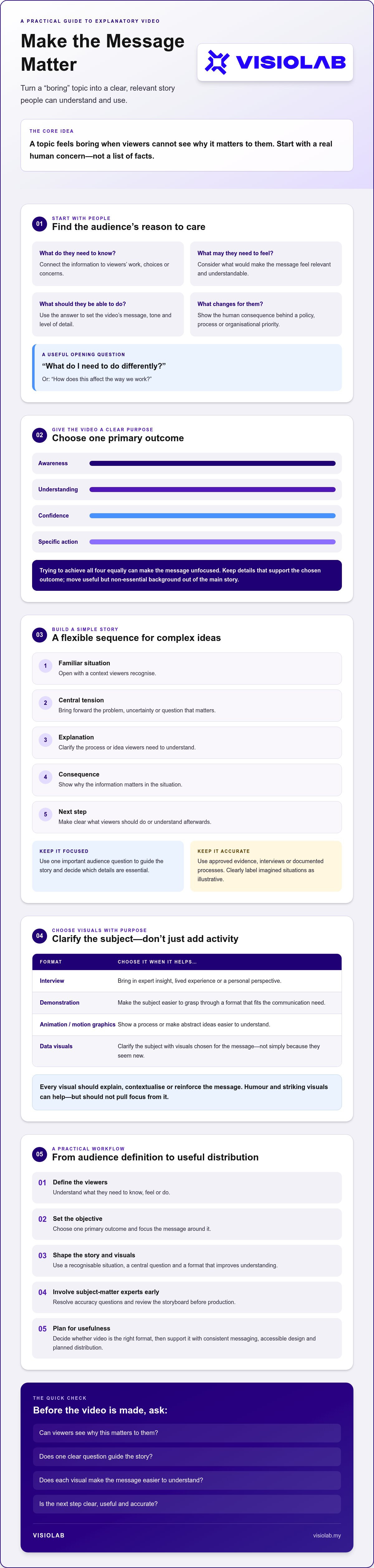
A repeatable process helps transform dense source material into a clear video without losing the facts that matter. The goal is to protect the meaning while simplifying the delivery. Use this workflow to move from initial research to a version you can test and refine.
Be specific about who needs the video and what they already know. An internal training video may need different language and detail from an explanation for customers or the public.
Decide what viewers should understand or do when the video ends. Use that outcome to stop background information from taking over.
Identify the everyday decision, challenge or change that makes the subject relevant. Let it guide the opening and examples.
Shape the essential information into a clear spoken narrative. Keep necessary details, but remove repetition and detours.
Map each key idea to a visual, such as an interview, demonstration or motion graphic. This reveals gaps and unnecessary scenes before detailed production begins.
Ask subject-matter experts to check facts, terminology and important caveats. Settle accuracy questions before production, and revise the script or storyboard if the evidence doesn’t support a claim.
Don’t wait for a polished edit to discover that the message is unclear. Review the script or a rough storyboard with relevant experts and decision-makers first. It’s easier to correct a missing explanation or inaccurate visual at this stage than after detailed production has begun.
Gather approved documents, expert input, audience questions and any required terminology. Write for the ear, not the page: use direct sentences and explain specialist terms when they first appear. Read the script aloud. If a sentence feels difficult to say, it may also be difficult to follow. Cut repeated points, tangents and facts that don’t advance the objective.
Before production, check whether the script and storyboard make sense to people familiar with the subject. After production, ask representative viewers what they understood, remembered and would do next. Compare their responses with the video’s objective, rather than judging success by views alone. Use feedback to refine pacing, visuals, terminology, captions and the closing action. For a strategic approach to developing an organisational video, connect the message, creative choices and audience outcome from the start.
Video isn’t the right answer for every subject. Choose it when people need to see a process, hear a clear explanation or revisit information consistently. A written guide may be better for detailed reference, while a live session can suit topics that depend on discussion or individual questions. Sometimes the strongest approach combines formats: a video introduces the idea, and a written resource holds the detail.
That choice is central to how to make boring topics engaging with video without making video an end in itself. Start with the communication challenge, then select the format that helps the audience understand or act. VISIOLAB’s corporate, explainer, training and safety videos, along with 2D and 3D motion graphics, support different organisational needs rather than serving as universal solutions.
An explainer video can break a complex idea into a visual sequence. Training or safety video may be useful when people need to see a procedure demonstrated consistently or return to instructions later. A corporate video can provide broader context, perspective or organisational narrative for stakeholders. Let the subject and audience determine the format, not a desire to use video for its own sake.
Make the video usable in the setting where people will encounter it. Consider captions, readable graphics and a pace that gives viewers time to absorb each point. Decide where the video will appear, who needs access to it and what supporting information, such as a written guide or contact point, would help them act on the message.
Consistency matters too. Align the video’s key terms and claims with related organisational communications so viewers don’t receive conflicting explanations across channels. Then review how well the video serves its purpose: are people understanding the message, using the information or taking the intended next step? Combine that assessment with audience feedback to guide future content. Views alone may not show whether the communication worked.
Once you’ve defined the audience, objective and format, you can consider whether a production partner is a good fit. Review VISIOLAB’s video services in the context of your communication needs.
Making a dry subject compelling isn’t about adding spectacle. It’s about showing people why the information matters, shaping it around one clear message and choosing visuals that make the idea easier to understand. A focused workflow, with expert review and audience feedback, helps keep the story engaging and accurate.
That’s the practical answer to how to make boring topics engaging with video: start with the audience, then make every creative choice serve their understanding and next step. The right format might be an explainer, training or safety video, or a corporate story. It depends on the communication need.
VISIOLAB provides strategic video services for corporate, GLC, MNC and government organisations, with capabilities in explainer, training and safety videos, as well as motion graphics. Important information can earn attention when it’s made relevant. Start with the audience, and give your message room to make a difference.
Contact VISIOLAB to discuss a strategic video approach for your message.
Make the topic relevant by opening with a problem viewers recognise, then build the video around one clear objective. Ask what they need to understand or do. Use a human angle, such as how a procedure changes someone’s daily task, rather than leading with background facts. This is how to make boring topics engaging with video: connect information to a real concern and give viewers a useful next step.
The best format depends on the subject, audience and communication goal. Use an interview when expert perspective matters, a live-action demonstration to show a real procedure, or animation and motion graphics for systems that are difficult to film. Data visualisation may clarify figures and relationships. Match the format to what viewers need to understand, and combine approaches only when each one strengthens the explanation.
Yes, animation can clarify serious or technical ideas when it shows something that’s difficult to film, such as an unseen process, system or sequence of steps. Labels and motion can guide attention through the explanation. It becomes distracting if decorative effects, too many moving elements or playful humour compete with the subject. Keep the style appropriate to the audience, and check that every visual represents the information accurately.
There’s no single ideal duration for every educational video. Keep it as long as needed to explain the subject clearly, but remove details that don’t support the learning objective. A focused demonstration may need less time than a detailed explanation of a complex process. Consider how and where viewers will watch, and whether the material is easier to absorb as one video or several shorter sections. For teams looking to adapt dense topics for social media, agencies like KALU Creative show how concise, short-form video can maintain engagement while keeping the core message intact.
Keep a training video focused on what viewers need to do. Show a task in a clear sequence, use close-up demonstrations or simple graphics for critical steps, and connect instructions to realistic work situations. Avoid lengthy introductions and repeated information. Add brief comprehension checks, such as asking viewers to identify the next step or recall a key instruction, to see whether the training supports understanding.
Check whether viewers understand the main idea, remember key information and know what to do next. Ask representative viewers to describe the message in their own words, then gather feedback on confusing sections, terminology and pacing. Compare responses with the video’s original objective. Views can show reach, but comprehension, recall and relevant actions provide stronger clues about whether the explainer helped communicate its message.
No. Use video when visuals, spoken explanation or repeat viewing help people understand the subject. A written guide may work better for detailed reference, while a live session can support discussion and questions. A blended approach can pair a video introduction with written instructions or a follow-up session. Choose the format based on the audience’s needs and the task, not on complexity alone.
Let’s create and collaborate
We’re versatile multitaskers, and we thrive on a lot of projects. You've seen a few of our works that we are most proud of, and your project could be next in line.

Empowering brands with captivating visual stories, creating strong connections and growth.
