
The strongest video plans don’t begin on set; they begin with a shared view of what each moment needs to do. That’s the importance of storyboarding in video production: it turns an idea or script into a visual sequence, clarifying shots, camera movement, transitions, and audio cues before filming or...

The strongest video plans don’t begin on set; they begin with a shared view of what each moment needs to do. That’s the importance of storyboarding in video production: it turns an idea or script into a visual sequence, clarifying shots, camera movement, transitions, and audio cues before filming or animation begins. The format changes with the medium, but the goal stays the same: align the story with its execution.
A storyboard doesn’t need polished artwork to be useful. It needs to clarify the intended action, give the team a shared reference, and leave room to refine the details. For live action, that might mean mapping camera angles and actor movement. For animation or motion graphics, it can show how characters and graphic elements move through a scene.
Here, you’ll learn how storyboards shape production, guide visual choices and camera moves, and help teams collaborate before committing to a shoot. We’ll also look at storyboarding across live action, animation, and motion graphics, and the planning mistakes a clear, well-reviewed sequence can help prevent.
• Use a storyboard to give the team a shared visual direction before filming or animation begins.
• Map camera angles, movement, transitions, and audio cues so each scene has a clear purpose.
• Choose the level of detail that fits the format: live action, animation, and motion graphics each need different visual planning.
• Reviewing and revising panels with stakeholders can surface unclear moments and missed shots before production.
• Explore how storyboarding can support Corporate Video, Explainer and Training Video, ESG Video, and Safety Video projects.
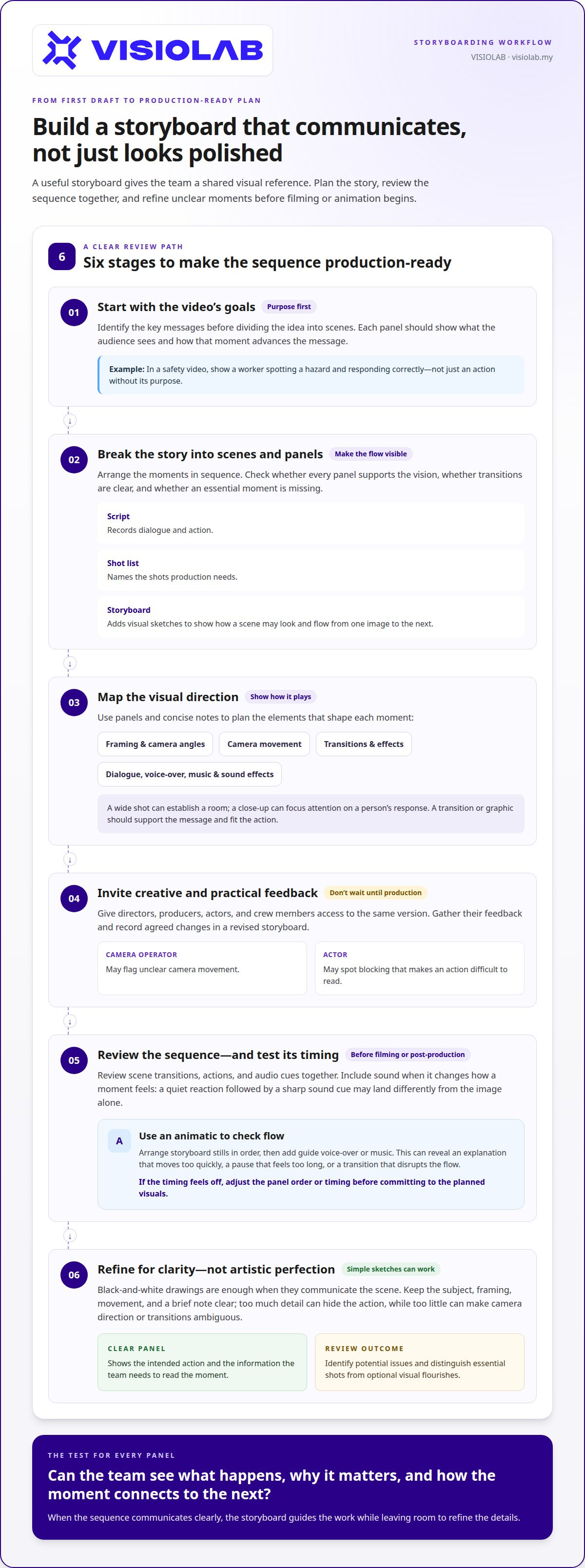
A storyboard can lose its value when it looks polished but fails to communicate the creative vision. Each panel should show what the audience sees and how the scene advances the message. For example, a safety video might show a worker spotting a hazard and responding correctly. If panels show actions without their purpose, the team may film clear images that still miss the intended point.
A storyboard differs from both a script and a shot list. A script records dialogue and action, while a shot list names the shots production needs. A storyboard adds visual sketches to show how a scene may look and flow from one image to the next.
Another mistake is treating the first draft as final. The process starts with the video’s goals and key messages, then breaks them into scenes and panels. The team can review whether each panel supports the vision, whether transitions are clear, and whether the sequence omits an essential moment. For example, revisions to a commercial can make product placement and key messaging easier to follow.
Storyboarding can also falter when creative input arrives too late. Directors, producers, actors, and crew members can each spot practical or narrative issues from their perspective. Give stakeholders access to the same version, gather their feedback, and record agreed changes in a revised storyboard. A camera operator might flag unclear movement, while an actor may identify blocking that makes a key action difficult to read.
Skipping review can leave confusing panels unresolved until filming or post-production. Before production, the team should review the sequence, scene transitions, actions, and audio cues together. Include dialogue, voice-over, music, or important sound effects when they shape the moment. For instance, a quiet reaction followed by a sharp sound cue may create a different effect than the image alone suggests.
An animatic offers another way to test the sequence before production. The team arranges storyboard stills in order, then adds guide voice-over or music to assess timing. This can reveal whether an explanation moves too quickly, a pause feels too long, or a transition disrupts the flow. The team can then adjust the panel order or timing before committing to the planned visuals.
Finally, avoid overcomplicating panels or aiming for artistic perfection. Sketches can be simple, including black-and-white drawings, as long as they communicate each scene clearly. Too much detail can hide the action; too little can make camera direction or transitions ambiguous. A focused panel might show the subject, framing, movement, and a brief note. That clarity helps a storyboard guide the work without restricting creative choices.
A storyboard links individual shots into a visual sequence, showing how transitions, effects, and camera movement carry the message. For example, a close-up can shift to a wide view to reveal the setting.
Transition planning shows how one shot gives way to the next, while effects notes identify visual elements to add or change. A fade can signal a pause, while a graphic overlay can highlight information without interrupting the scene. Mapping these choices in sequence helps the team judge whether each effect supports the message. It can also expose potential issues, such as a graphic appearing before the audience has context.
For a product demonstration, a storyboard might show a graphic callout appearing as the camera reveals a feature. The panel can indicate where the callout enters, how long it stays, and how the next shot follows. These details keep effects connected to the action instead of making them feel like separate decoration. Planning the transition also helps maintain a cohesive visual rhythm.
Camera direction turns the visual idea into a filming plan. According to the European Commission, a storyboard visually represents the script and helps plan each shot, camera angles, and movements. A wide shot can establish a room, while a close-up can focus attention on a person’s response. Notes about framing or movement give the director and cinematographer a shared reference for creating the intended visual.
Storyboarding is visual planning that translates a script into panels showing how each scene may appear. It matters because the team can consider the sequence before filming, rather than interpreting every line independently on set. For example, a presenter moving from a doorway to a desk may need a clear camera position and path. Panels make that movement easier to discuss and refine.
Shot choices also affect production efficiency. Grouping scenes by location or setup can help the team identify shots that share a background, lighting approach, or camera position. The storyboard does not replace a schedule, but it can reveal production needs early. If a sequence requires a moving camera and a separate visual effect, the team can plan how those elements fit together.
Clear panels help allocate resources by distinguishing essential shots from optional visual flourishes. A team can review the sequence, identify potential issues, and revise the plan before filming. For a production that needs aligned visual direction, video production planning can connect the storyboard with the wider creative approach.
Digital storyboards let a production team arrange scenes, revise panels, and preview a video’s visual flow before production. They help connect the intended narrative with the audience, platform, and marketing message.
Digital pre-visualisation uses storyboard software to organise panels and test how a sequence may appear. Tools such as Canva and Storyboard That let teams adjust images and scene order as the concept develops. Revisions can clarify the production team’s direction before filming or animation begins.
For example, a team planning an explainer can move a product illustration ahead of its supporting dialogue. The revised sequence makes the relationship between image and explanation easier to assess. A shared digital file also gives collaborators one working version, helping them focus feedback on specific panels rather than scattered notes.
A storyboard visualises scenes through a sequence of panels, giving the team a preview of the intended final product. It matters because a written script may not reveal how a scene’s framing, action, and dialogue work together on screen.
Consider a training scene showing a staff member responding to a workplace hazard. Panels make the order of actions visible, while notes clarify the dialogue that accompanies each moment. The team can review whether the images support the instruction and whether the next scene follows naturally. This provides a visual reference before filming or animation.
For a launching video, scene panels can also connect a product reveal to its supporting message. Reviewing that sequence helps the team see whether the visual emphasis matches the intended audience and communication goal.
Early storyboard review compares the narrative with the visuals planned to express it. This matters because a panel may look compelling yet fail to support the scene’s purpose or marketing strategy.
For instance, a script may introduce a key benefit, but the matching panel might show unrelated activity. The production team can revise the image, dialogue, or scene order before committing to production. A digital storyboard makes it easier to compare versions and track how each change affects the overall narrative.
Review also helps test whether the video’s pacing suits its intended platform, such as a YouTube video, television advertisement, or Instagram Reel. A marketing message that appears too late may lose prominence in a shorter format. Comparing the planned sequence with the audience and platform makes these mismatches visible while the concept can still be reshaped.
That review is crucial for alignment: each scene should contribute to the message, and each visual should help the audience understand it. When the production team can see the sequence as a whole, it can identify gaps, refine dialogue, and shape a more coherent final product.
The same storyboard format can serve different production methods, but its focus changes with the concept. Each panel should clarify the intended action and help the production team shape a visual experience for its audience.
A live-action storyboard sketches what the camera will capture, including framing, actor blocking, and movement. It matters because these choices affect how a scene reads before the crew sets up a shot. For example, a wide panel can establish a workplace, while a closer panel follows an employee demonstrating a task.
In a documentary, panels may map the narrative flow and interview segments rather than prescribe every moment. A sequence could show an interview, then a cutaway to the location being discussed. This gives the team a shared reference for connecting real footage while leaving room for events that cannot be staged.
For a scripted scene, the storyboard can clarify where an actor enters, turns, or interacts with a prop. The director and cinematographer can consider whether the chosen camera angles show the action clearly. A panel showing a handoff, for instance, may reveal that the audience needs a closer view to understand what changed hands.
An animation storyboard maps illustrated scenes and character actions; a motion graphics storyboard shows how graphic elements move and interact. Both matter because movement, sequence, and visual emphasis need to be understood before final assets are created.
In an animated explainer, panels can show a character facing a challenge, followed by an illustration of the solution. Notes can describe the character’s expression or the action linking scenes. The drawings may be rough, but they need to make each moment legible and preserve the intended narrative.
For motion graphics, a panel might show a title entering, a diagram forming, and a key phrase receiving emphasis. The sequence helps the team judge whether each graphic supports the spoken message. It also makes it easier to discuss what appears first, what moves, and what remains on screen.
These formats call for different kinds of visual detail. Live action often centres on camera position and actor movement; animation focuses on characters and scene changes; motion graphics tracks the movement and relationship of on-screen elements. A clear concept guides all three, but the panels should reflect how the final images will be made.
The takeaway is practical: match the storyboard to the production method, not to a single drawing style. A live-action sequence may need blocking notes, while a motion graphics sequence needs visual cues for movement. This distinction keeps the storyboard useful and collaborative, giving each team a shared view of the action without limiting creative development.
Without a storyboard, production decisions can depend on separate interpretations of the same script. A director may imagine a close-up, while the editor expects a wider scene that establishes the setting. In a corporate video, that mismatch can weaken the intended message or leave viewers without context. The importance of storyboarding in video production becomes clear when a shared sequence helps everyone work toward the same result.
Missed shots are another risk. If a training video needs to show a hazard, a response, and its result, an unplanned shoot may capture only part of the sequence. The missing moment can make the instruction difficult to follow. A storyboard helps identify essential scenes and actions early, so the production team can plan how each moment connects.
Continuity can also suffer when scenes are filmed without a clear visual reference. For example, a presenter might demonstrate a process with a tool in one hand, then appear holding it differently in the next shot. If the storyboard shows the action and shot order, the crew has a reference for keeping the sequence coherent. Editors can also use it to arrange shots and maintain continuity during post-production.
Unplanned camera choices can create avoidable production complications. A wide shot may be needed to establish a location, followed by a close-up that captures a key reaction. If the intended framing or movement is unclear, the crew may discover the gap only after the scene has changed or filming has moved on. Revisiting the storyboard during filming can help the team address emerging issues.
Without a shared plan, collaboration can lose focus. A stakeholder may expect a particular visual, while the director and crew interpret the script differently. Reviewing panels together gives people a concrete sequence to discuss, revise, and align around. For an explainer, this might mean agreeing that an illustration appears alongside the relevant voice-over, rather than after the explanation has ended.
Planning gaps can also affect production resources and editing. A sequence that requires a graphic, a location change, and a specific transition may need coordinated preparation. If those elements surface late, the team may need additional filming or editing work. Storyboards help identify essential shots and visual elements before production, supporting clearer decisions about how the work fits together. This is one practical reason for the importance of storyboarding in video production: it gives the team a chance to address gaps before they disrupt the shoot.
A storyboard cannot prevent every change on set, but it can reduce misunderstandings, missed shots, and extensive reshoots. For a video with multiple scenes or contributors, plan your video production around a clear visual sequence before filming begins.
VISIOLAB helps organisations turn complex messages into clear, purposeful video content. A storyboard can connect the core message with the scenes, visuals, and production choices needed to communicate it. That shared direction is useful when a project involves multiple stakeholders or calls for animation, interviews, or coordinated footage.
For projects such as Corporate Video, Explainer and Training Video, ESG Video, or Safety Video, storyboarding helps align the creative concept with the intended audience before production moves forward. It gives the team a visual framework to develop and refine while keeping the message central.
To discuss how storyboarding can support your video project, contact VISIOLAB.
A video’s direction takes shape through choices made before production: what the audience should understand, feel, and remember. The importance of storyboarding in video production lies in making those choices visible early, so creative decisions serve a clear purpose instead of competing for attention.
For your next project, start with the message you need to communicate and the response you hope to inspire. That gives the production team a strong foundation for developing a visual approach, whether the story calls for real-world footage, animation, or a blend of both. A thoughtful plan can focus creative discussions and keep the final video aligned with its goal.
If you’re ready to shape a video concept into a clear production direction, plan your video with VISIOLAB. A strong idea deserves a visual plan that brings it to life with purpose.
Storyboarding is the visual arrangement of a video’s key moments before production. Each panel represents a scene or shot, with brief notes clarifying what happens and what the audience should notice. Sketches can be rough or detailed, depending on the project. For a product demonstration, panels might show the item in its packaging, the opening action, and the feature in use.
A storyboard gives the director and cinematographer a shared visual reference for discussing how a scene should appear. They can compare framing, subject position, and movement before filming. For example, a panel showing a character looking off-screen can prompt agreement about the eyeline direction and matching shot. That discussion turns an abstract intention into a specific visual decision.
Storyboards help teams align on the sequence, spot missing moments, and make creative decisions before filming. They can also clarify what props, locations, graphics, or sound cues a scene needs. For a corporate profile, mapping an employee interview alongside workplace footage can show whether the visuals support the spoken message. The result is a clearer production plan and a more coherent edit.
In video production, storyboarding means translating a script or concept into a sequence of visual panels. The panels show how scenes connect, rather than presenting the story as text alone. A panel may include a sketch, a short action description, and notes about dialogue or a transition. This makes the intended sequence easier to discuss across creative and production roles.
Storyboarding before filming helps the team make creative choices while scenes can still be rearranged on paper. For instance, reviewing a planned interview may reveal that a key point needs a supporting cutaway. The team can then plan the footage and relevant props before filming. Early visual planning also gives stakeholders a concrete sequence to review, helping align expectations before production begins.
A storyboard communicates a concept by showing how the idea unfolds through images, actions, and scene changes. It can also establish visual consistency through recurring choices, such as close framing for personal moments or wide compositions for context. In an ESG video, for example, panels might pair a spokesperson’s message with visuals of the work being described, keeping the style connected to the subject.
Storyboarding can support more efficient production by helping teams identify related shots and prepare for them together. If several scenes use the same location, the planned sequence can help the crew organise those setups. It can also reveal a missing visual before filming, when adding it to the plan is simpler than discovering the gap during editing or arranging additional footage.
An effective storyboard makes the intended action and sequence easy to understand. Useful elements include a sketch for each key shot, a short description of the action, camera framing or movement, and relevant dialogue or audio cues. Notes about transitions can explain how scenes connect. For an animated scene, a panel can also indicate how a character or graphic element changes position.
Let’s create and collaborate
We’re versatile multitaskers, and we thrive on a lot of projects. You've seen a few of our works that we are most proud of, and your project could be next in line.

Empowering brands with captivating visual stories, creating strong connections and growth.
