
A virtual corporate event brings employees, clients or partners together online for a shared business purpose. It can combine presentations, discussion and activities that help people connect, rather than simply watch a broadcast. Interactive video for virtual corporate events gives attendees clear...
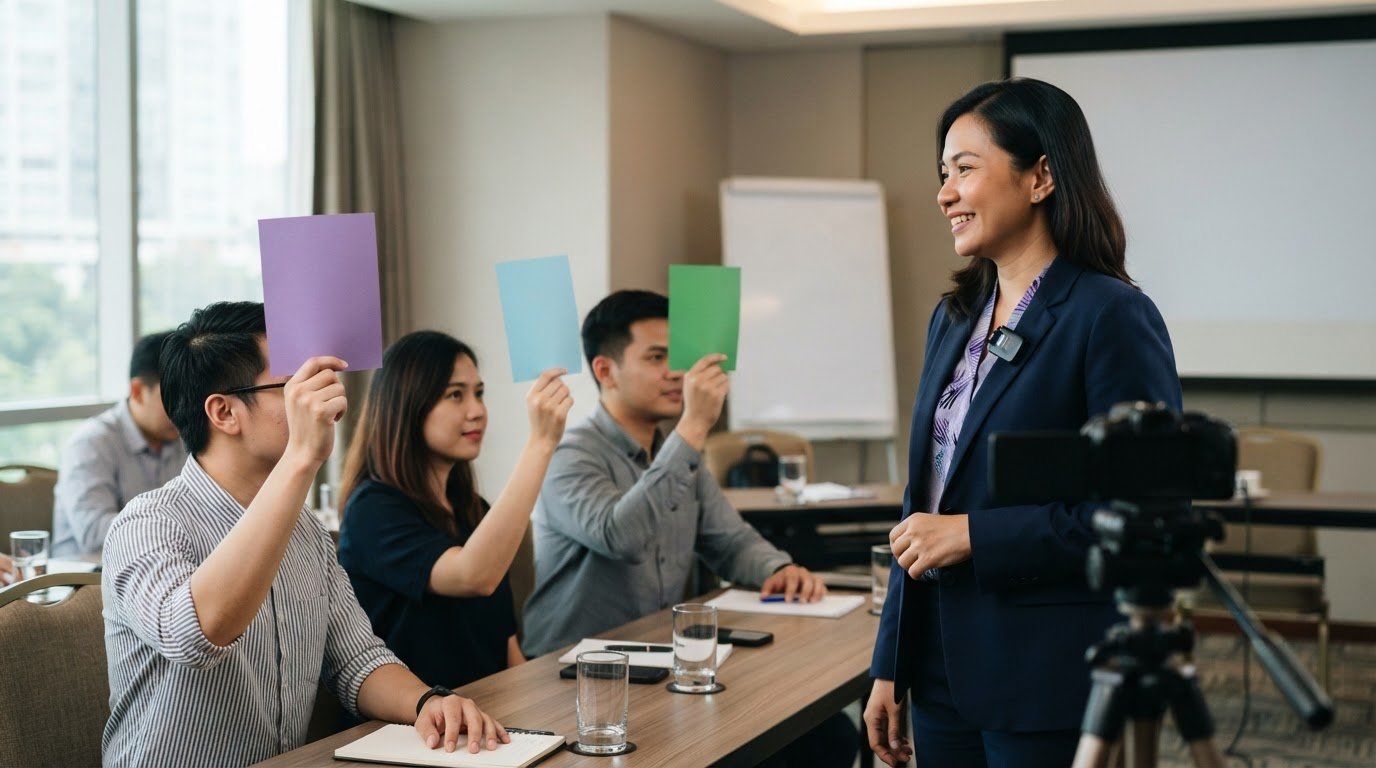
A virtual corporate event brings employees, clients or partners together online for a shared business purpose. It can combine presentations, discussion and activities that help people connect, rather than simply watch a broadcast. Interactive video for virtual corporate events gives attendees clear ways to respond, ask questions and shape the experience as it unfolds.
A polished stream matters, but so does keeping people involved. The right mix of engaging video, live Q&A, polls and audience participation can turn a one-way session into a more immersive event. This article explains how these elements work, how to encourage participation and how to match the format to your event’s goals, audience and schedule.
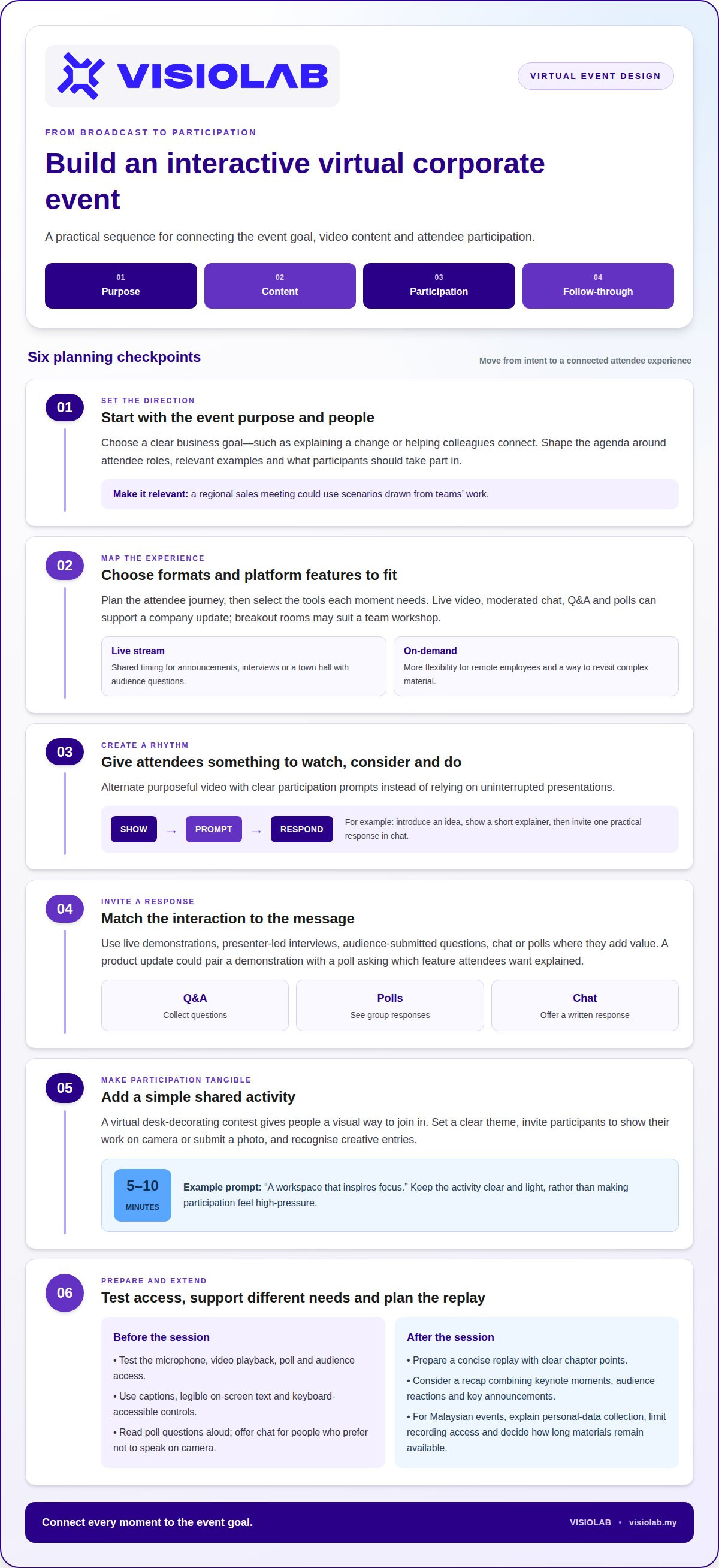
• Shape the virtual event around its purpose and attendees, then tailor the experience to make it feel relevant and immersive.
• Use purposeful video content and clear participation prompts to give attendees more ways to engage than simply watching.
• Build live Q&A and polling into the session so attendees can share questions and responses as the event unfolds.
• Make participation easier with brief icebreakers, small-group discussions and activities that give more people a chance to contribute.
• Use a cohesive visual environment to connect each part of the event and create a more unified experience.
Virtual corporate events bring employees, clients or partners together online around a business purpose. A leadership briefing, product launch or remote team workshop can combine live presenters, video, discussion and shared activities. The format works best when each element serves a clear goal, such as explaining a change or helping colleagues connect.
Platforms with live video, moderated chat, Q&A and polls can support interactive event experiences. Some also offer breakout rooms or video playback, allowing organisers to move from a keynote to smaller discussions. Choose features to suit the session plan: a company update may need questions and polls, while a virtual team workshop may benefit from group rooms.
For Malaysian events, include registration details, chat questions and recordings in your personal-data plan. Explain what information you collect and why, limit access to recordings, and decide how long materials will remain available. These steps help participants understand how their contributions may appear in a replay or recap.
Common technical risks include unstable connections, poor audio, delayed video and links that fail during a session. Test the presenter’s microphone, video playback, poll and audience access before the event. Add captions, readable on-screen text, keyboard-accessible controls and spoken descriptions of important visuals to support different access needs.
Participant capacity and per-person pricing depend on the platform plan, event format, production requirements and expected attendance. A session with a presenter and chat has different needs from one with multiple live rooms and interactive video. Estimate attendance before choosing a format, then account for the tools and production work needed to create the intended participant experience.
Personalisation makes a virtual setting feel designed for its audience. Use attendee roles, event goals and relevant examples to shape the agenda. A regional sales meeting, for instance, could use scenarios drawn from teams’ work, while a cooking demonstration could invite remote participants to follow each preparation step at home.
Immersion comes from connected details, not visual effects alone. A consistent welcome screen, presenter introductions, branded slides and planned transitions can give a virtual event a coherent atmosphere. Clear cues help attendees understand what to do next as they move from a presentation to a poll or discussion.
Video recaps can extend an in-person event beyond the venue. A concise edit might bring together keynote moments, audience reactions and key announcements for colleagues who could not attend. For a hybrid programme, the recap can combine venue footage with selected online contributions to tell the story of both experiences.
Interactive video for virtual corporate events connects these elements through planned moments of participation. Start with the event objective, map the attendee journey, then choose video, discussion or polling where each adds value. This structure helps organisers create an experience that feels purposeful, personal and accessible.
Strong virtual event content gives attendees something to watch, consider and do. A live presenter can introduce an idea, then use a short video to show how it works. Follow with a prompt, such as inviting attendees to share one practical response in chat. This rhythm keeps the meeting connected to its purpose instead of turning it into uninterrupted presentations.
Formats work best when interaction fits the message. Live demonstrations, presenter-led interviews, short explainer clips and audience-submitted questions each invite a different kind of participation. A product update, for example, could pair a demonstration with a poll asking which feature attendees want explained. An on-demand version can retain the main video and add discussion prompts or a follow-up question.
Live streaming suits moments that benefit from shared timing, such as announcements, interviews or a town hall with audience questions. On-demand content gives remote employees more flexibility and lets them revisit complex material. A production plan can include both: stream the main session, then prepare a concise replay with clear chapter points for later viewing.
A virtual desk-decorating contest offers a simple, visual activity. Give participants 5-10 minutes to decorate, then invite them to show their work on camera or submit a photo. A clear theme, such as “a workspace that inspires focus,” makes the activity easy to understand. Recognising creative entries can add a light moment and support morale without turning participation into a high-pressure performance.
Successful interactive experiences can be built from small, memorable actions. For example, St. Jude’s Virtual 5K includes interactive activities and a tour of the St. Jude campus experience. A corporate event can adapt that principle with a guided virtual tour of a workplace or project, followed by audience questions. Engaging digital media platforms like Tanoshi Video illustrate how combining video with interactive map tools can encourage audiences to actively explore. The key is giving attendees a reason to respond, explore, or contribute.
For event video, clear sound and a steady picture matter more than elaborate equipment. Use a camera that produces a clear image, position a microphone to capture the speaker, and light the scene so faces remain visible. Bandwidth needs depend on video quality, the streaming setup and other devices using the connection. For organisations managing complex streaming setups, creative technology providers like Ideal Digital Innovation offer media, broadcast, and network solutions that support reliable digital delivery. Test the stream, playback and audience interaction from the presenter’s location before the event.
Make interactions accessible. Read poll questions aloud, use legible on-screen text and offer a chat response for people who prefer not to speak on camera. A host can explain each activity beforehand, then summarise responses so attendees know their input was heard. These production choices make participation clearer across different settings and devices.
To connect video, live participation, and replay into one event experience, develop a clear content plan. Explore event video planning as a way to align the story, visuals, and audience moments.
Live polls turn a broadcast into a two-way session. Attendees make a choice, see the group’s response and hear the presenter interpret it. A leadership team, for example, can ask which business priority needs more explanation, then address the leading response. That sequence makes polling useful rather than decorative.
Build each poll around a decision or discussion point. A clear question gives participants a reason to respond and gives the host a useful cue. Ask which project challenge feels most familiar or which topic deserves more discussion. Keep answer options distinct, use plain language and explain how the result will shape the next segment.
A poll can also open a team-building session. The This or That icebreaker takes 5-10 minutes, with 5-8 either-or questions to prompt quick choices. For example, ask whether attendees prefer a shared planning session or an independent work block. The host can use the responses to introduce a conversation, rather than treating the activity as a competition.
Live Q&A gives attendees a direct way to interact with presenters and guests. Invite questions during a talk, then group related submissions around themes such as implementation, timelines or customer impact. A moderator can select questions for the speaker, combine duplicates and keep sensitive or off-topic submissions out of the live discussion.
Timing affects the value of both formats. Place a poll after a key idea, when attendees have enough context to respond. Hold Q&A after the presenter introduces the topic, and leave time for answers before moving on. In a product briefing, a poll can reveal which feature needs clarification, while audience questions can guide the presenter’s explanation.
Plan what happens after each response. The host should acknowledge the poll result, explain its relevance and connect it to the next speaker or activity. If a poll reveals mixed views on a workplace change, the presenter can address the strongest concern before opening questions. Without follow-through, a poll feels like a click without consequence.
Make participation clear and easy. Explain how to submit a question or choose a poll response before the first interaction. Read questions aloud for attendees who may not be following the chat, and summarise results on screen or verbally. These steps help remote participants follow the discussion, even if they join at different points.
For interactive video for virtual corporate events, build polls and Q&A into the run of show instead of adding them at the last minute. The producer can prepare prompts alongside presenter cues, while the moderator tracks incoming questions and signals when responses are ready. This coordination keeps the video, discussion and audience input moving as one session.
Participation grows when people know what to do and have room to contribute. Begin an immediate team meeting with a 5-10-minute icebreaker, then keep each person’s response to 30 seconds. A focused prompt, such as sharing one current priority, gives everyone a simple way into the conversation without delaying the agenda.
Choose activities that suit the group and the meeting’s purpose. A virtual scavenger hunt can take 15-20 minutes, with participants finding items from a shared list. Connection bingo takes 20-30 minutes and gives colleagues reasons to discover shared experiences. Both formats work best when the host explains the rules before the activity starts.
For a team of 30, breakout rooms of four or five people give more attendees a chance to speak. Assign each group one clear task, such as naming a customer challenge or suggesting an improvement to a process. Then invite a spokesperson from each room to share a concise summary in the main meeting.
Smaller meetings can use Watch, Read, Listen, an activity suited to groups with fewer than 8 people. Each participant can bring a short recommendation, then explain why it mattered to them. A book, article, podcast, or video can spark discussion while giving quieter attendees time to prepare their thoughts.
Make virtual team building part of the meeting rhythm, not a separate event competing with work. A brief shared activity can open a planning session, while a closing reflection can help colleagues raise questions. The host should connect each activity to the meeting’s purpose so participation feels relevant rather than compulsory.
Long virtual events need a different structure. Divide them into topic-focused sessions and allow time for breaks, communication and networking. A company gathering, for example, can alternate leadership updates with smaller discussions. Clear transitions help attendees know when to listen, contribute or step away.
Platforms support participation through chat, breakout rooms and shared documents, but the host sets the tone. Explain how attendees can contribute, invite different voices and pause after each prompt. In a cross-functional meeting, asking each team to share one insight can prevent the discussion from being dominated by the first speakers.
Keep the format flexible. If discussion stalls, switch from open conversation to a specific prompt or small-group task. If a virtual meeting finishes early, close with one takeaway from each participant. Simple cues encourage people to contribute while keeping the agenda clear and focused.
Arm’s Reach Show & Tell gives each participant one minute to share their object. Allow 12.5 minutes for the virtual equivalent of a 5-minute in-office icebreaker. Connection bingo cards contain 16-25 squares; schedule virtual team-building activities as part of every meeting.
An immersive virtual event feels like one designed space, not a collection of disconnected video calls. Establish a visual identity through the opening screen, presenter backgrounds, title cards, and transitions. For a regional company town hall, a shared visual language can connect leadership updates, employee stories, and audience contributions across the programme.
Plan the attendee journey as a sequence of settings. A welcome screen can lead to a live stage, then to a topic-focused session or networking space. Use consistent labels and clear transitions so attendees know where they are and what happens next. A short host introduction can orient remote employees before each change of setting.
Video can make an online setting feel specific. A project story might open with location footage, then move to a presenter explaining the work and a team member sharing a perspective. This approach gives attendees a sense of place while grounding the message in real people, decisions and outcomes.
Design collaboration into the environment rather than treating it as an extra. Create a dedicated discussion space where a remote team can exchange ideas after a presentation. A facilitator can pose a task, capture key themes and bring those insights back to the main session. A clear purpose helps each space contribute to the event story.
Social connection also needs a deliberate setting. Provide a relaxed virtual room for informal conversation, separate from the main work sessions. Attendees can meet colleagues from other teams or continue a discussion after a speaker finishes. Set expectations for respectful conversation and offer private chat for one-to-one exchanges.
Build visual variety with intention. A virtual exhibition can feature short videos, project highlights or employee perspectives, while a leadership stage can stay calm and focused. Each screen should help attendees understand the content. Avoid decorative elements that compete with captions, speaker names or essential information.
For a hybrid event, connect the physical venue with the online audience through planned camera shots and shared moments. Show the stage, audience reactions and contributions from remote participants. A host can acknowledge questions from both groups, helping online employees feel part of the same event rather than watching from outside it.
Before launch, rehearse each transition with the host, speakers, and moderator. Test the opening sequence, video playback, room changes, and return to the main stage. A clear run of show keeps communication aligned and gives production teams a shared reference. For an event that needs a cohesive visual journey, plan immersive event coverage around the story, setting, and audience experience.
VISIOLAB creates Corporate Video that turns complex organisational messages into clear visual stories. For a virtual event, video can introduce a key theme, explain a process or bring an important message to life. Event Coverage can capture an in-person gathering for colleagues joining remotely, while a Virtual Experience can help shape an engaging online setting.
Explainer and Training Video can make detailed information easier to follow before, during or after a session. The right format depends on your event’s purpose and the story attendees need to understand. If you’re planning a virtual corporate event and want coherent, purposeful video content, contact VISIOLAB to discuss your project.
Make your next event a starting point for stronger communication, not just a date on the calendar. Before production begins, define the message attendees should remember and the action they should take afterward. That focus gives interactive video for virtual corporate events a clear role, connecting each visual and audience moment to a meaningful outcome.
VISIOLAB’s Corporate Video, Explainer and Training Video, and ESG Video can support different communication goals, from explaining a complex initiative to sharing an organisation’s impact. The right direction starts with your story, your audience and the experience you want to create.
Contact VISIOLAB about your event to discuss a video approach that fits your objectives. Your next virtual event can give people more than information: it can give them a reason to take part.
Virtual corporate events are online gatherings organised for a business purpose, such as sharing company updates, introducing a product or connecting distributed teams. They can combine live presentations with recorded segments and audience activities. A product briefing, for example, might include a demonstration, moderated discussion and follow-up recording for employees who could not attend live. Match the format to the audience and intended outcome.
VISIOLAB project budgets typically start between RM30k and RM60k. The final scope depends on the content and production requirements, such as the video concept, filming needs, animation, editing, and how the video fits the event programme. A short supporting video and a larger corporate communication project involve different planning and production work. Share the event objective and content needs to shape a relevant project scope.
Plan each interaction alongside the video script and event run of show. A quiz can follow a training segment, a poll can gather views after a leadership update, and moderated Q&A can give attendees a way to ask presenters questions. The host should explain how to respond, while the producer coordinates each prompt with the relevant video cue. This keeps audience input connected to the content.
Compare platforms against the format you need, rather than choosing by feature count alone. Review support for live video, polls, quizzes, Q&A, breakout discussions, recording and accessibility features. Then compare pricing structures and audience capacity for the relevant plan, since both can vary by provider and event setup. A presentation with questions may need different tools from a multi-session programme with separate discussion spaces.
Platforms with live video, moderated chat, Q&A and polling can support interactive virtual corporate events. Some also offer breakout rooms and video playback.
Let’s create and collaborate
We’re versatile multitaskers, and we thrive on a lot of projects. You've seen a few of our works that we are most proud of, and your project could be next in line.

Empowering brands with captivating visual stories, creating strong connections and growth.
