
Motion graphics turn business videos into clearer visual stories. The role of motion graphics in business videos is to make complex ideas easier to follow, bring key information into focus and carry a consistent visual identity across marketing channels.That matters when a product, service or workfl...

Motion graphics turn business videos into clearer visual stories. The role of motion graphics in business videos is to make complex ideas easier to follow, bring key information into focus and carry a consistent visual identity across marketing channels.
That matters when a product, service or workflow is hard to show with live footage alone. Animated text, diagrams and visual cues can guide viewers through the message, while purposeful movement keeps the story focused. Used well, motion graphics support the message rather than distract from it.
This article explains how motion graphics can strengthen video marketing and social media campaigns, clarify products and workflows, and support different business video formats. It also covers what makes a motion graphics explainer effective, so you can identify where animation adds clarity and where a simpler approach may work better.
• Keep motion graphics aligned with your visual identity so campaigns feel connected across platforms.
• Use animated diagrams, labels and visual cues to make complex products and workflows easier to follow.
• Shape campaign assets around the message and platform, rather than relying on one video format for every audience.
• Build effective explainers around a clear goal, a focused narrative and purposeful movement.
• Choose motion graphics where they add clarity, from training and safety content to corporate and ESG videos.
Motion graphics can make a brand’s message more recognisable, give abstract ideas a visual form and adapt a campaign across digital channels. Their value comes from connecting movement to a clear marketing goal, not from adding decoration.
Audience reach is the opportunity for a brand’s video to appear across channels and introduce its message to potential customers. A 2020 survey of marketers found that 93% of brands gained a new customer through social media video, showing why a shareable visual promotion can support acquisition.
To build recognition, keep colours, typography, logo animation and movement style consistent across social posts, email, landing pages and advertising. A rebrand, for example, can use a 60-second visual story to introduce new brand elements in one coherent sequence, rather than presenting each change separately.
Engagement is the attention and interaction a video earns from its audience; distinctive motion design gives viewers a visual reason to stay with the message. One survey found that 51% of people are more likely to share video with friends than other content, making clear, memorable visuals useful in social promotion.
About 20% of viewers tune out after 10 seconds, so establish the central idea early. A product launch might open with an animated problem, then reveal the product’s role using branded icons and concise text. Avoid visual clutter: competing transitions, dense captions and unrelated effects can obscure the message instead of differentiating it.
Motion graphics create animated scenes from designed elements, while live-action footage records people, places or events. Graphics can illustrate invisible processes and keep imagery consistent; live action can show real people and physical settings. Production costs vary by approach: live-action may require locations, studios, crews, talent and equipment, while graphic production brings different creative and technical demands.
There is no fixed production timeline for a business motion graphics video. The schedule depends on factors such as script complexity, visual development, animation detail, feedback and revisions. The main steps are to define the audience and goal, develop the script, design the visual system, animate the approved sequence, and prepare versions for each channel.
To assess return on investment, match campaign measures to the goal: track reach and shares for awareness, clicks for traffic, and enquiries or sales for acquisition. Compare results with the campaign’s starting point and use consistent tracking links where appropriate. Avoid judging performance by views alone. A high view count does not show whether the intended audience acted.
Motion graphics can turn an abstract process into a sequence viewers can follow. A software company, for example, can animate a user’s journey from signing in to completing a task. Each screen, label and transition reveals one step, helping the audience see how the elements connect without relying on a lengthy verbal explanation.
For a complex service, animation can map what happens before, during and after delivery. A logistics business might show an order moving from a warehouse to a customer, with animated markers clarifying handovers and key decisions. This visual structure explains the service while keeping the message focused on what the viewer needs to understand.
Explainers are useful when a product’s important features are difficult to film. A digital platform’s data flow, for instance, can appear as moving shapes and connectors. A financial concept can use animated charts to show how inputs affect an outcome. One survey found that 96% of people had watched an explainer video to learn about a product or service.
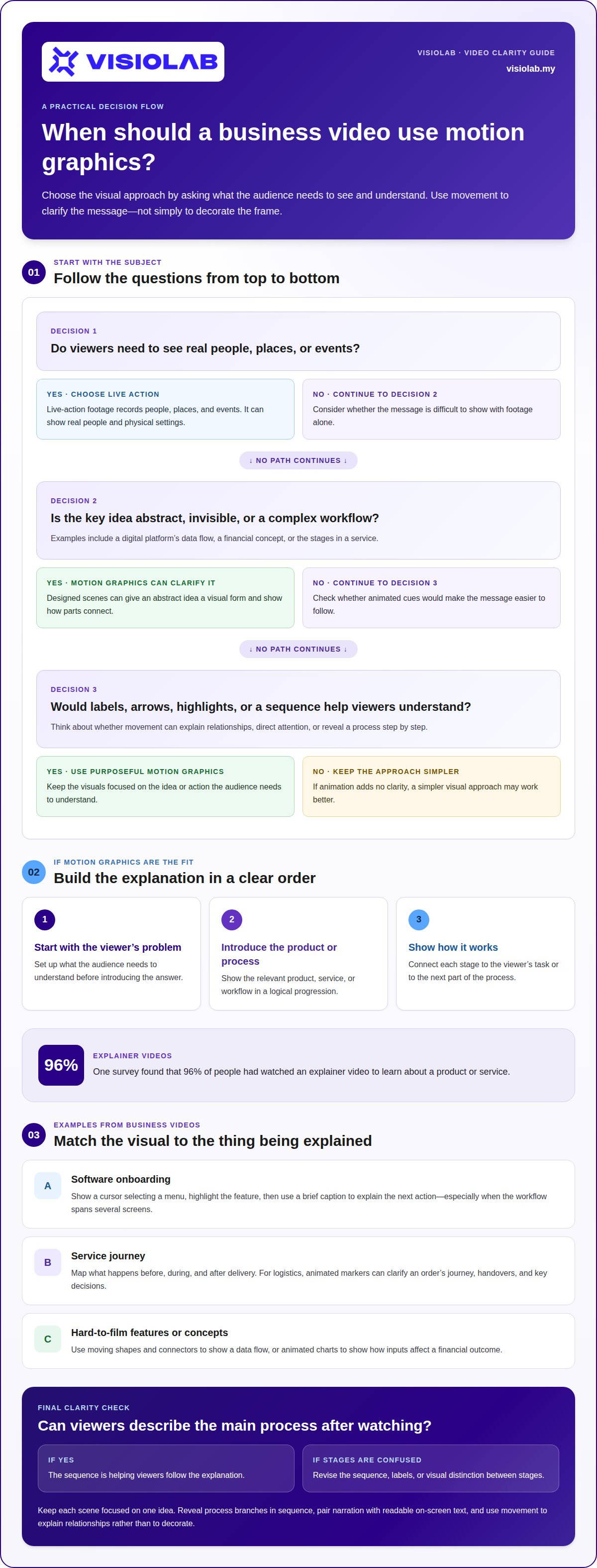
Clarity comes from deciding what to show and arranging it logically. An agency developing an explainer can begin with the viewer’s problem, introduce the relevant product or process, then show how it works. Short labels can define unfamiliar terms, arrows can direct attention, and colour changes can distinguish stages.
For software onboarding, motion graphics can show viewers exactly where to look. A cursor can select a menu, a highlight can identify a feature, and a brief caption can explain the next action. This is especially useful when a workflow spans several screens or a static screenshot would hide the sequence.
Keep each scene focused on one idea. If a process has several branches, reveal them in sequence instead of showing every path at once. Pair narration with readable on-screen text, and use movement to explain relationships rather than simply decorate the frame. These choices help viewers follow complex information at a practical pace.
A useful test is whether viewers can describe the main process after watching. If they confuse two stages, revise the sequence, labels or visual distinction between them. For a product demonstration, show the feature in context, then connect it to the user’s task. A clear visual explanation of complex workflows can make that connection easier to communicate.
Motion graphics can also clarify complex financial information through animated charts, infographics and explainers. These formats show relationships visually and give an explanation a clear progression. When visuals and narration work together, video can make ideas easier to follow.
Software demonstrations and user onboarding offer another practical use. Motion graphics can show how software works, highlight features and guide users through interfaces, making actions and tools visible in a walkthrough. A focused demonstration helps users see how a feature fits the task they need to complete.
A motion graphics campaign gives a brand a visual system for carrying a message across selected channels. The role of motion graphics in business videos is to connect movement and design to a communication goal, whether that is building awareness, introducing an offer or prompting an audience to act. Start with the goal, then shape the story and visual approach around it.
Attention depends on what viewers notice first. Introduce the central concept in the opening frame, then guide the eye towards supporting details. A campaign for a new service could reveal a customer challenge, introduce the service and close with a memorable brand cue. This sequence gives each visual a purpose and avoids delaying the message with decoration.
Content marketing can extend one campaign idea into several assets. A company might adapt an animated concept into a social media post, an email excerpt and a landing-page graphic. The core message stays consistent while each format reflects how people encounter it. The role of motion graphics in business videos includes creating this visual continuity, not just producing a standalone clip.
Plan digital placement into the design from the start. A vertical version needs a composition that keeps essential text and graphics visible on a phone. A square edit may need shorter captions and tighter framing, while a horizontal presentation can accommodate a wider diagram. Planning versions early helps preserve readability as campaign assets are adapted.
Motion graphics can make abstract campaign concepts easier to grasp. An organisation describing a sustainability initiative could animate how an operational change relates to its intended outcome. A recruitment promotion might use moving role titles and workplace details to introduce an opportunity. The visual idea should serve the campaign’s purpose and audience, not distract from them.
Measure each asset against its intended outcome. Reach and shares can help assess awareness; page visits can indicate interest; enquiries can show a response to an action-focused campaign. Compare versions by changing one creative element at a time, such as the opening visual or closing message. This makes it easier to identify which choices contributed to audience response.
Before production, align the message, visual identity, channel format and measurement approach. Then review the final animation at the size viewers will see it. Fine captions may be hard to read on a phone, even if they look clear on a larger screen. A mobile preview helps keep the campaign’s key information visible.
That emphasis reflects broader marketing practice: roughly 70% of companies use content marketing to promote their products and services, while close to three-quarters of marketers consider video production the top task in their content strategy. HubSpot is cited as reporting that videos are the second most popular content type marketers use to increase audience engagement, and that videos are among the top 4 content types companies invest in.
The average human attention span for advertisements is 8 seconds. People watch 17 hours of online video content per week, giving campaign teams a substantial viewing context in which to make the message clear and memorable.
A motion graphics explainer video uses animated visual design to communicate a business message. It can combine typography, shapes, icons, diagrams and sound to make information easier to follow. For example, a payment platform might animate a transaction from customer to merchant, showing each stage through connected symbols. This movement guides viewers through the explanation, while the graphic style keeps attention on the idea rather than a filmed setting.
Each component has a specific job. Typography names a feature, colour separates categories, arrows show direction, and transitions connect scenes. In a video about a digital service, a highlighted button can point to an interface action, while a simple chart shows how information moves. Every element should support the message. If decorative shapes compete with labels or narration, viewers may miss the point.
Motion graphics differ from character-led animation in their emphasis. A character-led story may follow a personality, while motion design often uses graphic elements as its main visual language. A network provider, for instance, could use animated lines and nodes to represent data moving between locations. This imagery can stand out without inventing a literal scene, making it useful for ideas that cameras cannot easily capture or that are difficult to demonstrate clearly.
The process starts with still images and identifies which elements should move. A service diagram might first show a customer, a request and a response; animation can then reveal their connection in sequence. This creates a deliberate rhythm: establish the context, introduce the process, then emphasise the outcome. Movement makes the explainer memorable when it clarifies cause and effect instead of animating every object onscreen.
Format shapes the viewing experience. A short animated graphic can deliver one idea in a social post, while a longer explainer can develop a product story across multiple scenes. A GIF may suit a looping interface demonstration; a narrated video can explain a service in greater depth. In any format, readable text, clear contrast and controlled pacing help viewers follow the message on different screens.
Strong explainers balance visual character with comprehension. A company introducing an unfamiliar service could use consistent icons for each stage, then repeat them when showing the complete process. That continuity helps viewers connect the details and recall the central idea. Before finalising the animation, check that each scene has one purpose: explain a term, show a relationship or direct attention. Remove movement that does none of these.
Motion graphics add the most value when a video needs to explain, compare or visualise information. A product launch can animate key features; a training video can show a process in sequence. The format works especially well when movement clarifies the message or makes invisible information visible, rather than merely decorating footage.
Corporate videos can use animated titles, maps and data visualisations to add context to filmed interviews. For example, a speaker discussing regional operations could be paired with a map that highlights locations as they are mentioned. This keeps the human voice while giving viewers a clearer visual reference. Motion graphics can also unify footage from different settings through consistent typography and graphic transitions.
Explainer videos are a natural fit for animated diagrams and interface demonstrations. A software company could show a user navigating a dashboard, with each feature highlighted at the right moment. Training videos can use the same approach for internal procedures: show the correct sequence, label important steps and use a visual cue to mark a decision point. Animation supports instruction by showing what words alone might leave abstract.
Safety videos can use motion graphics to clarify hazards and demonstrate safer actions. An animated floor plan, for instance, can trace an evacuation route and mark an exit without distracting background detail. For workplace procedures, labels and arrows can direct attention to equipment or movement. Keep each scene focused on one instruction, with an unmistakable visual distinction between a hazard and the correct response.
ESG videos can turn operational information into visual narratives. A sequence might connect a company initiative with its intended environmental or social outcome, using charts, icons and captions to explain the relationship. Graphics should support the evidence and keep claims clear. In a launch video, animated product details can reveal features in a deliberate order, from the central benefit to supporting information.
Event videos and presentations can benefit from animated names, schedules, speaker titles and data points. These elements help viewers follow a programme or understand a presentation’s key message. In a recruitment video, animated role titles and captions can make essential details easier to notice, particularly when viewers watch without sound. Give each graphic a clear purpose and keep it readable at the final screen size.
Choose motion graphics according to the video’s communication task. Use them when viewers need to see a process, understand a relationship or identify a key detail. Keep live footage central when real people, places or events provide the strongest evidence. For a blend, pair interviews with carefully timed diagrams or labels. Plan a business video with purposeful motion graphics to match the visuals to its message.
VISIOLAB helps businesses shape complex messages into clear videos, using motion graphics when movement makes ideas easier to understand. Turn to the team when a campaign, product or internal process needs a visual story that connects information to its purpose. Corporate Video, Explainer and Training Video, ESG Video and Safety Video can each use animation to clarify key points, guide viewers through a sequence or bring abstract concepts into focus. The right approach depends on the message, audience and role of the video. Share your central idea and what viewers should understand, then contact VISIOLAB to discuss a video aligned with your communication goal.
The role of motion graphics in business videos becomes clearer when you start with the change you want the audience to make: understand an idea, remember a message or take a next step. Let that purpose guide the creative direction. A focused visual approach can give your message a distinct identity without asking animation to do more than it should.
Before production begins, define what the video needs to achieve and how you’ll recognise progress. That decision can guide the story, visual choices and campaign’s next steps. If you’re ready to turn a business message into a purposeful video, contact VISIOLAB about your video. Start with one clear idea, then build a story that brings it to life.
Motion graphics are animated visual elements used to communicate a business message. They can include moving text, shapes, symbols, charts or diagrams, designed around a video’s purpose and visual identity. For example, a company update could animate a timeline to show a project’s progress. Unlike footage of a real event, motion graphics create a designed visual sequence that can make information more structured and easier to present.
Motion graphics make complex ideas easier to follow by revealing relationships and stages in a deliberate order. For example, a business explaining an approval process could show a request moving between departments, with each handover labelled. Viewers can see where decisions happen and how one action leads to another. This approach is useful when a concept involves abstract connections, multiple teams or information that is difficult to show in a single filmed scene.
Motion graphics can sustain attention by directing focus, pacing information and giving key ideas a distinctive visual form. A company presenting a new internal initiative, for instance, could reveal one priority at a time instead of displaying a dense slide. Clear movement helps viewers follow the presentation, while consistent visual cues make its ideas easier to recall. Engagement still depends on a relevant message, readable design and a pace suited to the audience.
Let’s create and collaborate
We’re versatile multitaskers, and we thrive on a lot of projects. You've seen a few of our works that we are most proud of, and your project could be next in line.

Empowering brands with captivating visual stories, creating strong connections and growth.
