
The edit isn't the only thing that shapes your launch date. A post-production workflow for corporate video typically takes 2-6 weeks, covering picture and sound editing, colour work, music licensing, review, and final delivery. The schedule depends on the project’s complexity and how smoothly feedba...
The edit isn't the only thing that shapes your launch date. A post-production workflow for corporate video typically takes 2-6 weeks, covering picture and sound editing, colour work, music licensing, review, and final delivery. The schedule depends on the project’s complexity and how smoothly feedback and approvals move.
It’s easy to expect a video to be finished as soon as filming wraps, but each post-production stage needs to support the next. A clear workflow keeps the story, sound, and visuals aligned while helping prevent avoidable delays.
This guide explains the post-production workflow for corporate video, from the first edit through audio mixing, licensing, file management, backups, and deliverables. It also covers what affects the timeline and how planning review rounds and delivery formats can keep a project moving.
• Post-production brings picture, sound, colour, and delivery preparation together; locking the edit before finishing helps prevent avoidable rework.
• Music rights depend on where the video will appear, so distribution plans influence licensing and audio decisions.
• Multiple aspect ratios and platform versions are easier to manage when deliverables are defined early.
• Organised file naming, reliable storage, and redundant backups help protect footage and keep complex projects manageable.
• Corporate and marketing video post-production typically takes 2-6 weeks, with review rounds and project complexity shaping the schedule.
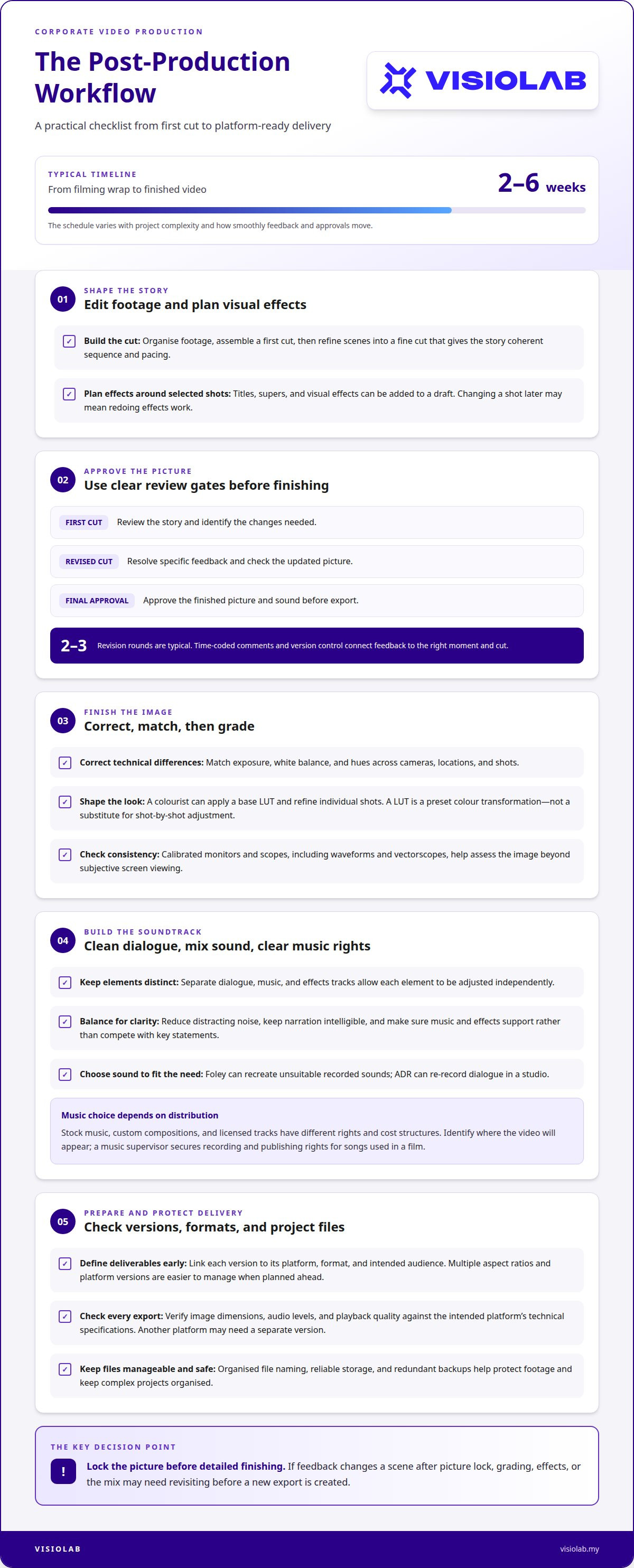
Post-production begins when filming wraps and turns recorded picture and sound into a finished video. A post-production workflow for corporate video connects editing, visual effects, colour correction, grading, audio mixing, review, and export in a deliberate sequence.
Each stage builds on earlier decisions. Approving the picture edit before detailed finishing helps prevent later changes from disrupting colour, sound, and effects work.
Editing selects and arranges footage into a coherent story; visual effects add or alter elements within the frame. Both matter because sequence and pacing shape how viewers understand the message.
An editor may organise footage, assemble a first cut, then refine scenes into a fine cut. Sound effects, titles, and supers can be added to a draft. Visual effects are planned around selected shots; changing a shot later can mean redoing work. For example, a graphic identifying a process may need to track accurately with the relevant scene.
Colour correction fixes technical differences between shots, while grading shapes visual mood and continuity. Matching exposure, white balance, and hues helps footage from different cameras or locations feel cohesive.
A colourist can start with technical corrections, apply a base LUT, then refine individual shots. A LUT is a preset colour transformation, not a substitute for shot-by-shot adjustment. Calibrated monitors and scopes, such as waveforms and vectorscopes, help assess the image beyond subjective screen viewing. For instance, matching interview shots can keep skin tones and background colour consistent across camera angles.
The post-production workflow for corporate video should include a first-cut review, a revised-cut review, and final approval before export. These stages let stakeholders assess the story first, then resolve specific changes before approving the finished picture and sound.
Time-coded comments connect feedback to precise moments, while version control ties each review to the correct cut. A typical corporate video project includes two or three revision rounds. Locking the edit before grading and mixing limits rework when later feedback arrives.
After picture lock, finishing brings approved visuals together with sound. Audio mixing balances dialogue, music, and effects; the team then checks colour consistency, titles, and visual effects throughout the sequence.
Delivery preparation follows approval. The export is checked against the intended platform’s technical specifications, including image dimensions, audio levels, and playback quality. A separate version may be needed for another platform.
A post-production workflow for corporate video relies on clear decision points for story development, picture approval, finishing, and delivery. If feedback changes a scene after picture lock, the editor may need to revisit grading, effects, or the mix before creating a new export.
Audio post-production helps viewers hear each message clearly and makes sound support the scenes naturally. Dialogue, music, and sound effects are handled as distinct elements before they’re balanced together.
Dialogue cleanup removes unwanted noise and edits spoken audio, while sound mixing balances dialogue, music, and effects. Clear interviews and voice-overs carry the message even when the visuals shift between locations.
A sound editor can assemble separate tracks, reduce distracting noise, and smooth dialogue between edits. Keeping speech, music, and effects on separate tracks lets each element be adjusted independently. For example, music can be lowered beneath an interview without changing the level of every sound in the scene.
Mixing brings those tracks into a coherent whole. The editor balances levels so narration remains intelligible, transitions feel deliberate, and sound effects don’t compete with key statements. If a stakeholder flags a line that’s difficult to hear, the mix can be refined around that moment.
Sound design uses recorded or created audio to give scenes texture, while music licensing secures usage rights. These choices matter because the sound should fit both the story and its intended distribution channel.
Sound effects can clarify an action or create a transition, but they should support the message, not distract from it. When recorded sound is unsuitable, Foley artists recreate sounds; actors can also re-record dialogue in a studio through ADR. These options address specific audio needs without rebuilding the entire soundtrack.
Music choices have different rights and cost structures. Stock music, custom compositions, and licensed tracks aren’t interchangeable, and requirements vary by distribution channel. A music supervisor secures recording and publishing rights for songs used in a film. Identifying where the video will appear helps guide music selection and licensing before final delivery.
Separate tracks also make reviews more efficient. Reviewers can comment on dialogue clarity, music tone, or a particular effect instead of giving general feedback about the whole soundtrack. Clear communication about the intended audience and channel helps the sound editor make focused adjustments.
For an interview-led training video, dialogue may need to stay prominent while subtle music supports the scene. An explainer video may rely more on narration and carefully placed sound effects. Both benefit from a mix tailored to the role each sound plays.
For projects where narration and sound carry complex information, explainer and training video production can bring the audio and visual message into alignment.
Large corporate video projects need a delivery plan that links each version to its platform, format, and intended audience. Late changes after approval, unclear specifications, and inconsistent versions are common risks. Agreeing deliverables early and controlling revisions helps reduce rework.
An export is a rendered video file; a deliverable is a version prepared for a specific use. Define both early, since one approved master may need several formats, crops, or language versions.
Aspect ratios shape how the picture fits its frame: 16×9 suits widescreen viewing, while 9×16 is vertical and 1×1 is square. A 4×3 version may also be required for a particular display. Reframing can move titles or crop visual details, so each version needs its own review.
Production teams can also prepare a master in a high-quality delivery format such as 422 Long GOP. That file serves as a consistent source for creating platform-specific copies without repeatedly rebuilding the edit.
Platform-specific delivery means encoding and checking each version against its destination’s requirements. This matters because an export that looks correct in an edit suite may display or play differently after upload.
For YouTube, a 1080p H.264 upload is a commonly recommended option. A company website, social platform, or presentation screen may call for different dimensions or compression. The delivery plan should map each platform to a named file, aspect ratio, and export specification.
Before handover, the post-production team tests exports on their target platforms. This can catch cropped titles, unexpected playback, or reduced visual quality. Distribution planning also identifies whether teams need alternate cuts, captions, or language versions.
A master file is the approved high-quality version used to create delivery copies; an archive preserves project materials for future revisions. This distinction matters when a title, logo, or other detail needs updating later.
Large projects may generate many files, so consistent naming and version control help prevent an outdated cut from reaching distribution. Label each export by project, language, platform, and revision status, then retain the approved master alongside relevant project files.
Delivery risks increase when requirements arrive after editing or late feedback changes approved scenes. A change after picture lock can also affect colour grading, titles, or visual effects, creating extra work across versions. Clear approval milestones help identify changes before linked tasks are complete.
For a campaign with widescreen and vertical outputs, track each version against the same approved message while adapting framing and titles. This makes differences clear without confusing one export with another.
Final checks compare delivered files with the agreed distribution plan: verify the version, aspect ratio, playback, and visual quality. Testing platform exports before release helps catch issues while there’s still time to correct the right file.
A corporate video editing brief should state the audience, key message, approved script, intended platforms, required versions, and delivery specifications. The asset handover should include camera footage, audio, logos, graphics, and any approved brand references, with notes identifying important takes or files.
Media ingest starts when the production team transfers camera cards and other source files into organised project storage. Before editing, check that footage and audio copied correctly, then preserve the original camera files as source material.
For a multi-camera shoot, a two-minute corporate overview with an interview and B-roll may involve hundreds of gigabytes of footage. Video recorded at 4K-8K can demand substantial storage and take longer to transfer. A post-production team accounts for this media volume before moving into editing, rather than treating the footage as a small set of lightweight documents.
Start with reliable storage. Back up footage from every camera to at least two drives, keeping separate copies so one drive failure doesn’t erase the only version. Maintain redundant backups throughout post-production and test recovery procedures regularly. A backup is useful only if the files can be restored and opened.
Organisation makes those copies usable. A clear folder structure can separate camera originals, audio, graphics, project files, review exports, and approved masters. Consistent names identify the project, shooting date, camera, scene, and version. For example, a date can use the YYYY-MM-DD format based on ISO 8601, followed by a descriptive identifier such as the camera or interview subject.
An organised structure helps editors locate raw footage without confusing it with temporary files or finished exports. It also lets teams trace which graphics, audio, or camera files belong to a particular edit. When an edit changes, a version label distinguishes the current working file from an earlier review copy.
Archiving preserves the materials needed for future updates. An archive may include original footage, the approved master, project files, graphics, audio, and notes explaining the folder structure. Keeping only the final video can make later changes harder because the editable project and source assets may be needed to replace a title or update a shot.
Before handover, check that archived files open, copies match their intended folders, and backup recovery works. Clear archive ownership and consistent file naming help teams retrieve the right raw footage when a corporate video needs a new version for social media or another platform.
Corporate and marketing video post-production typically takes 2-6 weeks. That window covers more than video editing: the schedule also involves feedback, approval, sound, finishing, and export.
A useful starting point is the edit itself. A standard corporate video of two to four minutes, with one interview and B-roll, typically takes three to five business days from when editing starts. That’s an editing estimate, not a full post-production schedule. Music, graphics, colour grading, review rounds, and delivery add further stages.
Project scope drives the timeline. A single-location interview has fewer visual elements to assemble than a multi-location story with several speakers and graphics. The director’s vision also shapes the cut: a precise narrative structure can guide editing, while late changes to the message may require scenes to be rearranged.
Review is another key stage. A standard corporate video project typically includes two or three revision rounds. Time-coded feedback helps the editor connect comments to exact moments, while a clear approval process keeps different stakeholders aligned. If approval changes the edit after picture lock, visual effects, grading, or audio mixing may need further work.
For corporate videos intended for Malaysian audiences, captions and subtitles should suit the viewers and the languages used in the video. Keep wording accurate, synchronise each line with speech, and review names, terminology, and on-screen titles before export.
Finishing needs its own schedule. Colour grading for a standard corporate production can take a few hours to a full day, depending on complexity and the number of locations. Visual-effects work may need revisiting when shots change or frames are added, so keeping the edit stable can help avoid rework. Music licensing and platform-specific exports also need to fit the planned delivery.
Build the timeline around dependencies, not just a target launch date. Map the edit, review windows, picture lock, finishing, and export in sequence. This makes it easier to see how delayed feedback affects later stages and where parallel work is possible without sending unfinished elements for approval.
Corporate and marketing projects commonly fall within the 2-6-week range, while commercial video post-production typically takes 1-4 weeks. The distinction reflects different project needs, not a guaranteed turnaround. Complexity, number of versions, and feedback timing all influence the schedule.
Set review dates and approval responsibilities before video editing begins. If a campaign has a fixed release date, work backwards from delivery and allow time for stakeholder feedback and platform testing. For a clearer production schedule, plan your corporate video timeline.
VISIOLAB turns complex organisational messages into clear corporate video content, with post-production shaped around the story and intended audience. It’s a natural next step when your team needs editing, sound, colour, and delivery coordinated into one finished piece.
For a focused learning objective, Explainer and Training Video can make processes easier to follow. ESG Video can bring sustainability stories into sharper focus, while Safety Video supports clear communication of workplace practices. Choose the format according to what viewers need to understand or do after watching.
Share your project goals, source materials, intended platforms, and key review stages to establish a clear production direction. Contact VISIOLAB to discuss your corporate video.
Your next video can do more than document an initiative. It can help people see why the work matters, understand what changes, and know what comes next. Start with a clear communication decision: what should the audience think, feel, or do after watching?
Use that decision to shape your brief, review roles, and delivery choices. A well-planned post-production workflow for corporate video connects creative decisions to the intended response, so each edit has a purpose beyond polishing footage. Align stakeholders around the message, not just the visuals. Shared direction gives the finished video a stronger foundation for launch and future use.
Plan for more than the first release. A story with a clear central message can guide future communications and help your organisation speak more consistently across audiences.
VISIOLAB can help turn that direction into a corporate video shaped around your communication goals. Share the purpose, audience, and intended use to start a focused conversation. Discuss your video with VISIOLAB, and give your next story a clear direction from the start.
The main steps are media ingest, editing, review, picture lock, finishing, and export. Once footage is organised, the editor builds a cut around the approved message. Stakeholders review it and provide consolidated feedback; after picture approval, finishing can proceed. For example, a video featuring a CEO interview may need a separate check of name titles and department terminology before final files are prepared.
Corporate and marketing video post-production typically takes 2-6 weeks. The schedule depends on the edit’s complexity, the number of versions, finishing requirements, and how quickly stakeholders provide feedback. A straightforward interview edit has different needs from a campaign requiring multiple language versions and platform crops. Treat the estimate as the post-production window, then plan the release date around review and approval time as well as editing.
Editing establishes the story; graphics, titles, and subtitles then fit the approved sequence. Colour grading and sound mixing follow picture lock, avoiding repeated work after scene changes. For example, check a subtitle file against the final dialogue and review a title card for spelling and brand terminology. This sequence keeps visual and spoken information aligned.
Choose exports around their destination rather than expecting one file to suit every placement. Widescreen 16×9 works for common landscape viewing, while 9×16 suits vertical placements; square 1×1 may be useful for other layouts. A 1080p H.264 file is a commonly recommended YouTube upload. Confirm the required resolution and format for each platform, then review the exported file on its intended destination.
Record each asset’s source, usage terms, and intended distribution. For music, distinguish stock tracks, custom compositions, and licensed songs because their rights and cost structures differ. Track recording and publishing rights for songs, and retain relevant licence information with the project files. Apply the same organised recordkeeping to fonts, stock visuals, and supplied footage so the team can identify approved assets when preparing later versions.
Let’s create and collaborate
We’re versatile multitaskers, and we thrive on a lot of projects. You've seen a few of our works that we are most proud of, and your project could be next in line.

Empowering brands with captivating visual stories, creating strong connections and growth.
