
What if the voice in a training video could make complex instructions easier to follow, not just fill the silence? Professional voice over for training videos brings a clear, human narration to the visuals, guiding learners through each idea with purposeful tone, pacing and emphasis.A strong voice-o...

What if the voice in a training video could make complex instructions easier to follow, not just fill the silence? Professional voice over for training videos brings a clear, human narration to the visuals, guiding learners through each idea with purposeful tone, pacing and emphasis.
A strong voice-over depends on more than a polished voice. The script, delivery and audio must work together so instructions are clear, key points stand out and narration fits the visuals. Language choices matter too, especially when training needs to reach different teams.
This guide explains how professional narration is developed for corporate training videos, from shaping the script and choosing a suitable voice to recording, editing and integrating the finished audio. You’ll learn what to consider when choosing tone, pacing, language and audio quality, and how a video production team can bring these elements together in a focused learning experience.
• Shape narration around the learning goal so the voice supports the instruction rather than competing with it.
• Use deliberate pauses, emphasis and pronunciation choices to make complex material easier to follow.
• Plan script, recording and audio integration together so narration fits the visuals and edit.
• Match tone, pace and language to the audience, then assess the finished audio for clarity and listening comfort.
• When training content needs a cohesive visual and audio treatment, VISIOLAB’s Explainer and Training Video service can bring the story and production together.
Narration connects spoken instruction with on-screen demonstrations, helping learners follow a process from start to finish. For corporate modules, tutorials and e-learning, the script and delivery should reflect what learners need to understand or do.
Educational videos and tutorials often guide learners through a sequence: introduce a task, explain each action, then reinforce the key point. A software tutorial, for example, needs narration timed to cursor movements and interface changes. Corporate learning content may also explain procedures, workplace expectations or product knowledge. A well-prepared script keeps terminology consistent across lessons and makes each explanation easier to follow.
Effective narration supports learning rather than simply reading every line aloud. A production team can match spoken instructions to demonstrations, diagrams and chapter transitions. In a safety lesson, the voice should distinguish a warning from a routine step. The key test is whether learners can understand the words, listen comfortably and hear important information emphasised naturally.
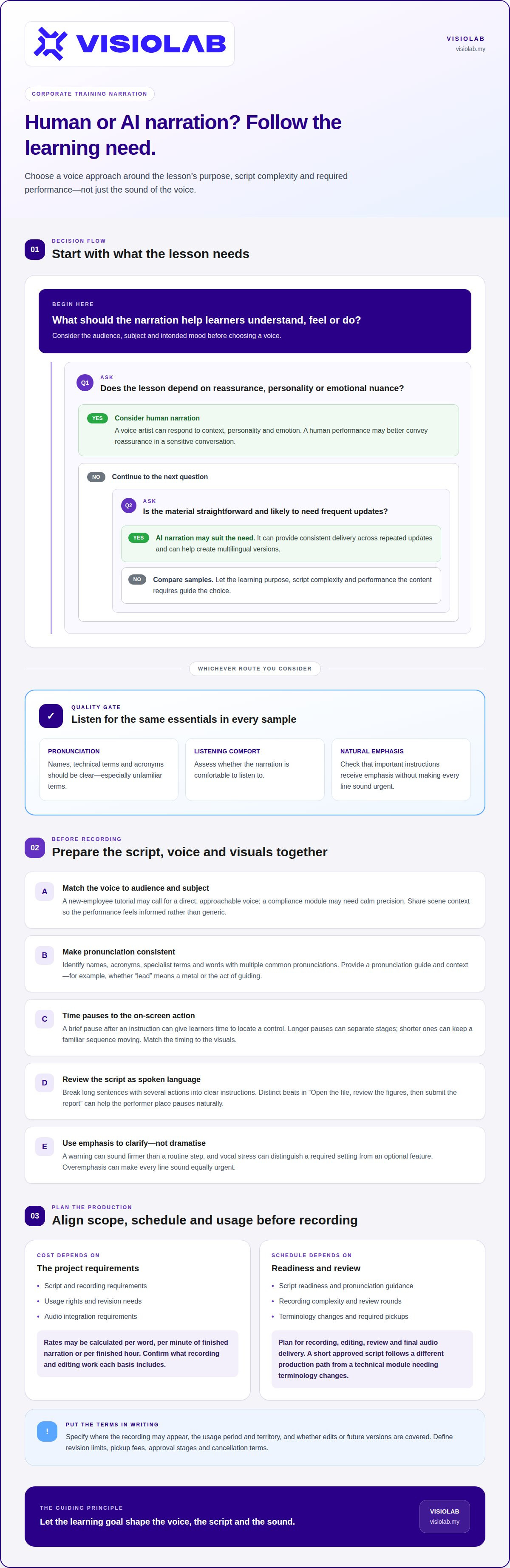
Human narration can respond to context, personality and emotion. A voice artist can make a customer-service scenario sound warm, then shift to a measured delivery for a technical explanation. AI narration can provide consistent delivery across repeated updates. Assess each sample for clear pronunciation, comfortable listening and natural emphasis, especially around instructions or unfamiliar terms.
AI voice tools can also help create multilingual versions of training videos, extending narration across content. However, language and pronunciation still need careful attention. A human performance may better convey reassurance in a sensitive conversation, while AI may suit straightforward material that needs frequent updates. Choose according to the learning purpose, script complexity and performance the content requires.
Choose a voice artist by matching the sample to the audience, subject and intended mood. A tutorial for new employees may need a direct, approachable voice; a compliance module may call for calm precision. Listen for clear pronunciation of names, technical terms and acronyms. Share a pronunciation guide and scene context so the performance feels informed rather than generic.
Effective narration supports learning through a clear pace, purposeful pauses and emphasis on essential instructions. In an equipment demonstration, for example, a short pause before a critical action gives learners time to register the visual. To find professional voice-over talent in Malaysia, look for experience with corporate learning content, then assess relevant samples and how the team handles scripts.
Set usage rights and licensing in the agreement: specify where the recording may appear, the usage period and territory, and whether edits or future versions are covered. Define revision limits, pickup fees, approval stages and cancellation terms in writing. These details clarify responsibilities before recording begins.
Professional voice-over costs in Malaysia depend on the script, recording requirements, usage rights, revisions and integration needs. The price depends on the case and is given after a quote request. Rates may be calculated per word, per minute of finished narration or per finished hour; the chosen basis should state what recording and editing work includes.
Delivery time depends on script readiness, pronunciation guidance, recording complexity, review rounds and any required pickups. A short, approved script with clear direction follows a different production path from a technical module that needs terminology changes. A reliable schedule accounts for recording, editing, review and final audio delivery, while the agreement defines how delays or cancellations affect the project.
Performance choices shape how learners interpret each instruction. During recording, professionals use the script, visuals and audience needs to guide speech, from technical terms to pauses before important actions. A professional voice-over for training videos makes these choices part of the learning design, not just the sound of the finished edit.
Before recording, the production team identifies acronyms, names, specialist terms and words with multiple common pronunciations. A pronunciation guide can show the preferred reading and provide context, such as whether “lead” means a metal or the act of guiding. This helps voice artists deliver terminology correctly and consistently across lessons.
Pauses work best where learners need time to process a step or connect narration with an on-screen change. In a software tutorial, a brief pause after “select the settings menu” lets learners locate the control before the next instruction. Longer pauses can separate stages, while shorter ones keep a familiar sequence moving. Timing should match the visuals rather than interrupt them.
Scripts also benefit from a spoken-language review. A long sentence with several actions can be divided into clear instructions, allowing the performer to place pauses naturally. For example, “Open the file, review the figures, then submit the report” may need distinct beats between actions. The recording team can flag ambiguous phrasing aloud and adjust delivery to preserve the intended meaning.
Emphasis directs attention to the words learners must remember or act on. In a safety explanation, the performer can give a warning a firmer tone than a routine transition. In a product tutorial, vocal stress can distinguish a required setting from an optional feature. The aim is clarity, not theatrical drama: overemphasis can make every line sound equally urgent.
Tone should suit the subject and audience. A welcome module may sound open and encouraging; a procedure describing a serious risk needs restraint and precision. During recording, the director can give a specific performance note, such as “slow the instruction before the demonstration” or “make the consequence sound direct, not alarming.” Clear direction helps voice artists adjust without guessing at the intended emotion.
Pacing should reflect the complexity of each idea. A familiar action can move briskly, while a new process may need more space between clauses. The team can compare the recording with the edit, then adjust pauses where a diagram appears or a demonstration changes. This creates variety without making narration inconsistent across modules. That balance is central to professional voice-over for training videos: every delivery choice should support the learner’s next step.
For a coherent result, production direction links pronunciation, tone and timing to the same learning goal. A training video production approach can align narration choices with the script and visuals, so each spoken cue has a clear purpose.
Voice-over production links the approved script, spoken performance and video edit. For example, in a software lesson, each instruction needs to match the action shown on screen.
A clear production sequence keeps these elements aligned. The team reviews the script against the visuals, prepares the narration, records or generates the audio, then integrates it into the edit. If a scene changes after recording, the affected line may need to be updated to match.
The team clarifies the learning objective, checks names and technical terms, and aligns each spoken line with its scene. A custom script can explain a process in the order learners see it.
The voice artist receives context about the audience, subject and intended tone. For a product demonstration, direction can connect each instruction to the relevant on-screen action.
The recording is assessed for clear speech, consistent delivery and errors such as a misread acronym. A revised line can be recorded as a pickup when a script correction changes the meaning.
The audio is cleaned and placed against the video timeline. The editor checks that narration starts with the right scene, leaves room for visual information and ends with the final instruction.
Standalone AI voice tools follow a related process: prepare a script, generate narration, export an audio file, then import it into video-editing software. A professional workflow adds editorial decisions at each stage. For instance, a generated line may need a timing adjustment if it covers a diagram before learners can read it. The team can also assess the sound against the video, rather than judging the audio in isolation.
Technical review checks that the finished narration works within the edit. A transition should not cut off a word, and a demonstration should not compete with an instruction. The production team can adjust timing, edit sections and review the full sequence again. These steps help keep the voice track cohesive across scenes, including custom graphics or explanatory animations.
For multilingual training, each version needs more than translated words. A global team may need language-specific pronunciation, timing and phrasing so the narration fits the same visuals. The production team aligns each script with its edit and checks that instructions remain clear. If a translated line takes longer, the scene timing may need to change.
Final delivery follows an agreed review process: the team checks the integrated video, addresses approved changes and exports the finished version. For example, a final playback may reveal a pause that feels too short beside a safety diagram. Reviewing narration in context helps catch issues a separate audio listen might miss.
Match delivery to the audience and task. A first-day induction can sound welcoming, while a procedure explaining equipment checks needs calm precision. The same voice shouldn’t make every section sound identical. A warm introduction can lead into direct instructions, then close with a concise recap. That contrast keeps narration engaging without weakening the message.
Pacing should follow the information, not an arbitrary speaking speed. In a screen-based tutorial, leave room for learners to locate a button after hearing its name. A dense explanation may need shorter sentences and clear pauses between steps. During editing, the team aligns each phrase with its visual cue, then adjusts timing if narration covers a label or demonstration.
Language choices start with the audience’s familiarity and the terms used in the workplace. A module for new staff may explain an acronym on first use, while a specialist lesson can retain established technical vocabulary. For multilingual content, each script needs natural phrasing in its target language, not a word-for-word conversion. The production team also checks whether translated lines fit the existing scenes.
Pronunciation and consistency matter across lessons. A glossary can record how product names, role titles and technical terms should sound. If an update adds a new module, that reference helps keep the voice consistent with earlier recordings. The team can also flag words that may be confused when spoken, then revise the script or guide the performer’s delivery.
Audio requirements depend on where the training video will be played and how it will be edited. A voice track intended for a video timeline needs to fit the project’s workflow and agreed delivery format. The production team listens for distracting background noise, abrupt cuts and uneven volume. It then reviews the narration alongside music, effects and dialogue to keep speech clear.
Review the finished mix in context. For example, a quiet instruction may be difficult to hear beneath a sound effect, even if the voice recording sounds clear on its own. The editor can balance the elements and check transitions between scenes. A final playback also reveals whether the narration ends naturally or cuts off as the next visual begins.
Before recording, the team aligns the audience, language, tone and playback needs in a production brief. That brief guides the voice direction and technical handoff. If an instruction changes later, the revised line should match the established voice and scene timing. This keeps the learning experience coherent and limits unnecessary rework across the video.
The process moves from script preparation to recording, editing and final playback. For example, in a procedure video, each spoken instruction needs to align with its matching demonstration so learners can follow the sequence without guessing.
Professional production starts by defining the learning goal and reviewing the video material. The team maps narration to scenes, identifies technical terms and prepares direction for the performer. Each stage has a purpose: clear scripts support accurate delivery, while a planned review catches mismatches before the final export.
The team studies the script, visuals, intended audience and learning objective. In a machine-operation lesson, it distinguishes the spoken explanation from labels learners need time to read.
The production team marks pronunciations, scene changes and performance notes. If a project uses English, the brief can specify the preferred accent and how specialist terms should sound.
The voice artist performs with the visuals and context in mind. A line introducing a new task may need a measured delivery; a familiar transition can move more quickly.
The editor aligns narration with scene timing, removes distracting sounds and checks transitions. If a visual changes, the team can adjust the affected line or its placement.
The team plays the finished sequence to assess clarity, timing and continuity. A line that sounds clear alone may need adjustment beside music or an on-screen explanation.
Direction is more effective when feedback identifies a specific moment and outcome. Instead of asking for a generally “better” read, a reviewer can request a slower explanation before a diagram, or a clearer distinction between a warning and a routine step. That gives the performer a practical adjustment and keeps revisions focused.
Background information also shapes performance. A voice artist briefed on learners’ roles, prior knowledge and workplace context can make unfamiliar terms sound intentional. For a global team, the production plan should account for language versions and matching scene lengths. Each version may need timing adjustments, especially when phrases differ in length.
Before recording, teams can reduce rework by agreeing on the script version, pronunciation notes, review stages and delivery format. If an instruction changes after approval, the producer identifies the affected scene and updates the narration to match. This keeps the project coherent without reopening unrelated sections.
For training content that needs a connected script, visual sequence and voice performance, plan your training video production around the learning goal from the start.
VISIOLAB produces Explainer and Training Videos that turn complex workplace information into clear visual stories. The service suits organisations developing onboarding, process guidance or learning content that needs a cohesive script, visuals and narration. For safety-focused instruction, a Safety Video can present procedures through structured visual explanations. Corporate Video, ESG Video and Explainer and Training Video projects can also support different organisational communication goals.
Bring the learning objective, key messages and existing training materials into the production conversation. These inputs help shape a video around what employees need to understand and remember, rather than adding narration without a clear purpose. Contact VISIOLAB to discuss an Explainer and Training Video for your organisation.
Your next training video can do more than present information. It can help employees understand why a process matters and how each idea connects to their work. Treat the voice as part of the design, not an audio layer added at the end. Professional voice-over for training videos should serve the message, the audience and the way the finished content will be used.
VISIOLAB produces Explainer and Training Videos for organisations developing learning content, alongside Corporate Video and ESG Video services. If you’re planning a new module or reworking existing material, a conversation about the learning goal can help define the right creative direction.
Contact VISIOLAB about your voiceover and take the next step toward training content that communicates with purpose. Your message has a story to tell; build it with clarity and confidence.
Voice-over narration is spoken audio that explains or supports what viewers see on screen. In a training video, it might guide an employee through a new reporting process while the relevant form appears. Narration can clarify steps, explain terminology or connect separate scenes. Unlike dialogue between on-screen characters, it’s typically recorded separately and paired with the visuals during editing.
Request audio that matches the video editor’s project specifications, rather than choosing a format in isolation. Confirm the required file type, sample rate, bit depth, channel layout and whether the editor needs separate lines or one continuous track. For example, a module with replaceable instructions may benefit from scene-by-scene audio files. Agree on file names and version labels to keep revisions organised.
Compare human and AI samples using the same short script, including a technical term and an instruction. Assess whether learners can understand the words, whether the voice is comfortable to hear and whether emphasis sounds natural. A human artist can interpret context and adjust emotional nuance; AI can provide consistent delivery for repeated updates. Choose according to the content’s purpose and the performance required.
Delivery time depends on script readiness, pronunciation guidance, recording complexity, review rounds and any required pickups. The schedule should account for recording, editing, review and final audio delivery.
Risks include terminology changes, recording errors and scene changes that require pickups or updated lines. Define revision limits, pickup fees, approval stages and cancellation terms in writing, including how delays or cancellations affect the project.
Let’s create and collaborate
We’re versatile multitaskers, and we thrive on a lot of projects. You've seen a few of our works that we are most proud of, and your project could be next in line.

Empowering brands with captivating visual stories, creating strong connections and growth.
