
What if a project’s visual record could do more than produce a polished final video? For teams coordinating across sites and stakeholder groups, progress can be difficult to explain through written updates or occasional photos. The benefits of timelapse for project management begin with a clearer vi...

What if a project’s visual record could do more than produce a polished final video? For teams coordinating across sites and stakeholder groups, progress can be difficult to explain through written updates or occasional photos. The benefits of timelapse for project management begin with a clearer view of change over time, giving people a shared reference for conversations and decisions.
That visibility has limits. Timelapse documents what a camera captures; it doesn’t automatically provide live monitoring, flag delays or replace project-control software. Its value depends on how well the footage is planned, reviewed and connected to the questions a project team needs to answer.
This guide explains how timelapse can support progress reviews, stakeholder communication and project documentation. You’ll learn what visual records can and can’t reveal, which capture and review practices make them more useful, and how to assess whether the approach fits your project. The goal is to turn a sequence of images into a practical record that helps teams see progress more clearly.
• The benefits of timelapse for project management depend on connecting visual records to real project questions and decisions.
• Compare timelapse with reports, periodic photos and live feeds to choose the right visual reference for your needs.
• Plan camera views and review routines around the work you need to document, then record any actions that follow.
• Assess whether long-term timelapse suits your project’s duration, visibility needs and stakeholder communication goals.
• A management record and a polished final video serve different purposes, but thoughtful capture planning can help one support the other.
A project can change substantially between site visits. Timelapse makes those changes easier to review: images captured at intervals from a consistent viewpoint are assembled into a visual sequence. The technique builds on the principles of Time-lapse photography, compressing change over time into a record people can revisit. For construction teams, that record can add context to progress discussions, milestone reviews and stakeholder updates.
The benefits of timelapse for project management come from using that visual history alongside other project information. It can complement schedules, inspections, written reports and project-management software, but it doesn’t replace them. Start with a clear purpose: what work needs to be visible, who will review it, and what questions should the footage help people discuss?
Written summaries communicate status and decisions, while a consistent visual view shows how the site has changed between captured moments. During a milestone discussion, a team might review the sequence alongside the project schedule to compare visible work with planned progress. Stakeholders who aren’t regularly on site can refer to the same record instead of relying only on different people’s descriptions or scattered photos.
A shared view can make conversations more specific. Teams can point to a visible change, discuss when it appears to have occurred, and decide whether further information is needed. The footage supports the discussion; the project team still interprets it and records decisions and follow-up actions.
Images show only what falls within the camera’s view. They can’t explain why work changed, establish contractual responsibility, or reveal concealed work behind walls, below ground or outside the frame. A visual sequence may prompt a question, but it isn’t proof of the cause or significance of what appears in it.
A timelapse is a visual record of captured moments, not a live site-monitoring or project-control system. It doesn’t automatically detect issues, prevent delays or replace professional judgement. Camera coverage also can’t take the place of site visits, inspections or established safety procedures. Use it as supporting documentation, then verify important matters through the appropriate project processes.
Keeping these limits in mind helps set realistic expectations. Planned construction progress documentation can create a consistent visual history, while schedules, reports and direct site oversight provide other forms of evidence. Each serves a different role, and the project team gets a clearer picture when those records are considered together.
A visual record becomes more useful when it has a place in the project’s regular workflow. Teams can review dated views at agreed milestones or coordination meetings, then compare what’s visible with the work planned for that stage. The footage doesn’t assess performance automatically. It gives people a shared reference to discuss alongside the schedule, site notes and other project records.
Consistent visual records give project teams a common reference for discussing what has changed, what needs checking, and what happens next. That is where the benefits of timelapse for project management become practical: visibility informs a conversation, and accountable follow-up turns that conversation into a management input.
Set a review point that fits existing milestone discussions or coordination meetings. Compare views from the same camera position, note visible changes, and record observations in the meeting notes. Keep actions separate from the footage: assign each follow-up to an owner and capture its due date in the project’s usual tracking system.
Comparisons are only as clear as the views allow. An obstruction, a changed camera position or work outside the frame can limit what the images show. If a view no longer captures the relevant work, flag that limitation rather than treating the sequence as a complete account of site progress.
A selected sequence can help summarise visible site changes for people who don’t work on site every day. Match the level of detail to the audience: clients may need a concise milestone overview, leadership may want context for a decision, and contractors may need a closer view of a specific work area. Share footage only with appropriate stakeholders, and pair it with a short explanation of what it shows and what it doesn’t.
For a deeper look at shaping visual documentation into progress updates, see this construction progress video guide. A clear narrative can connect key stages without suggesting that images alone verify every detail.
Over time, the record can also provide historical context. Teams can revisit earlier views when discussing the sequence of visible events or draw on selected moments to tell the project’s story. These uses work best when capture is planned around communication goals, rather than treated as a camera installation alone. For an example of long-term timelapse and construction progress documentation, visit VISIOLAB.
Each project record answers a different question. A report explains status and decisions; a photograph captures detail; a live feed shows a current view; timelapse gives visual context across selected moments. The benefits of timelapse for project management are clearest when teams choose records to match the task, rather than expecting one source to do everything.
| Method | Time context | Detail | Ease of review | Limitations |
|---|---|---|---|---|
| Timelapse | Shows selected changes across time | Depends on framing and image quality | Sequences can make broad changes easy to review | May miss detail, causes and work outside the view |
| Written reports | Records status at the time of reporting | Can include explanations and decisions | Structured summaries are easy to scan | Quality depends on clear, consistent reporting |
| Periodic site photos | Captures individual moments | Can show close-up details | Simple to review individually | Different angles or dates can make comparisons harder |
| Live feeds | Shows a current view, if available | Limited to the camera’s position and view | Offers an immediate visual check | Doesn’t by itself provide a historical sequence or project analysis |
A fixed, consistent viewpoint can make changes easier to compare across dates. For example, a sequence may show how a work area has progressed between milestone reviews, while a close-up photo can reveal a detail the wider frame misses. Keep dates, viewpoints and relevant site context with both forms of documentation. A changed angle or an obstruction can affect what a comparison supports.
No. A live view shows a current moment; timelapse presents selected change over time. Neither inherently provides real-time alerts, verified analytics, schedule control or integration with project software. Confirm those capabilities separately if the project requires them. Use the schedule and project tools to manage tasks, and use visual records as supporting context. For broader guidance on purposeful visual communication, see the strategic corporate video guide.
Choose a combination based on project risk, reporting needs and existing workflows. A team reviewing milestone progress may pair dated timelapse views with schedules and site notes; a close inspection may call for detailed photos and direct site review. If you need a practical platform to streamline daily reporting and site documentation alongside visual updates, check out GoBuid. The right mix makes evidence easier to interpret without asking any one method to carry the whole project record.
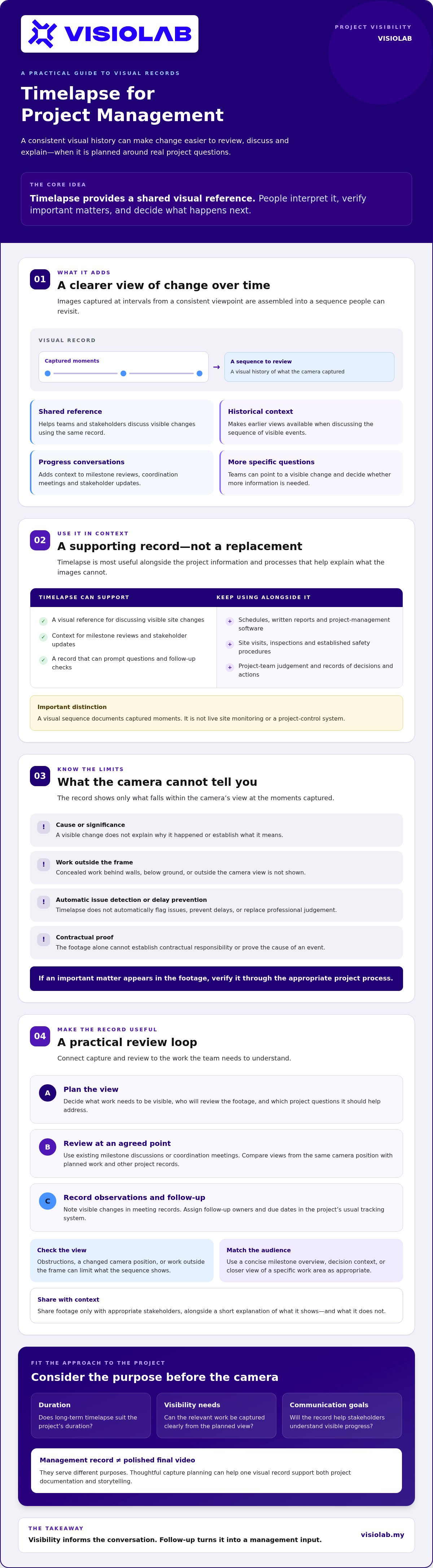
A useful timelapse starts with a management brief, not a camera specification. Define the questions the record should support, then plan the view, review routine and responsibilities around them. This turns capture into a repeatable project input and makes the benefits of timelapse for project management easier to assess.
Identify the milestones, work areas and audiences that matter. For example, if the team needs to review progress around a particular structure, choose a viewpoint that keeps that work visible as the site changes. Agree who reviews the images, when reviews fit the project’s coordination rhythm, and where observations and follow-up actions will be recorded. The aim is a relevant, usable record, not a guarantee of schedule or cost outcomes.
Use this workflow to shape the brief:
What progress or sequence of visible changes should the record help the team review?
Choose positions that show the relevant work, and consider access, obstructions, changing site layouts and viewpoints that may become blocked.
Agree the capture frequency and connectivity requirements in light of site conditions, expected duration and intended use. There’s no universal setting that fits every site.
Identify reviewers and agree when footage will be considered alongside schedules and site notes.
Document observations, decisions, owners and next steps in the project’s established workflow, rather than relying on footage as an action log.
Before capture begins, clarify who manages access, storage, approvals and sharing, and how the footage may be used. If the project needs live access, secure hosting or integrations, confirm those requirements and capabilities directly rather than assuming they come with timelapse.
Ask a potential production partner how they plan camera placement, maintain capture continuity, provide image access, handle editing and prepare the final handover. Confirm permissions, information security, ownership, retention and sharing arrangements in writing. These details help align the visual record with project needs from capture through delivery. For a broader framework for evaluating creative partners, read this video production agency selection guide.
VISIOLAB provides long-term timelapse and construction progress documentation. A well-defined brief can help clarify how that documentation fits your project.
Long-term timelapse may suit a project when visible changes unfold over an extended period and a consistent record would help with reviews, stakeholder communication or project storytelling. It’s a less direct fit if the work you need to understand happens out of view, requires immediate alerts, or depends on close-up detail that a wide, fixed viewpoint may not capture. Start with the project’s objectives, not the appeal of a final video.
Before capture begins, agree on the intended outcomes and practical boundaries. Confirm which stages and viewpoints matter, the planned coverage period, who needs access, and how often the record will be reviewed. Ask how interruptions, changing site conditions and missed images will be handled, and what information the team will receive if the visual record has a gap.
Clarify the output, too. A management record is designed to support ongoing reference and review; a polished final film is shaped to communicate the project as a coherent story. They can complement each other, but they aren’t interchangeable. If you need both, define the review materials and final deliverable in the brief, including who approves project details and how the footage may be shared.
A sequence of images becomes easier to understand when it has context. Select meaningful milestones rather than treating every captured moment as equally important. Captions or approved project information can explain what stage is visible, while keeping claims tied to what the footage and verified project records support. Avoid presenting a visual sequence as proof of progress beyond the camera’s view.
VISIOLAB provides long-term timelapse and construction progress documentation. To assess fit, prepare a draft brief that covers project goals, viewpoints, coverage period, access, review expectations and desired output. Then agree who is responsible for permissions, approvals, information access and follow-up. Clear responsibilities help connect the archive to a useful final narrative.
If long-term visual documentation fits your project, discuss a timelapse project with VISIOLAB.
Timelapse is most useful when visual evidence is tied to project questions, review routines and follow-up actions. A consistent sequence can help teams communicate visible change and revisit key stages, but it works alongside schedules, reports, inspections and site oversight, not in place of them. Those are the practical benefits of timelapse for project management: a shared visual reference, used with clear expectations about what it can and can’t show.
Start by defining what the record needs to support, who will review it, and whether the intended output is ongoing documentation, a final film or both. Then consider project duration, viewpoints, access and stakeholder needs before committing to a capture plan.
VISIOLAB provides long-term timelapse and construction progress documentation, as well as drone visuals for infrastructure projects. If you’re assessing how planned visual documentation could fit your project, review VISIOLAB’s project documentation services. A clear brief is a strong first step toward a project record that informs conversations and gives progress a lasting perspective.
The main benefits of timelapse for project management are clearer visual context, easier review of visible changes over time, and a shared reference for stakeholder discussions. Teams can compare captured views with planned milestones and use observations to guide follow-up. Timelapse works best alongside schedules, reports, site notes and inspections. It documents what appears within the camera’s view, but doesn’t explain causes or replace project controls.
Timelapse may help teams notice that visible work appears different from what they expected at a milestone, but it can’t identify or confirm a delay by itself. Compare dated footage with the project schedule, site notes and other records, then investigate any discrepancy through normal project processes. Images may not show the full work area, concealed activities or the reason a task changed, so avoid treating footage as a complete delay assessment.
Timelapse can give stakeholders a shared visual reference for discussing site changes, rather than relying only on written summaries or isolated images. A project team can select a relevant sequence, explain which stage it shows and pair it with approved project information. Tailor the level of detail to the audience: clients may need a milestone overview, while contractors may need context about a particular work area. Visuals support communication; they don’t replace explanation.
Neither is always better. Timelapse can show broad changes across selected moments, especially when views use consistent framing. Individual progress photos may capture close-up details that a wide camera view misses. Choose based on the question: use a visual sequence to understand change over time, and detailed photos to document a specific area or feature. Keeping dates, viewpoints and site context with both makes comparisons more useful.
A timelapse record shows captured images arranged to reveal change over time; it isn’t automatically a live monitoring system. Some setups may include a live-view function, but that capability must be confirmed for the specific system and project. A live view, where available, shows what the camera sees at that moment. It doesn’t inherently provide alerts, issue detection, schedule control or a complete picture of site activity.
There’s no single capture frequency that suits every construction project. The right interval depends on how quickly visible work changes, the project duration, the milestones to document and the intended review or final output. A frequency that captures useful progress without unnecessary repetition should be agreed during planning. Ask the production provider to explain how the proposed setting fits site conditions, connectivity and the project’s documentation goals.
Start by defining what decisions or communications the visual record should support, which work areas and viewpoints matter, and how long coverage is needed. Agree who can access and review footage, where observations will be recorded, and who handles approvals, storage, ownership, retention and sharing. Ask how interruptions, obstructions and missed images are addressed. Finally, specify whether the project needs ongoing documentation, a polished final film or both. To discuss long-term timelapse or construction progress documentation for your project, contact VISIOLAB.
Let’s create and collaborate
We’re versatile multitaskers, and we thrive on a lot of projects. You've seen a few of our works that we are most proud of, and your project could be next in line.

Empowering brands with captivating visual stories, creating strong connections and growth.
