
A quarterly business review is more than a scorecard: it’s a structured meeting held every three months to review performance, share insights and align on what comes next. Effective video content for quarterly business reviews makes results easier to follow and helps turn discussion into clear prior...

A quarterly business review is more than a scorecard: it’s a structured meeting held every three months to review performance, share insights and align on what comes next. Effective video content for quarterly business reviews makes results easier to follow and helps turn discussion into clear priorities for the next 90 days.
A quarterly business review can easily become a dense run-through of figures, even when the real goal is shared understanding and a useful decision. This guide explains who QBRs are for and what they should achieve, then explores how video, focused visuals, and deliberate pacing can clarify the story. You’ll also learn how to connect results to next-quarter priorities, assign owners, and make the next steps clear.
• Shape the review around the people who need to make decisions, not a one-size-fits-all presentation.
• Use a small set of audience-relevant KPIs, then connect each result to its business meaning and next action.
• Pair charts, photos, icons, and video with a clear narrative so complex information is easier to absorb.
• Choose live, recorded, or hybrid delivery based on the discussion required and how stakeholders need to engage.
• Close with three to five measurable priorities for the next 90 days, each with an owner, a date, and a clear next step.
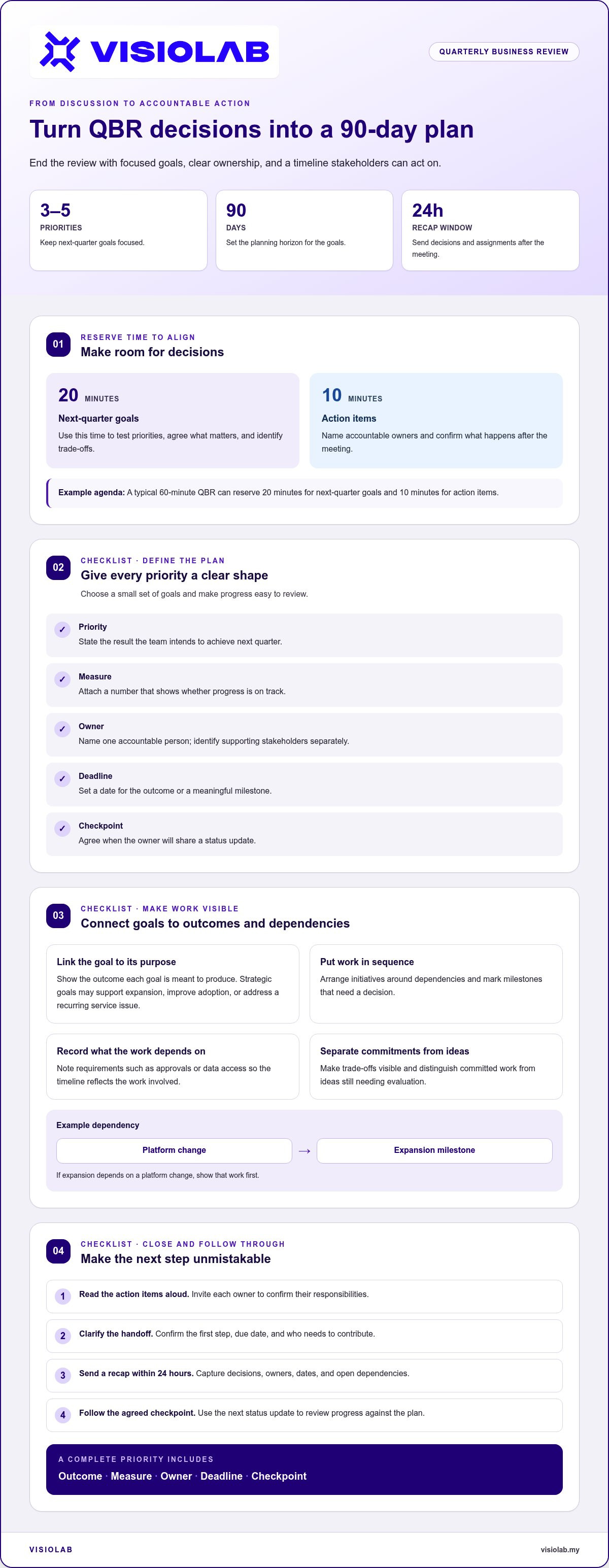
A QBR should end with a plan stakeholders can act on, not a list of unresolved discussion points. Use the final part of the meeting to turn outcomes into priorities for the next 90 days. A typical 60-minute agenda can reserve 20 minutes for next-quarter goals and 10 minutes for action items. That structure gives the group time to test priorities, name accountable owners, and confirm what happens after the meeting.
Keep the plan focused. Choose three to five goals for the next 90 days, with a number and a date attached to each. For example, “reduce onboarding delays” needs a defined target and deadline before it can guide work. A strategic goal might support expansion, improve adoption, or address a recurring service issue. Connect each goal to the outcome it is meant to produce, then explain how progress will be reviewed.
A concise template makes ownership visible across teams. Record each priority, its intended outcome, the accountable owner, the deadline, and the next checkpoint. Name one person responsible for moving each item forward, even when several stakeholders contribute. For example, a product lead could own a platform improvement while a customer success manager tracks adoption. Note dependencies, such as approvals or data access, so the timeline reflects the work involved.
State the result the team intends to achieve next quarter.
Add a number that shows whether progress is on track.
Name one accountable person and identify supporting stakeholders.
Set a date for the outcome or a meaningful milestone.
Agree when the owner will share a status update.
Use the roadmap to show sequence, not just ambition. Arrange initiatives according to their dependencies and mark milestones that require a decision. If an expansion goal depends on a platform change, show that work before the expansion milestone. This makes trade-offs visible while the right stakeholders are present and distinguishes committed work from ideas that still need evaluation.
Close by reading the action items aloud and inviting owners to confirm their responsibilities. Clarify the first step, the due date, and who needs to contribute. After the meeting, send a recap within 24 hours, capturing decisions, owners, dates, and open dependencies. The next status update should follow the checkpoint agreed in the QBR. A clear follow-up turns the video or meeting into a working reference, while assigned actions keep next-quarter priorities connected to measurable outcomes.
A quarterly business review creates a regular opportunity to examine results, raise concerns, and decide what deserves attention next. Held every three months, it connects an account’s performance with the customer’s business priorities. The discussion should do more than provide an update: explain what the metrics mean, where expectations differ, and which decisions need stakeholder input. A rise in usage, for example, matters most when the group can connect it to an operational outcome or customer goal.
The audience shapes the review. An executive may need a concise view of outcomes, risks, and strategic direction, while an operational lead may need details about adoption, workflows, or unresolved issues. Account owners bring context across these perspectives. Before preparing the presentation, identify who will attend and what each person needs to decide. This helps separate information everyone should see from details suited to a focused follow-up.
Use the meeting to build a shared account of progress. Highlight changes since the previous quarter, explain meaningful movements, and invite stakeholders to challenge assumptions. If a metric falls short, show the trend and its business impact, then discuss possible causes. If results are positive, connect them to the actions or conditions that helped produce them. Keep the review balanced: evidence first, interpretation second, decisions next.
For business review videos in Malaysia, tell participants before recording, explain the purpose and intended audience, and obtain their agreement. Limit identifiable customer details, control access to the file, and retain it only for the agreed business purpose.
Focus on outcomes, risks, and decisions requiring leadership.
Show relevant metrics, process changes, and open issues.
Connect the update to relationship context and agreed priorities.
Not every stakeholder needs the same version of the story. A leadership recap can highlight direction and decisions, while a working session can examine implementation details. Keep shared materials aligned so every audience sees consistent figures and definitions. Before wider distribution, remove or generalise any chart or statement that could expose confidential account information. A clear purpose, defined audience, and controlled sharing plan help make the review useful and responsible.
Where a complex message needs a stronger visual narrative, corporate video storytelling can help present organizational information with clarity. The format should serve the review’s purpose, whether that means explaining performance, setting context, or supporting a focused discussion. In every case, the audience should leave knowing what the update means and what decision or conversation follows.
Choose each visual for a clear purpose: clarify a result, show evidence, or guide a decision. A trend chart can reveal movement across the quarter; a photo can document a project milestone. An icon can flag a risk, while a short video can explain a process that numbers alone cannot show. Tie every visual to the agenda so viewers understand why it matters and what to discuss next.
Build charts for quick reading. Give each chart a title that states its message, label the axes and units, and distinguish actual results from forecasts. For example, show monthly adoption as a line and annotate when a product update changed usage. Use consistent colours for performance categories throughout the presentation. Avoid decorative effects that obscure data or make comparisons harder.
Photos work best when they provide evidence or context. A construction progress image, for instance, can make a milestone more tangible than a generic stock image. Add a short caption explaining its relevance and crop out unrelated details. Keep icon meanings consistent throughout the presentation: use the same symbol for a risk or decision each time. This visual system helps executives scan the material without losing the story.
For a professional QBR video, use a camera or stable webcam, a clear microphone, suitable lighting, and a quiet recording space. Use presentation or screen-recording software to show charts, then edit the sequence so narration and visuals stay in sync. Select a platform with access controls suited to the customer information being shared.
Present results and forecasts by naming the reporting period, defining each metric, and separating observed performance from projected outcomes. Explain the assumptions behind a forecast, then highlight its business implications and the decision it supports. For example, pair a projected adoption trend with the operational dependency that could change its direction.
Use a clearly labelled trend or comparison to answer one business question.
Add a relevant project image and a caption that explains its significance.
Keep risk, decision, and progress symbols consistent throughout the presentation.
Use a brief process explanation where a live demonstration adds useful context.
Plan visual pacing alongside the agenda. A QBR deck can aim for 10 to 15 slides, with an audience question as early as slide three. Pause for stakeholder input every 5-7 slides, especially after a major result or forecast. That moment turns passive viewing into customer success discussion. End each visual sequence with a clear implication, a question, or a next step, so engagement moves the review forward.
Use metrics to explain customer outcomes, not to fill the screen with numbers. A QBR video should connect performance indicators to the customer’s goals and upcoming decisions. Select three to five KPIs for the audience, then explain what each measures and why it matters. For example, pair product adoption with the customer’s intended workflow improvement. A metric becomes useful when viewers can see how activity relates to business value.
Start with a clear reporting period and consistent definitions. If “active user” means someone who completed a specific action, define it before showing the chart. Compare like with like: the same measure, time window, and data source. A change in definition can make an apparent rise or decline misleading. Label actual results separately from targets and forecasts so viewers can distinguish recorded performance from future expectations.
Give each KPI a short narrative: the result, its context, and its implication. Pair a retention indicator, for instance, with relevant customer behaviour or service developments. Explain whether the trend supports the customer’s goal, signals a risk, or needs further discussion. Do not treat correlation as proof of cause. If an operational change coincided with a metric shift, describe the connection accurately and identify what the team still needs to learn.
Show whether intended users are engaging with the relevant product features.
Put issue patterns beside their operational effect.
Connect usage or delivery measures to the customer’s stated objective.
Identify signals that may affect the next decision or forecast.
Design each KPI segment for video. Introduce one chart at a time, use readable labels, and narrate the key movement rather than reading every value aloud. A highlighted data point can draw attention to a meaningful change; a brief pause gives viewers time to interpret it. Keep supporting details in a companion report when the full dataset would crowd the screen. This keeps the story clear while preserving a route to deeper analysis.
Close the metrics segment by turning insight into a decision or question. If adoption is below the intended level, identify the barrier to discuss and the evidence needed to understand it. If performance is on track, state which practice should continue. In either case, connect the insight to an owner or follow-up action. This makes customer success metrics more than a status display: they become a shared basis for assessing progress and shaping the next conversation.
The right format depends on the account’s complexity and the discussion required. A recorded update suits a straightforward performance story; a live review supports decisions and dialogue. A hybrid approach combines prepared video with a meeting for questions. Match the format to the audience, the information being shared, and the action the review needs to produce.
Recorded video works well when stakeholders need a concise, repeatable update. A scaled digital QBR video takes around three or four minutes to watch. It can highlight key results, explain a dashboard, or introduce next-quarter priorities before a discussion. Viewers can watch at a convenient time, while a written recap or dashboard provides more detail. Make the recording specific to the customer’s goals rather than reusing a generic script.
Live video is valuable when a review needs direct discussion. Strategic-account QBRs can use customised data and roadmap tie-ins in live virtual or in-person meetings. Participants can question an assumption, discuss a risk, or agree on a change while decision-makers are present. Reserve live time for topics that benefit from interaction, such as an expansion opportunity or a complex performance issue. A live meeting still needs a clear agenda and prepared visuals.
Hybrid delivery separates information-sharing from decision-making. Send a recorded overview or asynchronous slide walkthrough before the meeting, then use live time for questions and next steps. For growth accounts, QBRs can be delivered through video, email recaps with dashboards, or asynchronous slide walkthroughs. This gives stakeholders time to review the material and keeps the live session focused on issues that need collaboration.
The update is consistent, the story is focused, and discussion can happen separately.
Stakeholders need to challenge findings or make decisions together.
Viewers need preparation time, followed by a focused conversation.
Account coverage also matters. Most customer success teams reserve live QBRs for their top 10-20% of accounts by annual recurring revenue, while B2B companies run reviews for about 20% of their accounts. These figures describe common approaches, not a rule for every team. Consider strategic importance, customer needs, and the complexity of the decisions before selecting a format. A smaller account may still need live discussion when an urgent issue requires alignment.
Plan the format around the outcome: use video to frame the story, then make space for questions where needed. Plan a QBR video format that fits your audience and review goals.
VISIOLAB creates Corporate Video to present complex business messages with clarity and a coherent visual story. For quarterly reviews, this can mean shaping performance insights, organizational priorities, and progress into content stakeholders can follow. Explainer and Training Video can clarify a process or initiative, while ESG Video can support communication about environmental, social, and governance work. Safety Video can help explain safety practices and procedures.
Turn to VISIOLAB when your review needs more than a collection of slides: a focused narrative, purposeful visuals, and a format suited to your message. Share the goals and key information you want the video to communicate. Visit visiolab.my to discuss your corporate video needs.
Treat your QBR video as a strategic communication asset, not a recording to file away. Before production begins, define the decision it should support, the audience who needs to act, and the message they should remember. That focus keeps video content for quarterly business reviews connected to business direction as priorities evolve.
VISIOLAB’s Corporate Video can shape an organizational story, while Explainer and Training Video can clarify processes. ESG Video can help communicate sustainability-related work. Choose the format that fits your message, then give the creative team the context needed to make it relevant and clear.
Ready to shape your next review around a stronger visual story? Contact VISIOLAB to discuss your video. Bring your audience, objectives, and key message into the conversation, and take the next step with purpose.
A QBR helps customer and provider teams make informed decisions about the direction of their relationship. It creates a regular opportunity to assess whether current work supports the customer’s priorities and where attention is needed. If adoption grows but a key workflow remains difficult, for example, the review can clarify what to investigate next. Its value lies in building shared understanding, surfacing issues early, and helping stakeholders coordinate decisions.
Yes. Keep one shared account narrative, then tailor the emphasis to each stakeholder’s responsibilities. An executive may need the implications for business goals, while an operations lead may need workflow details. Use role-specific versions or chapters, but keep performance definitions and underlying figures consistent. For example, a shared results segment can lead into separate sections on strategic decisions and day-to-day implementation, helping each viewer find relevant context without creating conflicting messages.
Measure whether viewers understood the message and acted on it, not just whether the video played. Review available viewing data, then compare it with practical signals: questions raised, decisions made, and agreed follow-up completed. If the video explains a proposed process change, for example, check whether stakeholders discuss the decision and assign an implementation owner. Pair viewing information with meeting notes or account records to distinguish attention from business progress.
Video content for quarterly business reviews should help viewers interpret progress and make decisions. Include the customer’s priorities, a focused performance story, relevant project evidence, and the implications of key findings. Briefly explain unresolved issues when context matters. Keep detailed data tables in accompanying materials so the video stays clear while viewers can explore supporting evidence and return to the key message.
A scaled digital QBR video takes around three or four minutes to watch. That length can introduce the account’s key message before viewers explore a dashboard or join a discussion. Let complexity and audience needs shape the final runtime: a focused update needs less explanation than a review involving several decisions. If the story grows, divide it into clear chapters instead of compressing essential context or including unrelated detail.
Use a five-part narrative: frame the review, establish customer context, present performance, explain implications, and close with decisions or follow-up. The opening can take 2-3 minutes in a longer QBR presentation, but a short recorded update should move quickly into its central point. Script for spoken delivery, not slide reading. For each segment, write one key message, supporting evidence, and a transition that shows why the next section matters.
Track engagement signals separately from outcomes. Depending on the platform, viewing information may show whether people started or completed a recording; follow-up questions can reveal where the message prompted discussion. Video content for quarterly business reviews is effective when it supports a concrete business signal, such as a recorded decision, an advancing action, or renewed focus on a customer goal. Compare those signals with the video’s purpose, then refine the next version.
Let’s create and collaborate
We’re versatile multitaskers, and we thrive on a lot of projects. You've seen a few of our works that we are most proud of, and your project could be next in line.

Empowering brands with captivating visual stories, creating strong connections and growth.
