
The event may be over, but your strongest video moments can keep working for months. A post-event video content strategy can phase releases across a 12-month period: share timely highlights in the first weeks, build engagement next, then extend the most useful content’s life through later months. I...
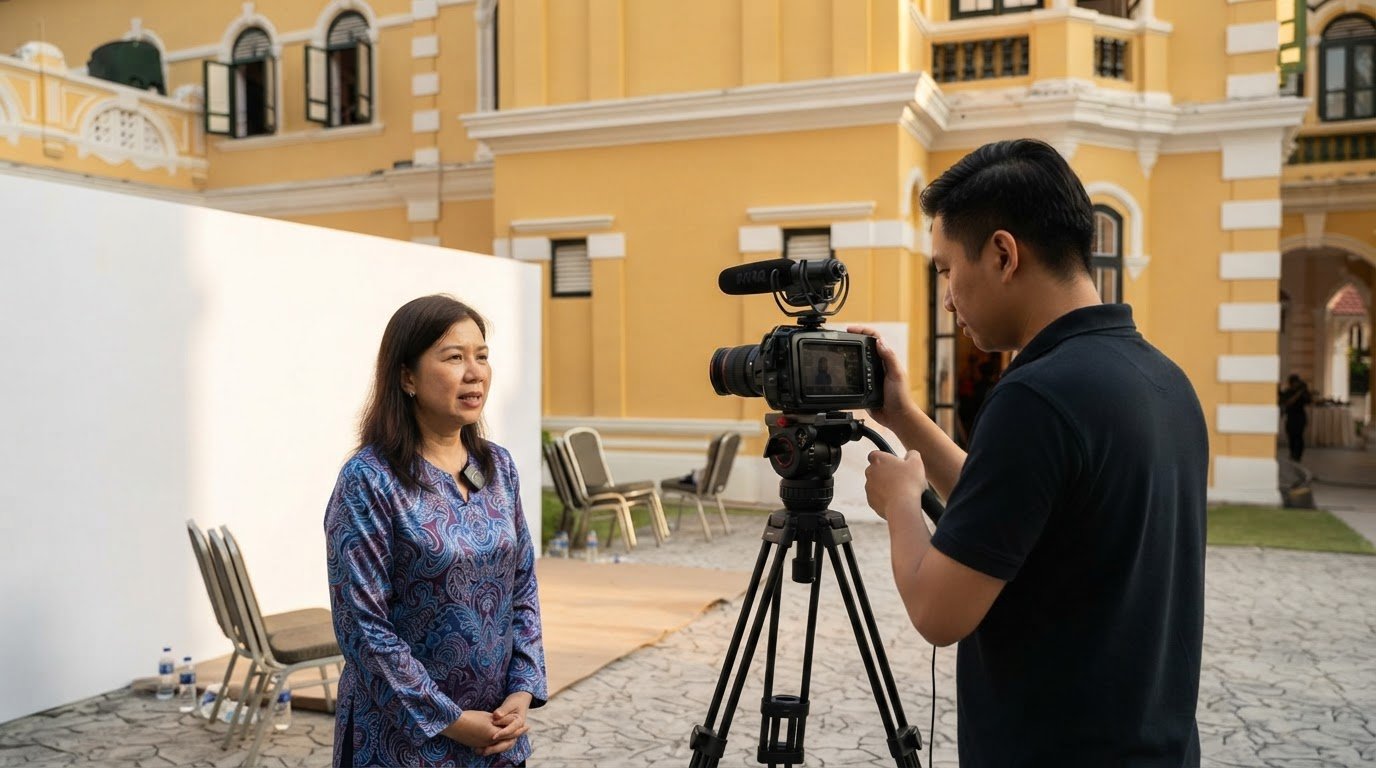
The event may be over, but your strongest video moments can keep working for months. A post-event video content strategy can phase releases across a 12-month period: share timely highlights in the first weeks, build engagement next, then extend the most useful content’s life through later months.
It makes sense to want a clear schedule for your post-event video content strategy. Publish too much at once and valuable moments can get lost; wait too long and the event’s energy may fade. Match each video to its audience, purpose and channel instead of treating every recording as a single recap.
This guide shows how to choose what to share, shape footage into short clips and longer sessions, and pace releases from the first weeks through months 7 to 12. You’ll also learn how to use viewer behaviour and audience feedback to refine future plans, so each event creates a stronger story beyond the room.
• Adapt each clip’s length, format and message to the platform and the audience you want to reach.
• Combine speaker highlights with behind-the-scenes footage and attendee testimonials to show both the ideas and the experience.
• Pair short highlight reels with full session recordings so viewers can choose how deeply to engage.
• Review views, watch time, engagement and click-through rates at 30, 60 and 90 days, then use the patterns to refine future releases.
• Set a clear goal for every video, from building awareness to supporting sales or internal alignment.
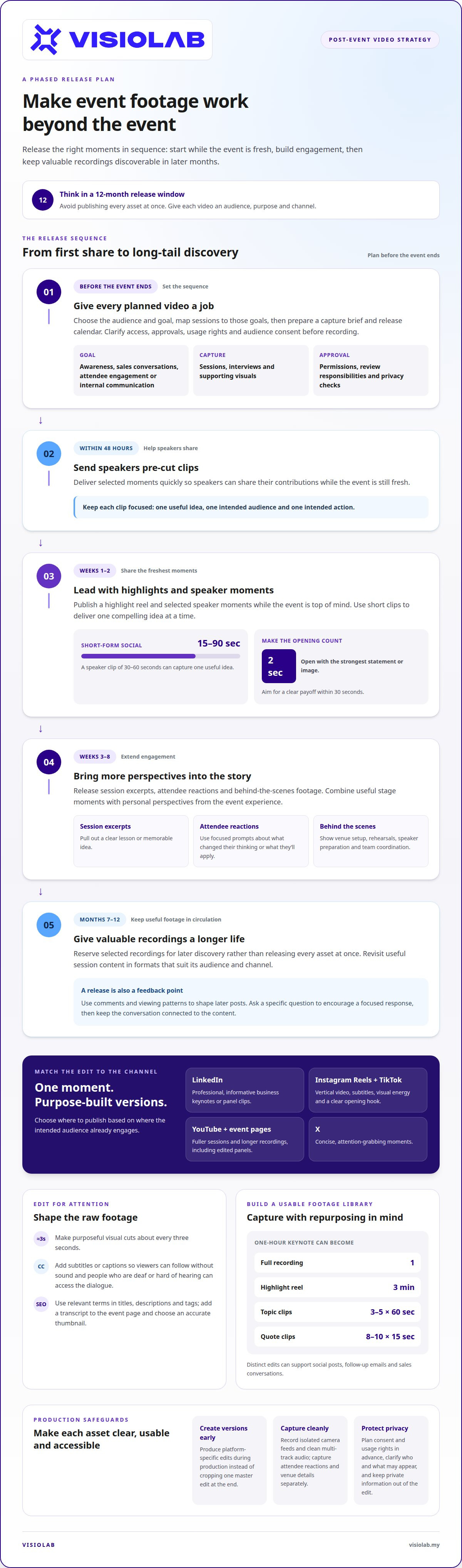
Build a release sequence before the event ends. In weeks 1 to 2, publish a highlight reel and selected speaker moments while the event is fresh. Send speakers pre-cut clips within 48 hours so they can share their own contributions. From weeks 3 to 8, extend engagement with session excerpts, attendee reactions, and behind-the-scenes footage. A 12-month distribution plan can reserve valuable recordings for later discovery instead of releasing every asset at once.
For short-form social posts, aim for 15 to 90 seconds; a 30-to-60-second speaker clip can capture one useful idea. The ideal recap length and format depend on the platform: use vertical, subtitled edits for Instagram Reels and TikTok, concise clips for X, and structured professional segments for LinkedIn. YouTube and event pages can carry longer recordings, including sessions edited from a 45-minute panel.
Raw footage needs a deliberate edit before publication. Open with the most compelling statement or image in the first two seconds, then make purposeful visual cuts about every three seconds. Give the viewer a clear payoff within 30 seconds, such as a practical insight from a keynote. Create platform-specific versions during production, rather than cropping one master edit at the end. Subtitles help viewers follow dialogue with sound off and support people who are deaf or hard of hearing.
Short-form clips can support both public marketing and internal communication. A speaker’s key point can become a social post, while a concise team edit can bring staff who missed the event up to speed. Select several impactful moments from a presentation, then give each clip one message, one audience and one intended action. This keeps each edit focused instead of turning it into a miniature version of the entire session.
For SEO and accessibility, use relevant terms in video titles, descriptions and tags, and add a transcript to the organiser’s event page. Choose an accurate thumbnail that reflects the clip, and include captions so viewers don’t have to rely on audio. These steps make recorded sessions easier to understand and discover.
For consent, copyright and privacy in Malaysia, plan permissions and usage rights before recording or publishing. Make audience consent and approvals part of the event workflow. Clarify who may use the footage, which people or materials may appear, and how the video will be shared. Keep private information out of the edit.
Keep the conversation going after each release. Invite a specific response, such as asking LinkedIn viewers which keynote insight they’ll apply, then use comments and viewing patterns to shape later posts. A planned sequence turns event footage into an ongoing channel for engagement, not a one-off recap.
A post-event video promotion guide connects footage decisions to marketing goals and release plans. It identifies which sessions support awareness, sales conversations, attendee engagement or internal communication. Planning these uses before the event helps the production team capture footage with a clear purpose. A strong plan also treats preparation, audience reactions and keynote content as separate story opportunities, not just material for one recap.
Plan production step by step: set the audience and goal, map sessions to those goals, then prepare a capture brief and release calendar. During the event, record the planned sessions, interviews and supporting visuals. Afterwards, select footage and edit it for each intended use. Finalise the capture brief well before the event so the team can align shot requirements, access and approvals.
Preparation footage gives viewers a glimpse of the work behind the finished event. Capture venue setup, stage rehearsals, speaker preparation and the team coordinating details. An empty room becoming a completed stage creates a simple visual sequence. A short interview with a speaker before a session can introduce the topic, then connect to a useful moment from the keynote later.
During the event, attendee testimonials add a personal perspective that stage footage alone can’t provide. Ask focused prompts, such as which session changed someone’s thinking or what they’ll apply at work. Record answers in a quiet breakout room, then pair a concise quote with relevant venue or audience B-roll. This combination shows what participants experienced and why the event mattered to them.
Keynote footage can support more than a full-session replay. A one-hour keynote can become one full recording, a three-minute highlight reel, three to five 60-second topic clips, and eight to ten 15-second quote clips. Each edit should carry a distinct idea, such as a practical lesson or a memorable statement. That gives marketing teams options for social media, follow-up emails, and sales conversations.
Capture quality shapes what can be repurposed later. Record isolated camera feeds and clean, multi-track audio, while a separate camera captures attendee reactions and venue details. For a two-day conference with six hours of captured footage, the planned workflow could create 60 to 84 distinct video assets. That range depends on usable moments and the formats selected, so a capture plan should prioritise clear audio, varied shots, and purposeful interviews.
Event footage also needs a defined approval path. Set out usage rights, audience consent, and review responsibilities before the cameras roll. When preparation, keynote, and testimonial footage each have a planned role, the editing team can build a coherent sequence instead of searching for a story afterwards. For a considered event footage plan, align the capture brief with the content you intend to publish.
A post-event content strategy turns captured sessions into a planned set of useful videos. It assigns each recording a purpose, format, audience and release point. For example, a panel can become a full recording, selected highlight clips, quote cards and podcast audio. This gives viewers different ways to engage, from a quick takeaway to the complete discussion. It also helps organisers connect event coverage to goals such as awareness, registration or follow-up conversations.
Start by identifying moments that convey a clear idea, not just the loudest applause. A compelling highlight might be a speaker explaining a practical lesson, a panellist challenging an assumption or a concise answer from audience Q&A. Editors can pair that moment with the relevant speaker introduction, slide or audience reaction. The finished video should make sense on its own, even to someone who didn’t attend the session.
Use a highlight reel to tell the event’s central story quickly. Select a few distinct moments, then shape them into a beginning, middle and end: establish the event’s energy, show its strongest ideas and close with a next step or takeaway. A highlight reel is not a compressed agenda. It’s a deliberate edit that helps future attendees understand what makes the event valuable.
Give different edits different jobs. A mid-form video of 2 to 5 minutes can focus on one theme for LinkedIn, YouTube, or webinar follow-up. A long-form video of 8 to 15 minutes can suit YouTube, an event website, or email. These formats help audiences choose their level of detail. Use a descriptive title and a clear thumbnail so viewers understand whether they’re opening a recap, a topic segment, or a session recording.
Full-length session recordings preserve the speaker’s complete argument and its context. Add timestamps, presentation slides, a transcript and related reading materials where useful. Viewers can then return to a specific section, follow a reference or revisit a valuable explanation without scrubbing through the entire video. For recorded panels, chapter labels can separate themes such as audience questions, case examples and recommendations.
Keep the collection coherent. Use consistent naming for sessions, speakers and topics across the event page and social posts. If a keynote explores a complex subject, publish a standalone highlight first, then direct interested viewers to the full recording. A related quote card can reinforce the same point, while a transcript makes the session easier to scan. Together, these assets help one event serve different needs without making every edit feel identical.
Review the set as a viewer would: does each clip offer a complete thought, and does each longer recording provide enough context? A clear path from highlight to full session helps prospective attendees see the event’s substance and gives past attendees a practical way to revisit its ideas.
Use performance data to learn what held attention, not just what collected views. Review views, watch time, engagement and click-through rate for each recording. A keynote clip with strong views but an early drop-off may need a sharper opening. A session with fewer views but longer watch time could offer more useful depth for its audience. Interpret every metric in light of the video’s intended purpose.
Set a review rhythm at 30, 60, and 90 days after the event. At each point, compare results with the video’s original goal, such as awareness, shares, or conversions. Check whether viewers watched through, clicked a related link, or engaged with the post. A corporate session meant to support sales conversations should be judged differently from a highlight intended to build broad awareness.
Look beyond totals. Watch-time graphs can show where viewers leave or replay a section, while engagement rates reveal which moments prompted responses. If a recording loses viewers during a long introduction, shorten the opening in future edits. If comments cluster around a speaker’s practical example, consider featuring that insight in a follow-up clip. These patterns turn analytics into clear editorial decisions.
Audience feedback adds context that dashboards can’t provide. Start with a guest satisfaction survey, then ask which session was most useful and what questions remain. Compare responses with viewing behaviour: if attendees praise a panel but its recording has low watch time, the edit may need clearer structure or a more descriptive title. If a topic draws repeated questions, plan follow-up content around that need.
Separate results by channel, format and audience whenever reporting allows. A vertical social clip and a full session recording suit different viewing habits, so comparing raw views alone can mislead. Review each asset against its own objective, then note the opening, subject and call to action. This makes it easier to see whether a particular idea, speaker or format connected with viewers.
Turn each review into a small test for the next release. For example, if a clip’s click-through rate is weak, revise its title or thumbnail; if engagement is strong but conversions lag, make the next step clearer. Keep a record of the change and its result. The 30-, 60-, and 90-day checkpoints create a practical cycle: observe, interpret, adjust, and apply the insight to future recordings.
Finally, connect video metrics to event KPIs rather than treating every interaction as an outcome. Views, shares, engagement rates and conversion metrics reveal different parts of performance. A recording that earns shares may extend reach, while a session that prompts a relevant enquiry may support a deeper business goal. Reviewing audience responses alongside measured actions gives the next content plan a stronger basis.
A post-event content strategy is a plan for turning event footage into useful communication after the venue empties. It defines who each piece should reach, what action it should encourage and which format can deliver the message. A corporate event, for example, can generate content for marketing, sales enablement and internal alignment. The goal isn’t to publish everything, but to turn selected moments into relevant assets.
Start with the outcome. For awareness, choose moments that show the event’s character and strongest ideas. For future registration, show the experience and substance prospective attendees can expect. For internal alignment, select sessions that clarify priorities for employees. These objectives shape what the camera captures, what editors select and where each video appears.
Next, map each useful moment to an audience and format. A keynote insight might become a concise social clip, while the complete session serves people seeking deeper context. A panel discussion could also generate a written case study or a webinar on a popular topic. Each format should serve a distinct purpose instead of repeating the same footage with minor edits.
A phased plan can keep the event’s ideas active beyond the initial recap. Treat the first release as an introduction, then develop follow-up content from audience questions, speaker insights, and themes that emerged across sessions. A 90-day content engine can support marketing, sales conversations, and internal communication. Later, evergreen recordings can help people discover useful material outside the event’s immediate audience.
Measure the strategy by whether each asset supports its intended action. A video designed to explain a complex topic should make the idea clear; a recap should communicate the event’s distinctive experience. Views alone don’t show whether the message landed. Compare audience responses and conversion metrics with the original objective, then use those insights to adjust future capture and editing plans.
The clearest takeaway: define the goal before choosing the footage. That decision connects what the team records to what audiences need afterwards. For an upcoming event, plan event footage around your content goals, so key moments can become useful assets across the event’s lifecycle.
VISIOLAB helps organisations turn live events into footage for a planned release beyond the event day. Its Event Coverage is a natural fit when you need speaker moments, session recordings or audience perspectives for later content. With the audience and goals in view, event footage can become material for marketing, internal communication or future event promotion.
Bring VISIOLAB in when planning an event and you want coverage aligned with how you’ll use the videos afterwards. A clear direction connects what gets captured with the story you want to share, from a focused highlight to a fuller record of key sessions.
For event coverage that supports your next content plan, contact VISIOLAB.
Your next event can create more than a record of what happened. With a clear purpose for each video, captured moments can continue supporting communication long after the room clears. Treat your post-event video content strategy as part of the event’s wider story, one that can evolve with audience needs and your organisation’s priorities.
The next step is to decide what you want your footage to do. VISIOLAB’s Corporate Video, Explainer and Training Video, and ESG Video offerings can support different organisational stories beyond event coverage. Choose the direction that fits your message, then shape the footage around it.
Contact VISIOLAB to plan your videos and give your next event a thoughtful path from capture to communication. Each strong story starts with a clear purpose, and your next one can begin now.
Keep publishing useful event content for at least 90 days, then continue selectively with evergreen recordings. A phased plan can extend across 12 months: share timely updates first, then revisit sessions that remain relevant to your audience. For example, a safety or industry discussion may still answer questions months later. Use audience interest and each video’s purpose to decide which material merits another release.
Group each asset by topic, speaker, format, audience and intended use. For example, label a keynote clip with its session title, speaker name, key theme and whether it’s a short social edit or a full recording. Add practical details such as captions, aspect ratio and approval status. This makes it easier to find a suitable clip for a platform or campaign without reviewing every file again.
Assign each release a channel, audience and purpose, then spread related assets across the campaign. A business-focused session might lead on LinkedIn, while a community update could suit a relevant Facebook Group. Create distinct edits instead of posting the same file everywhere. Track which channel earns meaningful responses, then use that signal to decide whether a later clip should revisit the topic or explore a new angle.
A single event can produce full session recordings, highlight reels, speaker clips, attendee testimonials, behind-the-scenes footage, quote cards and podcast audio. A panel, for instance, can become a complete recording plus short extracts focused on individual questions. Strong event insights can also form the basis of a follow-up webinar, whitepaper or case study. Choose assets that serve different audience needs rather than making near-identical edits.
It’s a plan for deciding how event material will support communication afterwards. It connects goals, audiences, footage, formats and release timing. For example, a product demonstration could support a prospect follow-up, while an employee-focused session could help internal teams revisit key decisions. Start with the outcome each asset should support, then choose the recording or moment that best delivers the message.
A promotion guide is a practical plan for preparing, editing and distributing event videos. Footage is more useful when capture decisions connect to later content needs. Before an event, map sessions to communication goals and plan which formats the production team should capture. That preparation can create a clear path from a recorded moment to a social post, email or resource for attendees.
A post-event video content strategy is a planned approach to turning event recordings into videos for defined audiences and goals. It covers what to select, how to shape it and where to publish it. For example, an organiser might use a concise speaker insight to start a conversation, then share the longer session with viewers seeking more depth. The strategy links each video to a deliberate next step.
Publish the first recap during the momentum phase, in weeks 1 to 2 after the event. Speakers can receive pre-cut clips within 48 hours, giving them timely material to share while conversations are fresh. A full recap may need more editing than a short speaker moment, so plan distinct release dates for each. Use the first video to capture attention, then release supporting content as it’s ready.
Let’s create and collaborate
We’re versatile multitaskers, and we thrive on a lot of projects. You've seen a few of our works that we are most proud of, and your project could be next in line.

Empowering brands with captivating visual stories, creating strong connections and growth.
