
The best manufacturing safety video isn’t the broadest one; it’s the one that makes a specific risk and safe response clear. Effective safety training videos for manufacturing typically run three to seven minutes and focus on a practical topic, such as PPE, machine guarding, hazard recognition or em...
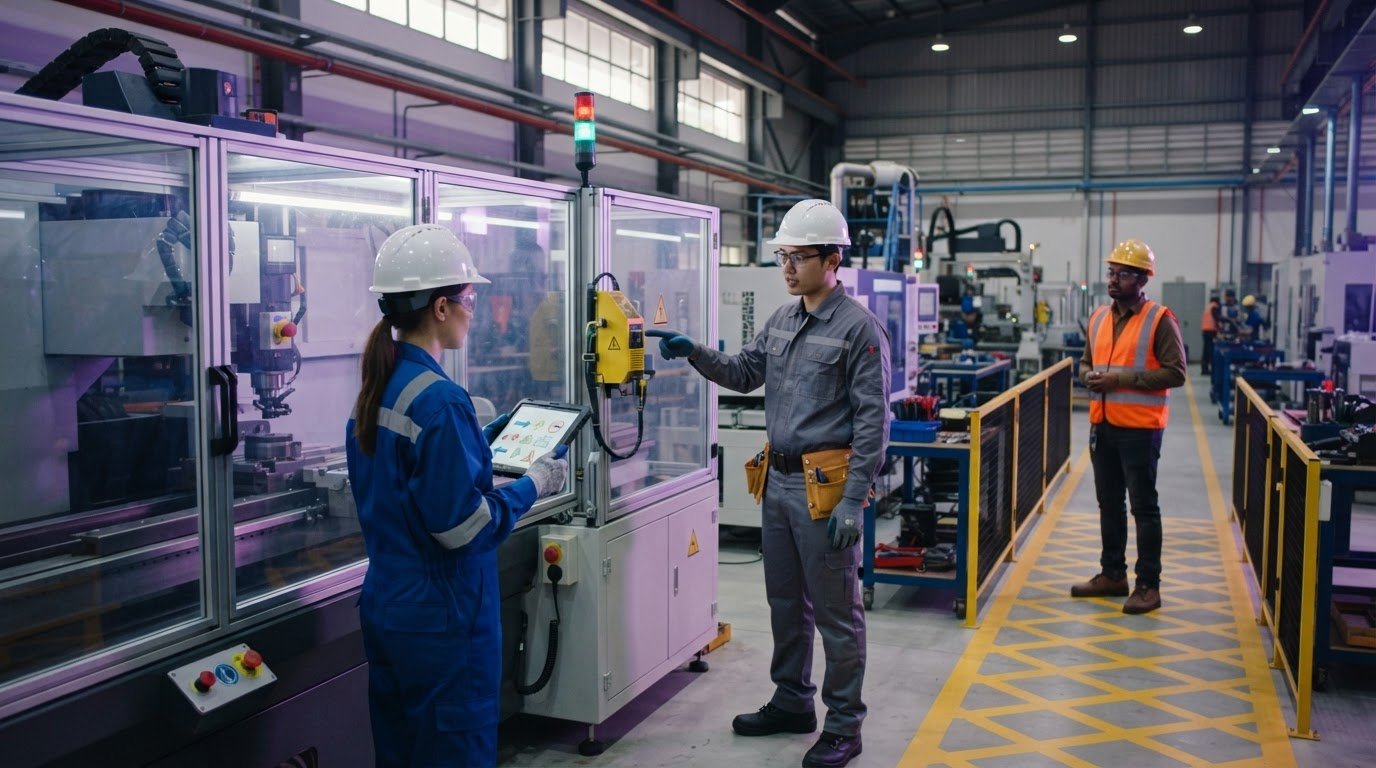
The best manufacturing safety video isn’t the broadest one; it’s the one that makes a specific risk and safe response clear. Effective safety training videos for manufacturing typically run three to seven minutes and focus on a practical topic, such as PPE, machine guarding, hazard recognition or emergency response. A relevant incident or near-miss scenario can help bring the consequences of unsafe actions into focus.
Training should give workers guidance they can understand and apply on the floor, not just watch and forget. A video works best as a clear visual starting point, followed by discussion and site-specific procedures that connect the message to the equipment, tasks, and risks in your workplace.
This guide covers suitable video topics for manufacturing teams, tailoring content to different roles, and using concise, authentic visuals to clarify technical procedures. It also explains how to use videos across shifts and locations, and how animation can illustrate hazardous situations without staging them live.
• Prioritise videos that address hazards workers face in their actual tasks, from machine guarding and PPE to incident reporting.
• Keep focused lessons concise, then use questions and site-specific procedures to connect the video to daily work.
• Tailor examples by job role so operators, maintenance teams and warehouse staff see guidance relevant to their responsibilities.
• Use subtitles and mobile-friendly access to make training easier to follow across shifts and locations.
• Choose animation for technical or hazardous procedures that are difficult to demonstrate safely in a live setting.
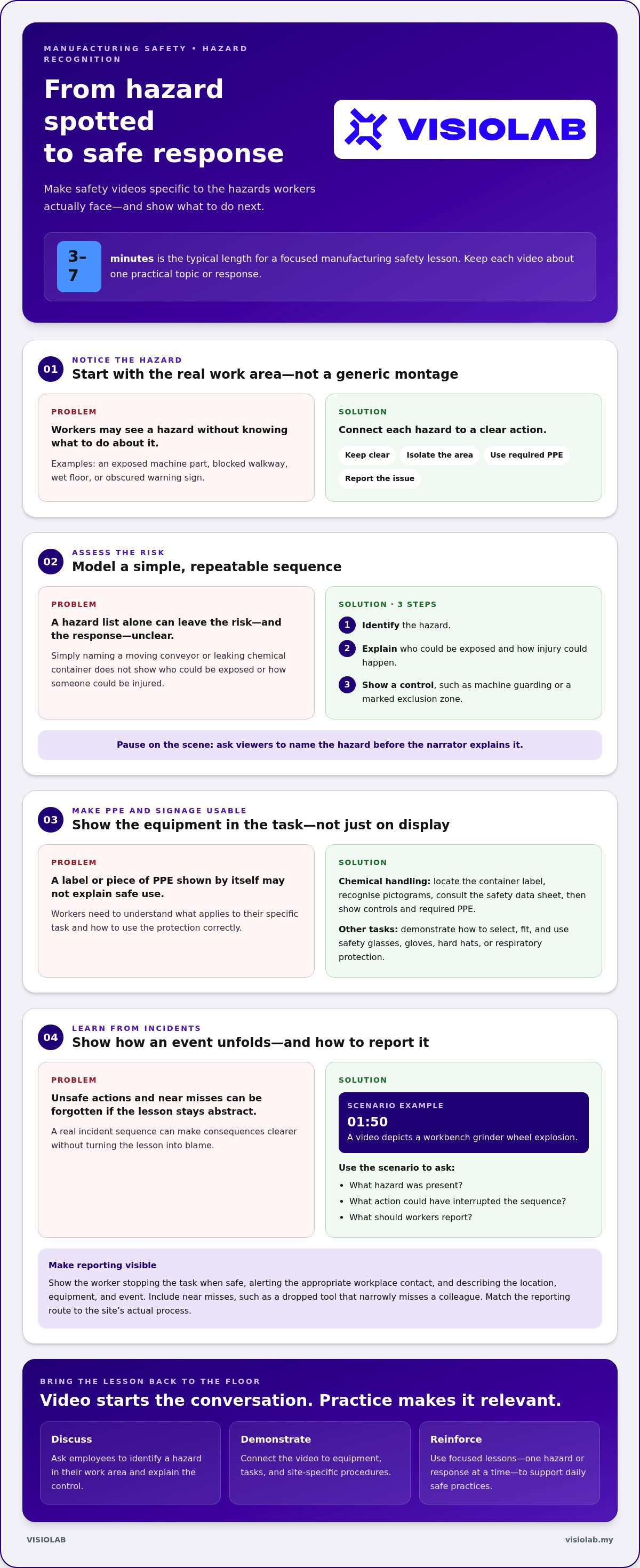
Begin safety orientation with a workplace walk-through, not a generic montage of hazards. Show workers how to spot an exposed machine part, blocked walkway, wet floor, or obscured warning sign. Connect each hazard to a clear action: keep clear, isolate the area, use the required protective equipment, or report the issue. This makes safety guidance relevant to the places employees actually work.
Hazard identification videos should model a straightforward risk-assessment sequence. First, identify the hazard, such as a moving conveyor or leaking chemical container. Next, show who could be exposed and how someone could be injured. Then demonstrate a control, such as machine guarding or a marked exclusion zone. Pause on a scene and ask viewers to name the hazard before the narrator explains it. This active step builds recognition rather than passive familiarity.
Show signage and PPE through clear, task-based examples. In a chemical-handling scene, workers can locate the container label, recognise its pictograms, and consult the safety data sheet before use. Then show the chemical’s control measures and the protective equipment required for the task. For other jobs, demonstrate how to select, fit, and use safety glasses, gloves, hard hats, or respiratory protection. Show the equipment being used correctly, rather than simply displaying it.
Manufacturing hazards become more memorable when a video shows how an incident unfolds. A 01:50-minute video depicts a workbench grinder wheel explosion. Use this type of scenario to prompt discussion: what hazard was present, what action could have interrupted the sequence, and what should workers report? Incident and near-miss stories can clarify consequences without turning the lesson into blame. For poultry processing, show how workers can recognise hazards around cutting equipment and follow the site’s safe procedures.
Make incident reporting a visible procedure. Show a worker stopping the task when safe, alerting the appropriate workplace contact, and clearly describing the location, equipment, and event. Include near misses, such as a dropped tool that narrowly misses a colleague, because they can reveal hazards before someone is injured. Match the reporting route to the site’s actual process so workers see the correct contact or method during orientation.
Effective safety training videos for manufacturing keep each lesson focused on a specific hazard or response. One video might cover machine guarding, while another explains chemical labels or incident reporting. After viewing, ask employees to identify a hazard in their work area and explain the control. This discussion connects the screen to the shop floor and reinforces safe practices in daily work.
The most effective manufacturing safety videos reflect the hazards, equipment, and tasks workers encounter. Choose content that demonstrates a relevant safe-work procedure, then adapt its examples to the factory’s machinery and job roles. Useful videos make technical instructions clear and practical instead of relying on general safety awareness alone.
Videos complement practical training, but do not replace it. A lesson can demonstrate steps consistently, while an instructor answers questions and workers practise procedures such as fitting a respirator or isolating equipment. Follow viewing with supervised practice, site procedures, and discussion about what could go wrong.
For Malaysian manufacturing teams, align training with applicable DOSH requirements, workplace hazards, and site procedures. Make instructions clear for machinery, electrical risks, chemical handling, and emergency response. Choose topics according to the work being done and the hazards employees may encounter in their roles.
Costs for training platforms and courses depend on factors such as licence scope, course depth, support, and localisation. For a commissioned video, the price depends on the project and is provided after a quote request; factors include the subject, production approach, and required language versions.
Keep each lesson focused. Effective employee safety training videos typically run between three and seven minutes, while complex subjects can be split into shorter modules. For respiratory protection, separate lessons can cover equipment selection, fit, use, and care. Longer explanations may suit detailed instruction, while concise refreshers can reinforce one procedure at a time.
Assess effectiveness by reviewing safety incident data, compliance rates, and employee feedback. After viewing, ask workers to explain a procedure or identify a hazard, then observe whether they apply the steps at work. Review results by topic and role so gaps in respiratory protection understanding are not obscured by stronger results elsewhere.
Localise narration, on-screen labels, and subtitles into languages workers understand. Keep machine names, warning signs, and procedure terms consistent with those used on site. For example, translated instructions should use the same name employees hear from supervisors for a machine control or protective equipment.
Use authentic examples for each role. Machine operators need relevant guarding procedures, while workers handling respiratory hazards need equipment-use instruction. A separate electrical safety lesson can demonstrate safe practices around equipment. Ergonomics content can show body mechanics and lifting techniques, then connect them to the loads and movements workers handle.
Video alone can leave workers unsure how to perform a procedure or respond to an unexpected hazard. Combine viewing with hands-on demonstrations, supervised practice, and site-specific discussion. A tailored manufacturing safety video can clarify complex steps, while practical training helps workers apply them.
Workers handling respiratory hazards need instruction suited to their tasks. Safety training content can be tailored by job role, with machine operators receiving training on machine guarding and warehouse employees receiving training on forklift safety. OSHA lists a 10:22 video on respiratory protection in general industry and a 07:54 video on respiratory protection training requirements, alongside a 17-video respiratory protection series. OSHA also lists an 11:59 video on respirator fit testing and a 10:14 video on maintenance and care of respirators.
Ergonomics videos should show how a task strains the body and demonstrate a safer alternative. For example, film an employee lifting a box from a low pallet: bring the load close, take a stable stance, and avoid twisting while carrying it. Show the full movement, including where the load is placed. A side view can make posture easier to assess. Focus on practical ways to reduce strain, not a generic reminder to “lift correctly.”
Match the footage to the equipment and workstations employees use. A packing-line lesson might show how to position frequently handled items within easy reach, adjust the work surface, and alternate repetitive movements where the workflow allows. For trolley tasks, show workers checking the route, keeping the load stable, and pushing without blocking their view. These examples connect posture and movement to specific tasks instead of treating ergonomics as an abstract topic.
Warehouse scenes can bring manual handling and vehicle awareness together. Show an employee moving a carton in a marked pedestrian area while a forklift follows its designated route. Explain where the worker should pause, how to keep the load from blocking sightlines, and how to use available handling equipment. A forklift safety video should address vehicle operation and pedestrian separation directly. Lifting footage alone cannot explain those controls.
Use close-ups to show the small decisions that can change a task. Compare reaching across a bench with moving an item closer, or show how an awkward grip makes a container harder to control. Include realistic loads, packaging, and work heights from the relevant station. Then ask employees to identify the safer setup before revealing the answer. This pause turns viewing into active observation and gives supervisors a clear starting point for discussion.
Ergonomics content also needs a response plan. If an employee experiences pain during a task, show how to stop safely, report the concern through the site’s process, and seek the appropriate workplace support. Keep that sequence distinct from emergency response, which follows the site’s procedure for an acute injury. OSHA lists a 21-minute, 10-second video titled “Ergonomic Programs That Work.” A workplace ergonomics video is about 11 and a half minutes long. Longer material can be divided into focused lessons on lifting, workstation setup, and repetitive tasks.
After viewing, supervisors can observe a routine task and discuss an improvement with the team. Workers might reposition supplies before the next packing cycle or choose handling equipment for a bulky load. Pairing video-based learning with a demonstration helps employees apply the technique in their actual work area. A clear lesson shows the task, the point of strain, and the safer movement in sequence.
Mobile access can help employees on different shifts view the same safety lesson without gathering everyone at once. One worker can review a machine procedure before starting a task, while another shift revisits it during a toolbox talk. Make videos easy to play on a phone, with clear visuals, readable labels, and narration that explains each action. Training should suit the workplace environment, not depend on a quiet office or large screen.
Subtitles make spoken instructions easier to follow and support localisation. Add them to explanations of warning labels, equipment controls, and evacuation routes, where a misunderstood term can affect the next action. Keep subtitles brief and synchronised with the scene. For Malaysian teams, use languages employees understand at work, and keep translated safety terms consistent with site signs and procedures.
Design for realistic viewing conditions. A worker using a phone in a noisy production area may rely on captions, while someone reviewing a lesson at a shared station may need headphones. Show one clear action at a time, such as identifying a stop control before explaining the next step. Avoid tiny text and rapid cuts that make important details hard to see on a smaller screen.
Use short scenarios to make mobile lessons engaging and specific. For example, show a worker approaching a machine after noticing an unusual sound. Ask viewers to choose the safe next step, then explain the site procedure. A confined-space scenario can show a worker recognising a restricted-entry warning and following the workplace’s designated process instead of entering to retrieve a dropped tool. Reinforce approved site practices.
A learning management system can centralise training materials and track employee progress. Organise videos by role or task, such as machine operation, chemical handling, or emergency response. This helps supervisors assign relevant content and see which workers completed it. For teams across multiple locations, shared materials can provide consistent instructions while keeping site-specific procedures distinct.
Mobile delivery does not replace discussion or supervised practice. After a video, ask employees to explain the machine’s stop procedure or point out the nearest emergency route. A supervisor can answer questions and connect the scenario to the actual work area. These steps help establish whether workers understood the instructions, rather than relying only on a viewing record.
Plan access around shift patterns and the work environment. Make lessons available when employees can view them safely, and do not ask workers to watch while operating equipment or walking through active production areas. Pair accessible video design with a clear follow-up activity. This supports consistent learning without distracting from the task at hand.
Animation can make hidden hazards visible without recreating them on an operating production line. A sequence can show how a loose sleeve reaches a moving machine, then pause to reveal the danger zone and safe response. This approach explains procedures that could put workers or equipment at risk if filmed live. It also shows what a camera cannot capture, such as movement inside a machine enclosure.
Use motion graphics to break a complicated task into clear stages. For a maintenance procedure, show the equipment, identify the energy source, and visualise each isolation point before showing the next action. Keep labels consistent with the terms workers see on site. A simple arrow or highlight can direct attention to a control without crowding the frame with instructions.
Different visual tools suit different topics. Diagrams can show safer lifting techniques, while infographics can summarise safety information for a programme or course. For construction safety, an animated site plan can clarify a vehicle route, pedestrian boundary, or restricted area. Keep the scenario relevant to the workplace, then explain the possible consequences of bypassing a control. The aim is not spectacle, but a procedure employees can understand and discuss.
Animation is especially useful for illustrating sequences that change over time. A simulation can show how a machine hazard develops when a guard is removed, or how a worker’s position affects exposure. Then compare the unsafe sequence with the approved safe-work procedure. Short scenes, clear narration, and restrained sound effects keep attention on the decision rather than the production style.
For a cohesive lesson, begin with one learning objective and storyboard the action before production. Identify the critical steps, required terminology, and moments when a pause or question can help viewers think. Divide a complex topic into focused modules instead of crowding it into one course. Check each frame against the actual equipment and site procedure, especially where component names or control positions matter.
Two-dimensional graphics work well for labelled diagrams and process flows; three-dimensional animation can clarify machinery layout or movement from different angles. Choose the format based on what workers need to see, not visual novelty. If a real machine is straightforward to film safely, live footage may communicate its controls more directly. Animation is most useful when it clarifies an invisible, hazardous, or difficult-to-stage procedure.
For technical procedures that need a visual explanation, explore custom safety animation and motion graphics as a way to translate complex steps into accessible training visuals.
Animation can make a hazardous situation visible without staging it live. Safety training videos for manufacturing and other workplaces can use animation to demonstrate these situations as visual examples. The scene shows the hazard workers need to recognise without recreating the event on the production line. Show what is happening, then connect it to the safe response workers are expected to follow.
VISIOLAB creates Safety Videos and Explainer and Training Videos that turn complex workplace procedures into clear visual guidance. If your manufacturing team needs training tailored to its equipment, tasks, or site procedures, these formats can make the steps easier to follow. Animation and motion graphics can clarify technical processes that are difficult to film safely, while authentic workplace visuals connect the lesson to employees’ daily environment.
Start with a specific training challenge, such as explaining a machine procedure or improving consistency across shifts. A focused brief helps shape the visuals around your audience, key actions, and learning objective. Contact VISIOLAB to discuss a safety training video for your manufacturing team.
Choose one training challenge and define what workers should understand or do differently. That gives effective safety training videos for manufacturing a clear purpose and connects the message to everyday practice. A video can support the training, while supervisors reinforce learning through discussion and practical follow-through.
VISIOLAB offers Corporate Video, Explainer and Training Video, and ESG Video to help organisations communicate complex messages through visual storytelling. If you’re shaping a safety training project for your team, discuss your videos with VISIOLAB. Clearer guidance starts with a focused idea, and your next training message can make that idea easier to act on.
An effective video gives workers a clear action to remember and a way to test their understanding. For example, pause a simulated production-line scenario before a decision, ask viewers what they would do, then explain the safest response. Keep terminology consistent with workplace procedures, and update the video when equipment or processes change. A supervisor can reinforce learning by asking employees to describe the response in their own words.
Choose topics based on the tasks and risks at the site. In addition to machine and material handling, consider electrical safety, fire response, first aid, and hearing conservation. A maintenance team might need a lesson on electrical equipment, while production workers may need guidance on responding to a fire alarm. Divide topics into focused lessons, then connect each one to the relevant workplace procedure and the person responsible for responding.
Let’s create and collaborate
We’re versatile multitaskers, and we thrive on a lot of projects. You've seen a few of our works that we are most proud of, and your project could be next in line.

Empowering brands with captivating visual stories, creating strong connections and growth.
